These instructions apply to the Kia Picanto Mk3 (JA) 2017-Present.
For other models, please choose your vehicle here.
The Kia Picanto JA (2017–present) with the 1.0L petrol engine has an Idle Stop & Go (ISG) system that switches the engine off when you’re stationary and restarts it the moment you press the clutch or release the brake. It’s on by default at every start; one button press disables it for the current trip.
What the Start/Stop Button Does
The button is a per-journey toggle, not a permanent setting. Every time you start the car, the system reverts to ON. Press the button once to disable it for that trip; the next start it’s active again. There’s no menu setting on the Picanto JA to make the OFF state permanent — a deliberate manufacturer choice tied to fuel-economy ratings.
Before You Start
- No tools needed — it’s the single Start/Stop OFF button on the centre console next to the gear lever.
- Deactivate start/stop before doing any work in the engine bay — an engine that restarts itself while you’re touching a belt or accessory is a real hazard.
- Deactivate before a ramp, garage or car wash so the engine doesn’t cut out at an inconvenient moment.
Deactivating the Start/Stop System
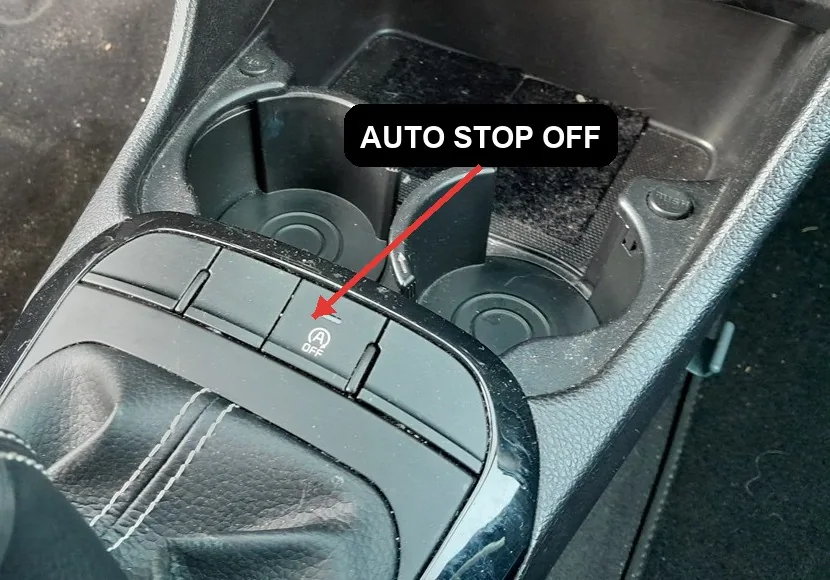
- Switch the ignition to ON or start the engine normally.
- Locate the Start/Stop OFF button on the centre console next to the gear lever — it’s marked with a stylised “A” inside a circular arrow.
- Press the button once.
- An amber warning light will illuminate on the instrument cluster (the same “A” with arrow symbol) and a brief text message will confirm deactivation on the multi-info display.
- The engine will no longer cut out at stops for the rest of this trip.
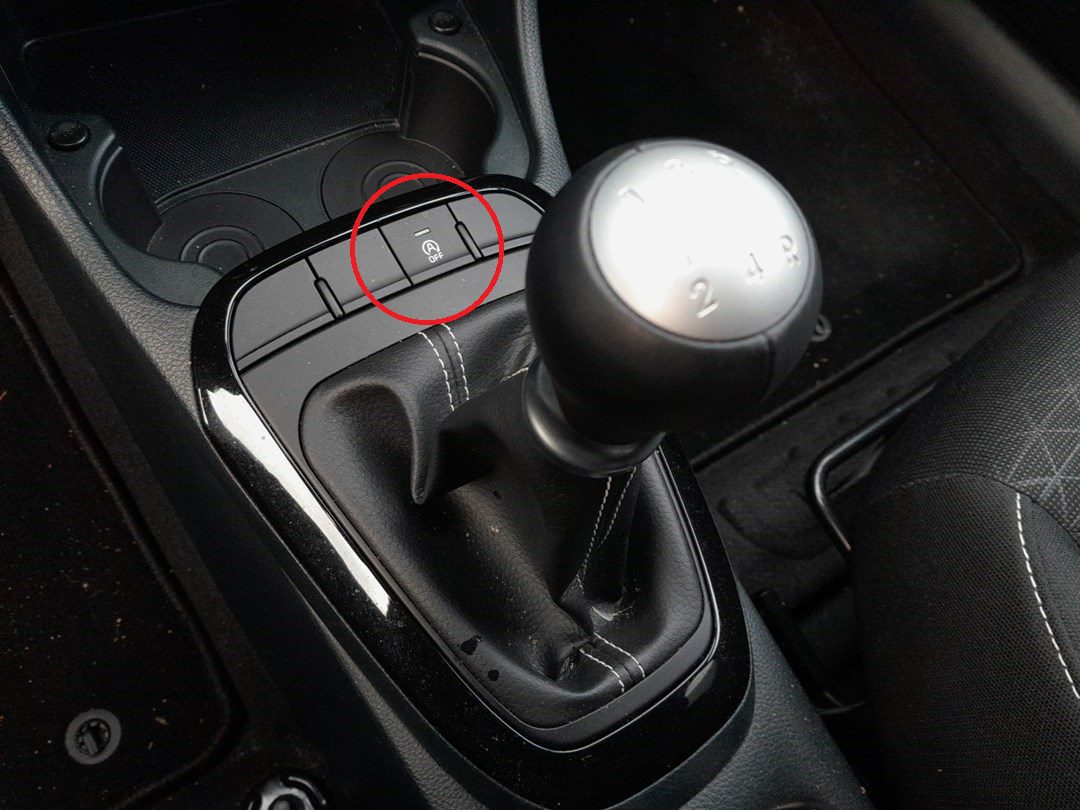
Reactivating the Start/Stop System
- Press the Start/Stop OFF button again.
- The warning light on the cluster will go out.
- The system is active again for the rest of the trip.
Reactivation also happens automatically every time you restart the car — so if you’d rather leave start/stop active, just don’t touch the button.
When the System Won’t Engage
Even with the system enabled and the warning light off, the engine may refuse to cut out at a stop for one of these reasons. This is normal behaviour, not a fault:
- The 12V battery is below 75% state of charge (cold mornings, lots of short trips, or a battery near end-of-life).
- The engine is not yet at operating temperature.
- The air conditioning or heater is working hard to bring the cabin to the set temperature.
- The driver’s seat belt is unfastened or a door is ajar.
- The bonnet is not fully latched.
- The steering wheel is turned past a certain angle (system holds off if a parking manoeuvre is in progress).
- The vehicle is on a steep gradient.
- The previous engine-off period exceeded the maximum allowed by the system (usually 3 minutes — after that the engine restarts itself to maintain accessory power).
Troubleshooting
- The Start/Stop OFF light is illuminated permanently — even after pressing the button. A stable amber light usually means the system has been disabled by the car’s electronics, not by you. The most common cause is a weak 12V battery. Have it load-tested at a parts shop; replacement typically restores normal operation.
- The warning light flashes intermittently while driving. Flashing indicates a fault detected by the ISG ECU — usually a sensor input (alternator output, battery temperature, crankshaft position). Have the body-CAN codes read with a scan tool.
- I keep forgetting to disable it for the car wash. Many Picanto owners use a piece of black electrical tape over the cluster’s auto-stop icon as a visual reminder, or fit an aftermarket “memory” module that holds the OFF state across ignition cycles. The aftermarket modules are widely available and reversible.
- The engine stops but won’t restart automatically. Press the start button (keyless) or turn the key fully on its own — this is a fallback restart path. Have the ISG starter and dual-mass flywheel inspected; the ISG-spec starter on the Picanto is rated for many more cycles than a standard starter, but it does wear out eventually.
Frequently Asked Questions
Does start/stop damage the engine or starter?
No — the ISG system on the Picanto uses a heavy-duty starter motor and reinforced engine bearings designed for the extra cycles. Manufacturer testing rates them for 300,000+ restarts. The conventional concerns (oil starvation at shutdown, ring wear from cold restarts) are managed by the ISG software, which holds off restarts when conditions would be harmful.
Will deactivating start/stop every drive hurt my fuel economy badge / VED?
The CO2 figure on your registration document was measured with start/stop active on the test cycle. Disabling it for everyday driving has no effect on the official figure or the VED band — those are set by what the car achieved on the standardised test, not what you do in practice.
Why does my car keep deactivating start/stop on its own in cold weather?
Below about 5 °C the system holds off because cold restarts are harder on the engine and cabin heater demand is high. This is by design and self-corrects once the engine and cabin reach normal temperatures.
A normal Auto Stop & Go standby message is not a fault. If your Picanto stores an actual diagnostic trouble code behind a warning light instead, you can decode it on autodtcs.com.
Independent guide — not affiliated with Kia. Always follow your official service manual and safety precautions. Read our full disclaimer.