These instructions apply to the Kia Picanto Mk3 (JA) 2017-Present.
For other models, please choose your vehicle here.
The Kia Picanto JA (2017–present) is fitted with a Tyre Pressure Monitoring System (TPMS) that warns you when one or more tyres lose pressure. After adjusting pressures, replacing tyres, or working on the suspension, the system needs to be re-initialised so it monitors the new values correctly. The amber warning is a maintenance prompt, not a fault — it means the current pressures no longer match the stored reference. Here’s how to store fresh pressures and clear the light.

How the System Works on This Model
Depending on market and trim, the Picanto uses either a direct system with a small sensor inside each wheel that transmits actual pressure, or an indirect one that infers a soft tyre from wheel-speed differences via the ABS. Either type stores a reference set of values, which is why a re-initialisation after any tyre work makes the warning behave properly again. The steps below suit whichever type your car has, because the initialisation confirms the pressures as they currently stand.
When a Reset Is Required
- After checking or adjusting tyre pressures
- After replacing or rotating wheels/tyres
- After suspension work that could affect tyre pressure readings
Getting Ready
- Check pressures when the tyres are cold — before driving, or after the car has stood a few hours.
- Set every corner to the figure on the driver’s door sticker for your wheel size and load.
- Include the spare if a full-size one is carried.
- Park on a flat, level surface with the car stationary.
- Have the engine running or the ignition on before you store the values.
Manual Reset Procedure
- Park the vehicle on a flat, level surface.
- Adjust all tyres to the recommended cold inflation pressure (see driver’s door sticker).
- Start the engine and keep the car stationary.
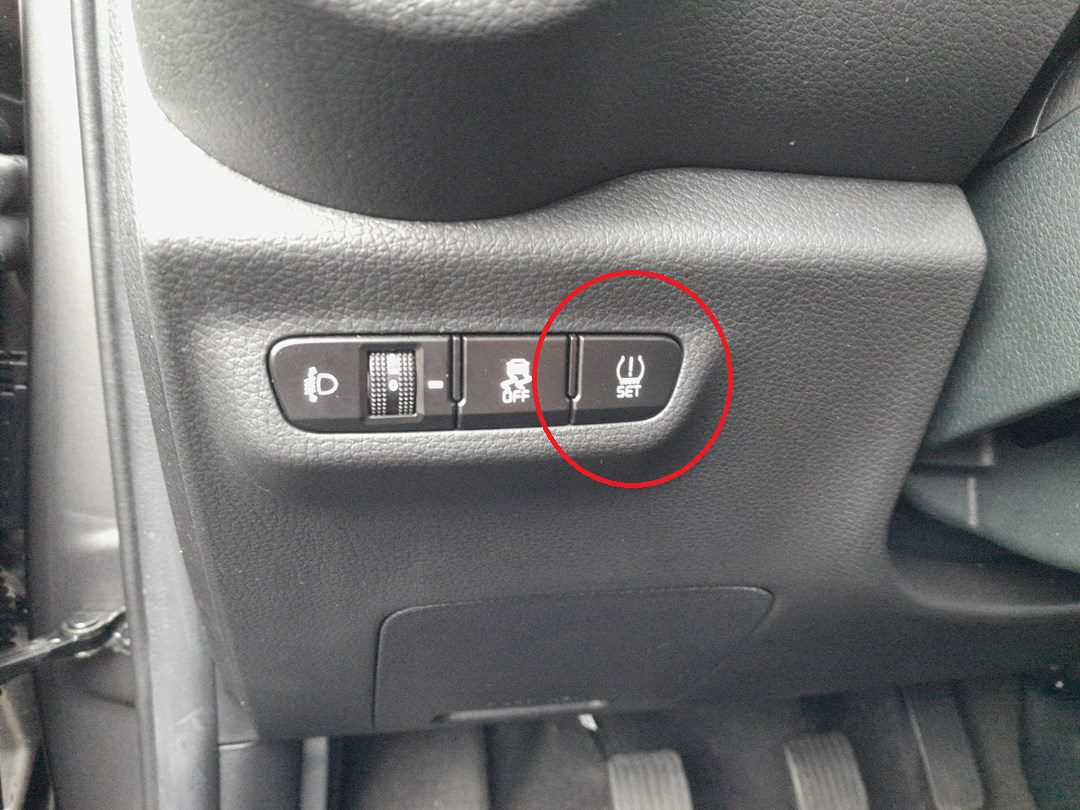
- Locate the TPMS reset button inside the vehicle (varies by market; often found near the steering column or lower dashboard).
- Press and hold the button for about 4 seconds.
- The TPMS warning light on the cluster will flash for around 4 seconds.
- A message such as “Tyre pressures stored” will appear on the display, confirming that the reset was successful.
If the Light Won’t Clear
- If the TPMS light stays on after reset, recheck all tyre pressures with a reliable gauge and repeat the procedure.
- Drive above 25 km/h (15 mph) for 10–15 minutes to let the system fully update.
- Low temperatures can reduce tyre pressure overnight, so a cold morning may wake the light — top up to spec and re-store.
- Not all Picantos have a physical reset button; if yours doesn’t, check whether the store function sits in the cluster or infotainment menu instead.
- Look for a slow puncture if one corner keeps dropping over a day or two — a nail or leaking valve is the usual cause.
- After fitting the spare or swapping wheels, re-store the reference so the system judges against what is actually on the car.
- If the light persists with correct pressures, a sensor battery may be flat — that is a workshop check rather than a home reset.
What Happens Next
Once the reset confirms, the warning light should go out and stay off for the rest of the trip. From that point the stored figures are the baseline the car watches, so the light only returns if a tyre genuinely loses pressure. If it comes back quickly with pressures you know are correct, treat it as a real leak or a sensor issue to investigate rather than a glitch.
Frequently Asked Questions
How do I reset the tyre pressure light on a Kia Picanto?
Set all four tyres to the cold pressure on the door sticker, start the engine, then press and hold the TPMS reset button for about four seconds until the light flashes and a “Tyre pressures stored” message appears. On cars without a button the store function sits in the cluster or infotainment menu.
Where is the TPMS reset button?
Its position varies by market, but it is commonly found near the steering column or on the lower dashboard. Not every Picanto has one — some rely on a store option in the driver-display or infotainment menu instead. If you cannot find a button, look through the tyre or vehicle settings on screen.
Do I need a tool?
No — a normal reset is done with the button or on-screen store option, so no diagnostic tool is needed. A tool is only required when brand-new pressure sensors are fitted to a direct system and have to be paired to the car, which is a workshop task.
Why does the light come on in cold weather?
Tyre pressure falls as the temperature drops, roughly 0.1 bar for every 10 °C, so a tyre set correctly in a warm garage can read low on a frosty morning. Top the tyres back up to the label figure while cold and re-store the reference, and the light should stay off.
How long before the light goes out?
After a successful store it usually clears at once or within the first few minutes of driving. Running above about 25 km/h for ten to fifteen minutes lets it settle fully. If it is still lit after that with correct pressures, recheck each corner and consider a sensor fault.
It lit after a wheel swap — is that normal?
Yes. Rotating tyres, fitting winter wheels or using the spare changes what the system has memorised, so it needs re-initialising. Set each tyre to the correct cold pressure first, then run the store procedure so the new values become the baseline.
Stored a fault code alongside the warning? Look it up on autodtcs.com.
Independent guide — not affiliated with Kia. Always follow your official service manual and safety precautions. Read our full disclaimer.