These instructions apply to the Kia Picanto Mk3 (JA) 2017-Present.
For other models, please choose your vehicle here.
The Kia Picanto JA (2017–present) has a service reminder system that alerts the driver when maintenance is due. It’s a scheduled-maintenance prompt, not a fault warning — the cluster is simply telling you that the pre-set service interval has been reached. After an oil change or scheduled service, the reminder has to be reset from the steering-wheel buttons. Depending on the instrument cluster version, there are two slightly different control layouts, and this guide covers both.

What the Service Light Means
On the Picanto the service reminder is a fixed-interval counter: the car counts down distance and time from the last reset, and when it reaches zero it flags that a service is due. It doesn’t measure the actual condition of the oil — it simply reaches the pre-programmed interval and prompts you. Because it’s a reminder rather than a fault, resetting it is safe once the maintenance is genuinely done. The exact distance and time for your car is in the service handbook; if you’re not sure of the figure, use the handbook rather than assuming a number.
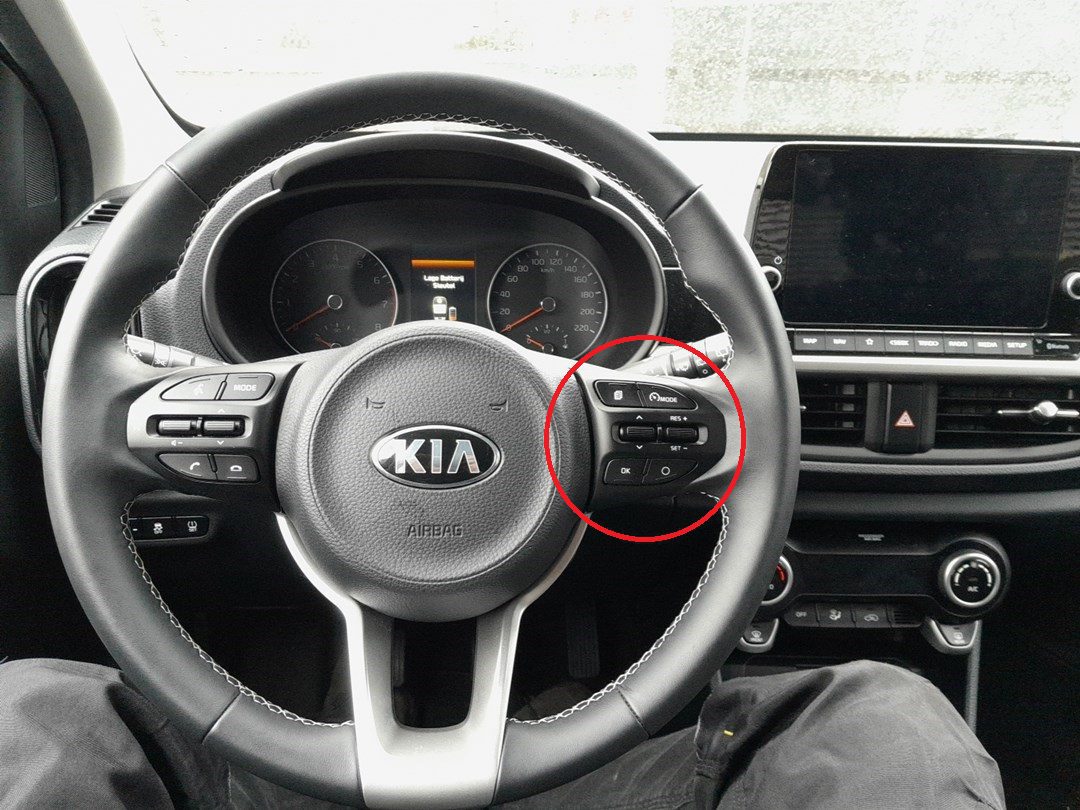
Steering Wheel Button Layouts
There are two button configurations used on the Kia Picanto JA:
- Type 1: Separate OK button below the MOVE scroll switch.
- Type 2: No separate OK button — press the MOVE scroll switch inwards to confirm selections.
First, a Few Checks
Do the actual service first — the reset only zeroes the counter, it doesn’t change the oil. Then:
- Park on level ground and apply the parking brake.
- Switch the ignition to ON with the engine off so the cluster is lit but the car isn’t running.
- Check which button layout you have (Type 1 or Type 2) before you begin.
- No tools are needed — the whole reset is done from the steering-wheel controls.
Manual Reset Procedure – Type 1 (Separate OK Button)
- Apply the parking brake.
- Switch the ignition to the ON position (do not start the engine).
- Press the MODE button to enter USER SETTING mode.
- Use the MOVE scroll switch to navigate through the menu.
- Select SERVICE INTERVAL and press the OK button to confirm.
- Scroll to RESET and press OK.
- Select YES and confirm with OK.
- The service reminder will now be cleared.
Manual Reset Procedure – Type 2 (No Separate OK Button)
- Apply the parking brake.
- Switch the ignition to the ON position.
- Press the MODE button to enter USER SETTING mode.
- Use the MOVE scroll switch to navigate through the menu.
- Select SERVICE INTERVAL and press the MOVE scroll switch inwards to confirm.
- Scroll to RESET and confirm by pressing the MOVE scroll switch inwards again.
- Select YES and confirm once more.
- The service reminder will now be cleared.
If the Reset Doesn’t Work
- If the service light does not clear, repeat the procedure — sometimes the confirmation press must be held slightly longer.
- Reset the reminder only after completing maintenance to keep service intervals accurate.
- If the indicator returns immediately, recheck that the correct interval is programmed in the menu.
- Make sure the ignition is ON (engine off). If the engine is running, the menu may not offer the reset.
- Confirm you actually reached YES and acknowledged it — backing out before the final confirm leaves the counter untouched.
- Still stuck? Switch the ignition fully off, wait a moment, switch on again and work through the menu from the start.
Once the Reset Is Done
Once the reset takes, the SERVICE INTERVAL counter returns to a full interval and the reminder no longer appears when you switch on. Nothing else changes on the dash — the reset only affects the service prompt, so any other warning lights are unrelated and stay as they were.
Reset Frequency
Reset the reminder after every completed service — each oil and filter change is the moment to zero the counter so the next prompt arrives on schedule. Follow the service intervals in your handbook for the exact distance and time; on a fixed-interval system like the Picanto’s, the reminder is only as accurate as the maintenance behind it.
Frequently Asked Questions
How do I know if my Picanto is Type 1 or Type 2?
Look at the steering-wheel controls. If there’s a separate OK button below the MOVE scroll switch, it’s Type 1. If there’s no separate OK and you confirm by pressing the MOVE switch inwards, it’s Type 2.
Does the engine need to be running to reset the Picanto?
No — switch the ignition to ON with the engine off. The cluster is powered so the menu works, but the car isn’t started.
Do I need a diagnostic tool?
No — the whole reset is done from the steering-wheel buttons through the USER SETTING menu. No scanner or dealer visit is required.
Why does the service light keep coming back?
Usually the confirmation didn’t complete — repeat the steps and make sure you select YES and confirm it. If it still returns, check the interval programmed in the menu.
Is the service reminder the same as a warning light?
No — the service reminder is a maintenance timer. A separate warning light (engine, oil pressure, brakes) is a fault and won’t clear with a service reset; it needs diagnosing.
Can I reset the reminder without doing the service?
You can, but you shouldn’t — the counter would restart while the old oil keeps ageing, so the next reminder would arrive late. Always service first, then reset.
Disclaimer: This guide is for general information. Always follow your vehicle’s official service information and safety instructions. Perform repairs at your own risk.
If a warning light appeared alongside the service message, look up the code on autodtcs.com.
Independent guide — not affiliated with Kia. Always follow your official service manual and safety precautions. Read our full disclaimer.