These instructions apply to the Honda Civic Mk9 (FK) 2012-2017.
For other models, please choose your vehicle here.
The Honda Civic Mk9 (FK, 2012–2017) — the European-market ninth-generation Civic hatchback, built in Swindon (UK) and sold across Europe through to the FK8 facelift transition — uses an i-MID (Intelligent Multi-Information Display) menu-driven service reset. There’s no pedal sequence and no diagnostic tool needed; everything happens through the steering-wheel buttons and the small colour screen at the top of the centre stack. The procedure is identical across every Mk9 FK engine variant (1.4 i-VTEC L13Z4, 1.8 i-VTEC R18Z4, 1.6 i-CDTi N16A1 diesel) and identical between pre-facelift (2012–2014) and facelift (2015–2017) cars.
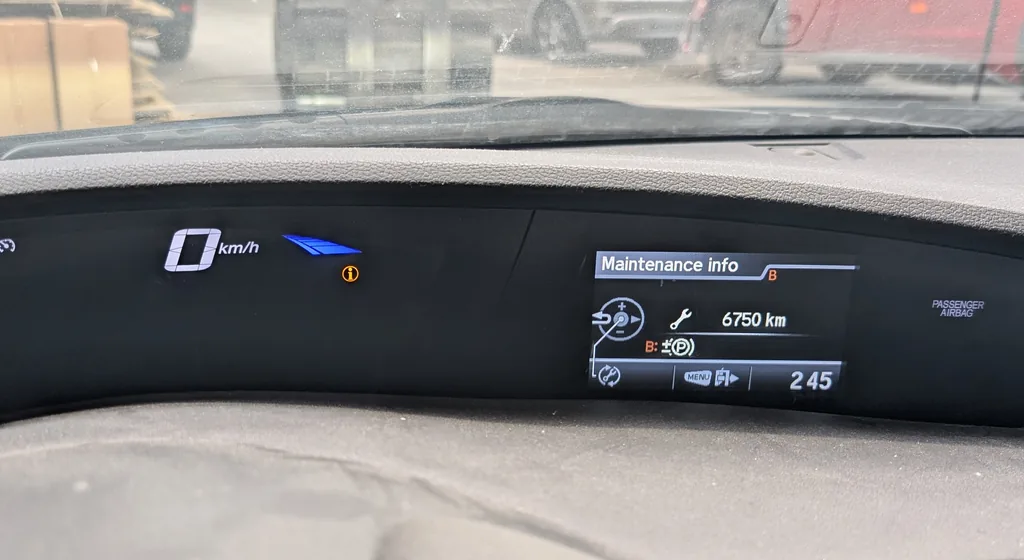
When to Reset the Service Indicator
- After completing an oil and filter change.
- If the wrench / spanner symbol with “SERVICE” or “SERVICE NOW” appears on the i-MID at startup.
- If you bought the Civic second-hand and the previous owner didn’t clear the indicator.
⚠️ The Mk9 Civic actually tracks multiple service items independently through the Maintenance Minder system (engine oil, transmission fluid, brake fluid, coolant, spark plugs, valve lash, air filter). What you’ll usually clear is “Item 1” (the engine oil + filter). The Maintenance Minder uses sub-codes (A1, A12, B12, etc.) to tell you exactly what’s due — clear only the codes that match work you’ve actually completed.
Before You Begin
- Park on a level surface and apply the parking brake.
- Complete the actual oil and filter change before the reset. Honda’s Maintenance Minder algorithm uses driving conditions to predict when items are due — clearing the counter without doing the work will throw the prediction off for the next interval.
- Identify the steering-wheel controls. On the Mk9 FK, the right-hand spoke has the i-MID controls: an INFO button, a MENU button, and the volume +/– rocker that doubles as a menu scroller. Button “A” in the procedure below is the selection / enter button — typically the central button on the same spoke (sometimes labelled with a checkmark or “ENTER”).
- The i-MID is the small colour screen at the top of the centre stack (above the radio / climate controls). On Type R and higher Sport trims it’s a colour LCD; on basic ES trims it’s a smaller monochrome display — the procedure is the same on both.
What You’ll Need
None for the reset itself. For the actual oil change you’ll need fresh Honda-spec oil — 0W-20 ACEA C2 / Honda Genuine 0W-20 for the 1.4 and 1.8 i-VTEC petrol engines, 5W-30 ACEA C2 / C3 for the 1.6 i-CDTi diesel, a new spin-on oil filter (different part numbers between L-series and R-series engines), a 17 mm sump-plug socket (1.8 i-VTEC) or 14 mm (1.4 i-VTEC and 1.6 i-CDTi), and a torque wrench rated to about 40 Nm (1.8 sump plug) or 30 Nm (1.4 / 1.6).
Service Indicator Reset — Step-by-Step
- Stop the vehicle and apply the parking brake.
- Turn the ignition ON but do not start the engine:
- Key-start trims: turn the key to position II (full ignition on, engine off).
- Start/Stop button trims: press the START/STOP button without your foot on the brake or clutch. The button only cranks the engine when a pedal is depressed.
- Wait a moment for the i-MID to fully wake. The “SERVICE” or “SERVICE NOW” text should be visible if a service item is overdue.
- Press the INFO button on the right-hand steering-wheel spoke. The i-MID switches from the default driver-information view to the menu navigation view.
- Press MENU.
- Use the volume + and volume – rocker buttons to scroll through the menu list.
- Highlight “VEHICLE INFO”.
- Press button (A) to confirm. (Button A is the selection / enter button on the steering-wheel — typically the central button or the OK rocker.)
- Inside Vehicle Info, scroll again with volume +/– and highlight “Maintenance info”.
- Press button (A) to confirm.
- The i-MID now shows the Maintenance Info screen with the service item due and a reset prompt.
- Press button (A) again. A confirmation message appears asking if you want to reset.
- Scroll with volume +/– to highlight “YES”.
- Press button (A) to confirm. The service indicator clears.
- Switch the ignition off to exit the menu.
Verify the Reset Worked
Switch the ignition off, wait 30 seconds, then cycle ignition back on. The “SERVICE” / “SERVICE NOW” text should be gone from the i-MID. Re-open the Maintenance Info menu (INFO → MENU → VEHICLE INFO → Maintenance info) — the service item you just reset should now show a fresh percentage (typically 100% with 12,000 miles / 12 months remaining) for the European-spec Mk9 Civic on the standard Maintenance Minder schedule.
If Something Goes Wrong
- No “SERVICE” message appears on the i-MID even though the spanner icon was on. The i-MID needs to be on its default driver-information page when you press INFO. If you’re on the radio / navigation page, press INFO once to switch to the driver-info view first, then press INFO again to enter the menu navigation.
- Vehicle Info menu doesn’t have “Maintenance info” as an option. You’re probably in a sub-menu of a different category. Press the back button (or hold MENU) until you’re at the top-level menu, then re-enter Vehicle Info. The correct menu path is always: INFO → MENU → VEHICLE INFO → Maintenance info.
- Reset succeeds but the spanner symbol comes back on the next start. Two common causes on the Mk9 Civic: (a) you cleared a different item to the one that triggered the warning (the Maintenance Minder shows codes like “A12” — that means Item A + sub-items 1 and 2 are due; clearing only Item 1 leaves Item 2 still pending); (b) the 12V battery is marginal and the i-MID’s EEPROM write didn’t commit. Reset again and clear all displayed codes, or load-test the battery.
- I see codes like “A1”, “B12”, “B16” — what do they mean? Honda’s Maintenance Minder codes:
- A: Engine oil + filter
- B: Engine oil + filter + inspection (tyres, brakes, suspension)
- 1: Tyre rotation
- 2: Air cleaner + cabin filter + drive belt + dust filter
- 3: Transmission fluid + transfer fluid (if 4WD)
- 4: Spark plugs + timing belt (if equipped) + valve lash
- 5: Engine coolant
- 6: Differential fluid (if 4WD)
A code like “A12” means: Item A (oil change) plus Item 1 (tyre rotation) plus Item 2 (air filter etc.).
- Type R FK2 — same procedure? The Mk9 Civic Type R (FK2, 2015–2016) uses the same i-MID and the same reset procedure as the standard Mk9. The Type R’s shorter maintenance interval (typically 6,000 miles / 10,000 km for the K20C1 engine) means the reminder appears more often, but the reset path is identical.
- The i-MID menu is in a language I don’t read. Change the i-MID language first: INFO → MENU → DISPLAY SETTINGS → Language. Then return to the reset path.
Frequently Asked Questions
What does the wrench / spanner symbol on the Civic mean?
On the Mk9 Civic the spanner icon is the Maintenance Minder reminder — it tells you one or more service items are due. The icon itself does not indicate an engine fault. Engine faults are shown by the orange check-engine light (an engine-outline icon, separate from the spanner). The Maintenance Minder uses the algorithm in the engine ECU to track items based on driving conditions, not just fixed mileage.
How often does the Mk9 Civic service indicator appear?
Honda’s official European-market schedule for the Mk9 FK:
- 1.4 i-VTEC petrol: typically 12,500 miles (20,000 km) or 12 months — variable based on Maintenance Minder.
- 1.8 i-VTEC petrol: typically 12,500 miles (20,000 km) or 12 months.
- 1.6 i-CDTi diesel: typically 12,500 miles (20,000 km) or 12 months — the diesel may also trigger a separate DPF regen reminder.
- Type R (FK2): 9,000 miles (15,000 km) or 12 months — shorter for the K20C1 turbo engine.
UK severe-service (short-trip / urban) driving can shorten the Maintenance Minder’s predicted interval to 6,000 miles automatically — the algorithm does adjust to driving conditions.
Does the reset clear engine fault codes?
No. The reset zeros the Maintenance Minder counter only. Engine fault codes (P0xxx etc.) are stored in the engine ECU and need a scan tool. For DTC interpretation see autodtcs.com.
What about the Mk10 Civic (FK7, 2017+)?
The Mk10 Civic FK7 moves to the newer Display Audio infotainment system and the reset path moves to the central touchscreen: Home → Settings → Vehicle → Maintenance Info → Reset. Same logic, completely different menu UI. We’ll publish a dedicated FK7 guide.
And the Mk8 Civic (FN/FK, 2006–2011)?
The Mk8 Civic uses an older instrument cluster with a button-and-hold sequence on the trip-reset button rather than the i-MID menu. Different procedure — see our forthcoming Mk8 Civic guide.
I drive a Civic Tourer (FK Wagon) — same procedure?
Yes. The Mk9 Civic Tourer (estate, 2014–2017) shares the FK hatchback’s instrument cluster, i-MID and Maintenance Minder firmware. The reset procedure is identical.
Will resetting the indicator extend my warranty service interval?
No connection. Honda’s warranty depends on actual service work being performed (with documentation), not on what the cluster says. The Maintenance Minder is a convenience reminder for the owner. As long as the actual oil change has been done correctly and recorded in the service book, your warranty is unaffected.
For DTC code interpretation on Honda vehicles see autodtcs.com.
Independent guide — not affiliated with Honda. Always follow your official service manual and safety precautions. Read our full disclaimer.