These instructions apply to the Hyundai Tucson Mk3 (TL) 2015-2020.
For other models, please choose your vehicle here.
The Hyundai Tucson Mk3 (TL/TLe, 2015–2020) — the third-generation Tucson SUV, replacing the ix35 in European markets, built in Nošovice (Czech Republic) for European sale across pre-facelift (2015–2018) and facelift (2018–2020) variants — uses a clean two-stage OK-button reset that’s the platform-twin of the Hyundai i20 Mk2 and i30 reset patterns. There’s no diagnostic tool needed; everything goes through the steering-wheel OK button. The procedure is identical across every TL engine variant (1.6 GDi, 1.6 T-GDi turbo, 2.0 GDi petrol; 1.7 CRDi, 2.0 CRDi diesel; 1.6 CRDi MHEV mild-hybrid).
When to Reset the Service Indicator
- After completing an oil and filter change.
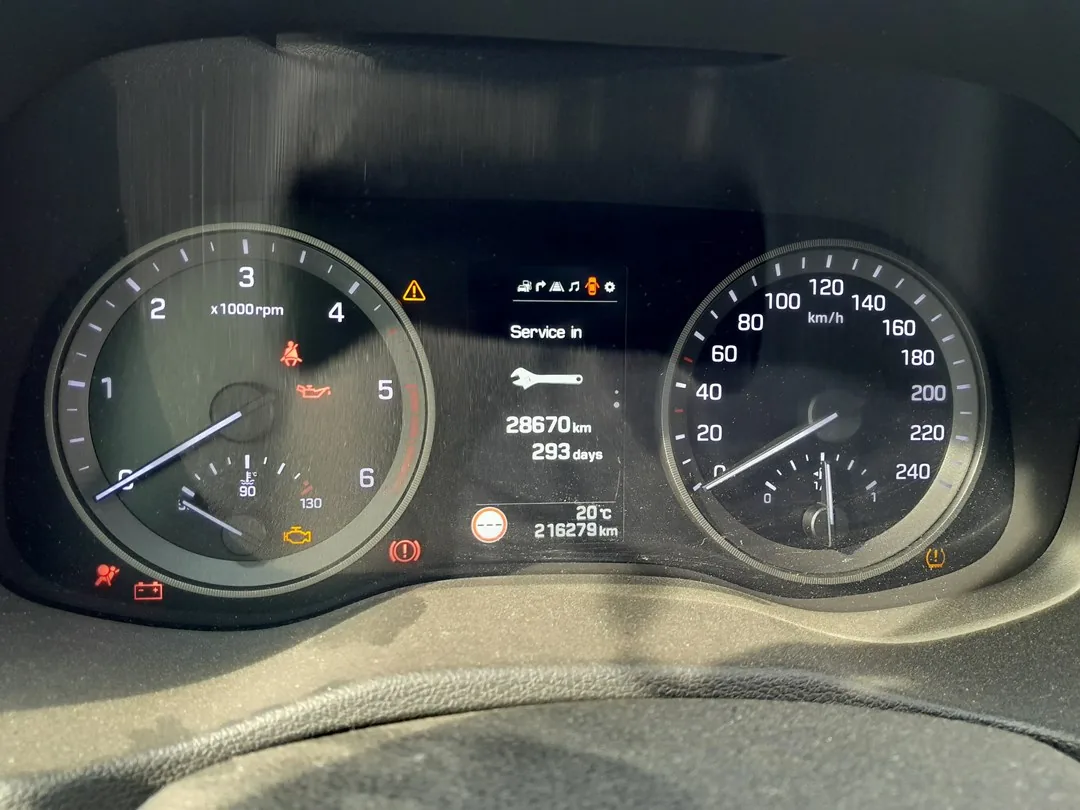
- If the spanner / wrench symbol with “Service required” or “Service due in” appears on the cluster at startup.
- If you bought the Tucson second-hand and the previous owner didn’t clear the indicator.
⚠️ On the TL Tucson the service indicator tracks the oil-change distance counter. Other items (brake fluid every 2 years, coolant at the manufacturer’s interval, timing belt at 90,000 miles on the 1.7 CRDi diesel, the 2.0 CRDi uses a non-serviceable chain) aren’t tracked by the cluster — those follow the printed service schedule.
Before You Start
- Park on a level surface with the engine off. Complete the actual oil and filter change before the reset.
- Identify the cluster control buttons:
- Scroll buttons — up/down rocker on the left-hand steering-wheel spoke. Used to cycle through cluster menu items.
- OK button — selection button next to the scroll rocker. The long-presses of this button are what commit the reset (note: there are two long-presses in the procedure).
- On lower trims (S Connect base trim, very early 2015 cars) without multifunction controls, the menu is driven by cluster-mounted MENU/OK buttons at the bottom-right of the instrument cluster face.
Tools and Supplies
None for the reset itself. For the oil change: fresh Hyundai-spec oil — 5W-30 ACEA A5/B5 for the 1.6 GDi and 2.0 GDi petrol engines, 5W-20 ACEA A5/B5 for the 1.6 T-GDi turbo, 5W-30 ACEA C2/C3 for the 1.7 / 2.0 CRDi diesels (DPF-compatible); a new spin-on filter (different parts per engine family); a 17 mm sump-plug socket (petrol) or 19 mm (CRDi); a torque wrench rated to about 35 Nm (petrol) or 50 Nm (CRDi).
Service Indicator Reset — Step-by-Step

- Turn the ignition ON with the engine off. Key position II on key-start trims; on Smart Key trims press START/STOP without a foot on the brake (pedal contact cranks the engine — keep both feet on the floor).
- Wait a moment for the cluster to fully wake.
- Using the steering-wheel scroll rocker, scroll through the cluster’s central menu display.
- Stop on the entry showing “Service due in” or “Service required” (the exact label depends on whether a service is currently due — if not yet due, it shows the remaining distance; if overdue, it shows “Service required”).
- Press and hold the OK button for 5 seconds.
- Release the button. The cluster shows a confirmation prompt.
- Within a few seconds of release, press and hold the OK button again, this time for 3 seconds.
- Release the button. The procedure is complete and the cluster shows the new full service interval.
- Switch the ignition off to exit the menu.
Verify the Reset Worked
Switch the ignition off, wait 30 seconds, then cycle ignition back on. The Service required / spanner warning should be gone. Scroll back to the Service due screen — the remaining-distance value should now show the full new interval (typically 10,000 miles / 15,000 km or 12 months for European-spec TL Tucson petrol, or 12,500 miles / 20,000 km or 24 months for the 1.7 / 2.0 CRDi diesel; the 1.6 CRDi MHEV uses the same 12,500 miles interval as the standard 1.7 CRDi).
Troubleshooting
- The first 5-second hold doesn’t trigger the confirmation prompt. The most common cause: the cluster isn’t on the Service due / Service required line when you start the hold. Cycle the scroll rocker until you’re specifically on that line — not the trip computer, MPG, or odometer. The OK long-press is only honoured from that screen.
- The first hold works but the second hold doesn’t take. There’s a tight window — about 5 seconds between releasing the first hold and starting the second. If you wait too long, the cluster reverts. Practise the timing: release → “one Mississippi” → press and hold again for 3 seconds.
- Reset works but the warning comes back after a few miles. 12V battery condition. The TL Tucson cluster, like other Hyundai/Kia clusters of the era, is sensitive to cold-crank voltage drop. Load-test the battery; replace if older than 5 years. On the 1.6 CRDi MHEV, the 48V mild-hybrid system has a separate small auxiliary 12V battery — that’s the one to test, not the main 48V battery.
- I have a 2018 facelift Tucson — same procedure? Yes. The 2018 facelift (TLe naming in HaynesPro) updated the front-end styling and added the 1.6 CRDi MHEV powertrain but kept the cluster firmware identical to the pre-facelift TL.
- 1.6 T-GDi N-Line — same procedure? Yes. The N-Line cosmetic / sport-trim variant (2019–2020) uses the standard Tucson cluster. Procedure unchanged. Note: the full Hyundai Tucson N performance model didn’t arrive on the Mk3 — only on the next-gen Mk4 (NX4).
- Hybrid Tucson — same procedure? The Mk3 Tucson never had a full hybrid in Europe. The 1.6 CRDi MHEV (post-2018) is a mild-hybrid that uses the same cluster as standard variants — same procedure. If you have a Mk4 Tucson Hybrid (post-2020), see the dedicated NX4 guide.
- 4WD Tucson — same procedure? Yes. The 4WD selector adds menu entries elsewhere in the cluster but doesn’t change the service-reset path.
Frequently Asked Questions
What does the spanner symbol on the Hyundai Tucson mean?
On the Mk3 Tucson the spanner / wrench icon is the oil-change reminder. It’s a mileage timer — when the distance since the last reset reaches the configured interval, the icon illuminates at startup with a “Service required” or “Service due in” message. It does not indicate an engine fault. Engine faults trigger the orange check-engine light (an engine-outline icon, different shape).
How often does the TL Tucson service indicator come up?
Hyundai’s official European-market schedule for the Mk3 Tucson:
- 1.6 GDi / 2.0 GDi petrol: 10,000 miles (15,000 km) or 12 months.
- 1.6 T-GDi turbo petrol: 9,000 miles (15,000 km) or 12 months — slightly shorter for the turbo.
- 1.7 CRDi diesel: 12,500 miles (20,000 km) or 24 months.
- 2.0 CRDi diesel: 12,500 miles (20,000 km) or 24 months.
- 1.6 CRDi MHEV mild-hybrid: 12,500 miles (20,000 km) or 24 months.
UK severe-service / short-trip driving typically halves the petrol interval to 5,000 miles or 6 months.
Does the reset clear engine fault codes?
No. The reset zeros the service-distance counter only. Engine fault codes are stored in the engine ECU and need a scan tool. For DTC interpretation see autodtcs.com.
What about the new Mk4 Tucson (NX4, 2020+)?
The fourth-generation Tucson (NX4, 2020 onwards) uses the new Hyundai supervision cluster (or full 12.3-inch TFT on Premium / N-Line S trims) and a different menu hierarchy: User Settings → Service Interval → Reset. We’ll publish a dedicated NX4 guide.
And the Mk2 Tucson / ix35 (LM, 2010–2015)?
The Mk2 Tucson was sold as the ix35 in most European markets. It uses an older cluster with a similar two-stage OK hold sequence — see our forthcoming ix35 guide for the specifics.
I drive a Kia Sportage Mk4 from the same era — is the procedure similar?
The Kia Sportage Mk4 (QL, 2016–2022) shares the TL Tucson’s platform and uses a closely related cluster. The same two-stage OK hold works on the Sportage Mk4 from the Service Interval menu. We’ll publish a dedicated Sportage Mk4 guide.
Will resetting the indicator extend my Hyundai 5-year warranty?
No. Hyundai’s 5-year warranty depends on actual service work being performed with documentation in the service book, not on what the cluster reports. The cluster reset is purely a convenience reminder.
For DTC code interpretation on Hyundai / Kia vehicles see autodtcs.com.
Independent guide — not affiliated with Hyundai. Always follow your official service manual and safety precautions. Read our full disclaimer.