These instructions apply to the Mazda 3 Mk3 (BM/BN) 2013-2018.
For other models, please choose your vehicle here.
Disconnecting the 12 V battery on a Mazda 3 Mk3 (BM/BN, 2013–2018) needs a little more care than most cars, because the battery-management system should be put into a “sleep” state first, and there are several things to re-initialise afterwards — the windows, the sunroof, the tyre-pressure system, the steering angle and i-stop. This guide covers the full procedure.
Where the Battery Is
The battery is in the engine bay. Lift any cover to reach the two clamps. There is a battery current sensor on the negative terminal — mind its wiring. Replace like-for-like.
Before You Disconnect — Put the System to Sleep
- Check your audio system security code.
- Cars with the multi-information display: close all the doors; the cluster shows a message and the display flashes — wait until it stops flashing before disconnecting.
- Cars without the display: turn the ignition on (engine off), select N, hold the brake pedal for 5 seconds (the charge and master warning lights flash), then press and hold the accelerator and blip it 3 times; the charge light comes on and the master light goes out. Release the brake and turn the ignition off.
- If working near airbags/pretensioners, after disconnecting wait 1 minute (5 minutes on i-stop cars).
Disconnecting
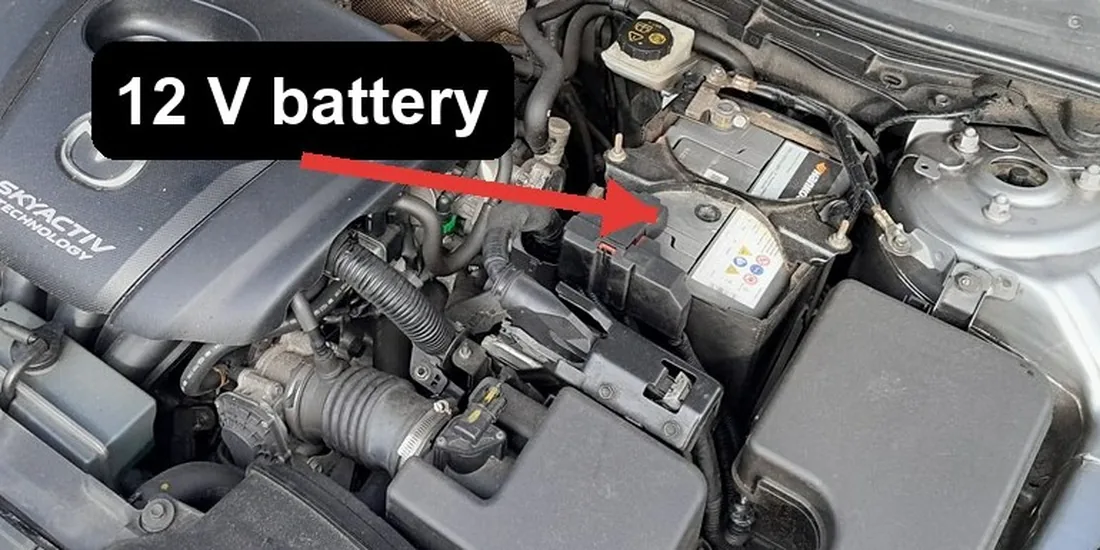
- With the system asleep, disconnect the negative (−, earth) terminal first.
- On the battery sensor, you may disconnect its connector, wait 10 seconds and reconnect as part of the reset.
- Only undo the positive terminal if removing the battery.
Reconnecting
- Connect the positive (+) lead first, then the negative (−) earth lead last, and reconnect the sensor connector. Tighten firmly.
- Turn the ignition on for a few seconds before starting.
What to Reset Afterwards
- Reset the date and time and enter the radio code.
- Re-initialise the tyre-pressure system (see our Mazda 3 TPMS reset guide).
- Re-initialise the electric windows (see our window guide).
- Re-initialise the sunroof if fitted (see our sunroof guide).
- Re-initialise the steering angle sensor — drive straight, then slow full-left and full-right turns; the warning light should clear.
- Let i-stop re-initialise over a drive on a healthy battery.
If a Warning Light Stays On
One or two lights right after reconnecting is normal and should clear on a short drive once the re-inits are done. If an airbag, DSC or engine light remains, a fault code was logged. Reading it needs an OBD scanner — you can look up what a Mazda code means on our sister site autodtcs.com.
Frequently Asked Questions
Why is there a “sleep” routine before disconnecting?
The Mazda 3’s battery-management/i-ELOOP system records the battery state; putting it to sleep first avoids confusing the charging logic and logging faults.
Do I have to do the brake/accelerator routine?
Only on cars without the multi-information display. Display cars just need the doors closed and the cluster to stop flashing.
How long should I leave it disconnected?
Around 15 minutes with the doors shut clears most transient glitches; i-stop cars want at least 5 minutes before airbag work.
Why won’t my windows auto-close after reconnecting?
Expected — the one-touch disables itself after a power loss. Re-initialise each window and it returns.
To clear the service reminder after maintenance, see our Mazda 3 service indicator reset guide.
Independent guide — not affiliated with Mazda. Always follow your official service manual and safety precautions. Read our full disclaimer.