These instructions apply to the Hyundai i30 Mk3 (PD) 2017-Present.
For other models, please choose your vehicle here.
Your Hyundai i30 Mk3 (PD, 2017–present) has an Idle Stop & Go (ISG) system that switches the engine off when you stop and restarts it as you pull away. It saves fuel, but plenty of drivers prefer it off in slow traffic. This guide shows how to switch it off per drive, why it sometimes won’t engage, and what your options are for a more permanent change.
How ISG Works on the i30
When you brake to a halt (automatic/DCT) or stop, put the gearbox in neutral and release the clutch (manual), the engine shuts off. Lifting the brake or pressing the clutch restarts it instantly. It only operates once the engine is warm and the battery is healthy.
How to Switch It Off (Per Drive)
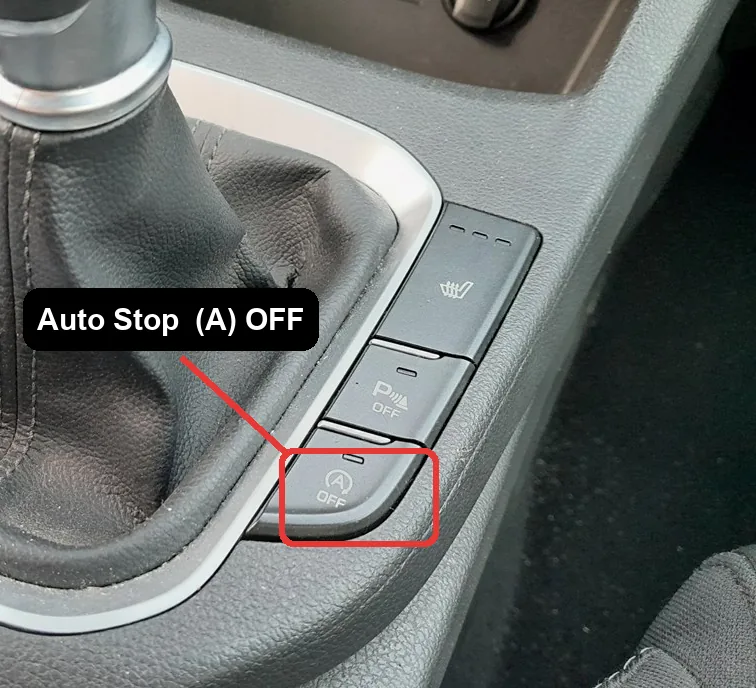
- With the engine running, find the ISG / Auto Stop OFF button — an “A” inside a circular arrow, usually low on the dashboard or near the gear lever.
- Press it once. A dash light or message confirms ISG is off.
- The engine now idles normally at a stop.
How to Switch It Back On
Press the button again, or simply restart the car — ISG defaults back on every time you switch the ignition off and on. There is no factory menu setting to make “off” stick.
Why It Sometimes Won’t Activate
- The engine isn’t yet up to temperature.
- The battery charge is low — common after a battery change or lots of short trips; ISG is blocked to protect the battery.
- Cabin heating or demisting (climate set to MAX) needs the engine running.
- The steering is turned, the car is on a steep slope, or you’re reversing.
If ISG stopped working entirely right after a battery change, the battery may simply need a full charge cycle — see our i30 Mk3 battery guide.
Frequently Asked Questions
Does the i30 remember my ISG setting?
No — it resets to on at every start. There’s no built-in option to keep it off; the only permanent route is aftermarket coding by a specialist.
Is it bad to keep using ISG?
No. The i30’s reinforced starter and AGM/EFB battery are designed for frequent restarts, and the system skips stops when the battery is low to protect itself.
Why won’t the engine auto-stop?
Most often it’s a cold engine, a low battery, or the climate system demanding the engine — all normal blocking conditions.
The ISG warning light is on — what now?
A lit ISG fault indicator usually points to battery condition or the bonnet/seat-belt switches; have the code read if it persists.
If a warning light appeared alongside the fault, look up the code on autodtcs.com. To clear a service reminder, see our i30 Mk3 service indicator reset guide.
Independent guide — not affiliated with Hyundai. Always follow your official service manual and safety precautions. Read our full disclaimer.