These instructions apply to the Ford Puma Mk2 (J2K) 2020-Present.
For other models, please choose your vehicle here.
On the Ford Puma (2020–present), Auto Start-Stop is more eager than on an ordinary car — the EcoBoost mHEV versions use a 48 V belt starter-generator that can stop the engine smoothly and even shut it down as you coast to a halt. Great for economy, but if you’d rather keep the engine running in stop-go traffic, here’s how to switch it off, and why it sometimes refuses to stop the engine at all.
Why the Puma’s System Feels Different
On the mild-hybrid Puma the restart is handled by the belt-driven starter-generator rather than a conventional starter motor, so stops and restarts are quicker and quieter. The trade-off is that it triggers more often, which is exactly why some owners turn it off.
Switching It Off (Per Drive)
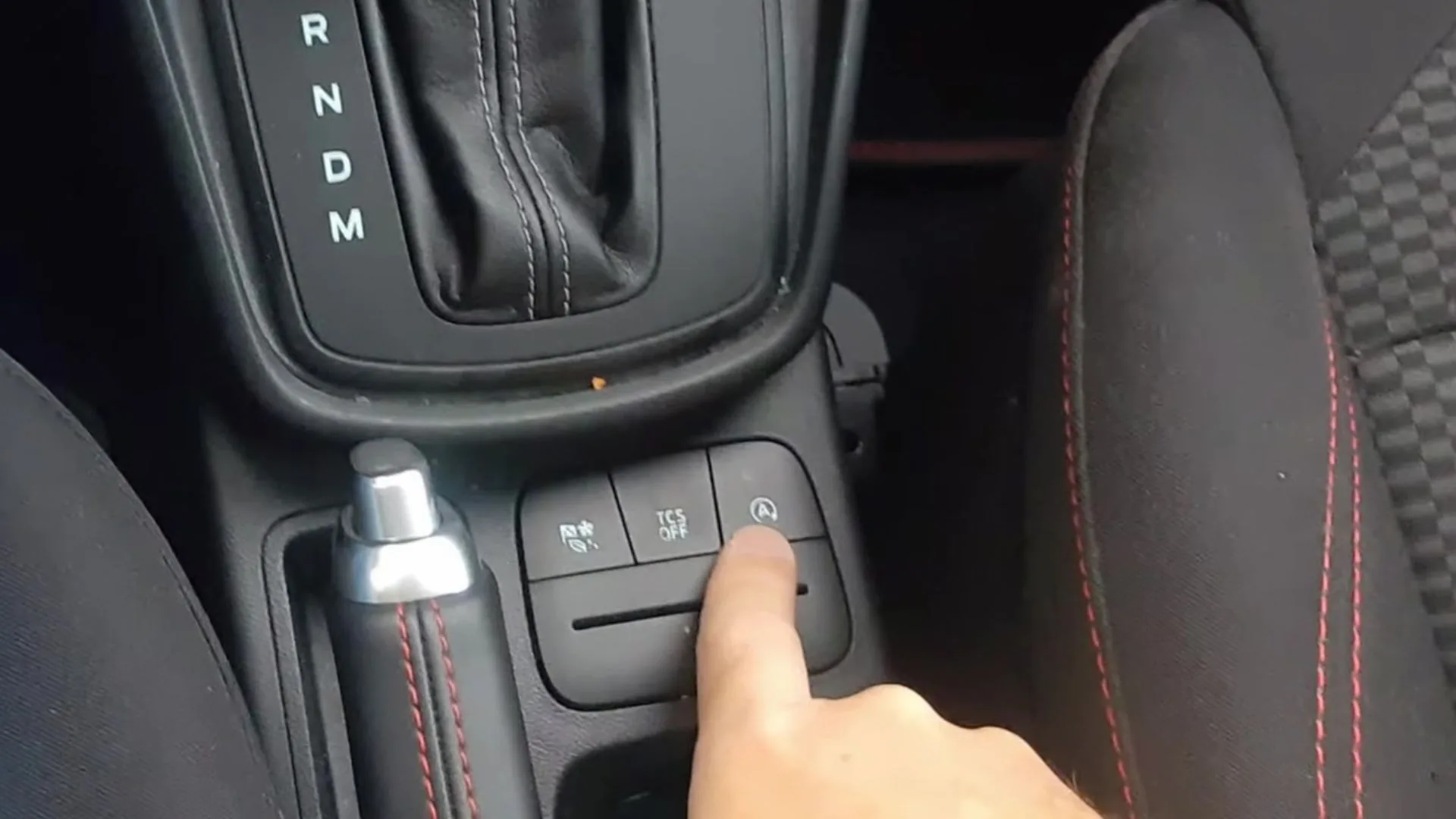
- With the engine running, press the Auto Start-Stop button — the “A” inside a looping arrow — on the centre console beside the gear selector (rightmost in the cluster next to the TCS OFF button; see photo above).
- The start/stop warning light comes on to confirm it’s disabled, and the engine idles normally at a stop.
Turning It Back On
Press the button again, or just restart the car — like every Ford, Auto Start-Stop returns to on each time you switch the ignition off and back on. There’s no factory setting to make “off” stick.
Why It Sometimes Won’t Stop the Engine
If the engine keeps running when you expect a stop, the system is usually protecting itself or you. Common, normal reasons on the Puma:
- Engine or cabin not yet up to temperature; demister or strong heating/cooling demand.
- 12 V battery state of charge low — very common after short trips or a recent battery change before the BMS was reset.
- Steering turned, on a gradient, bonnet open, or seat belt/door open.
- Hill-start or the battery being topped up by the mild-hybrid system.
If it stopped working right after a battery change, the Battery Monitoring System may need resetting — see our Puma battery guide.
Frequently Asked Questions
Does the Puma remember if I turn Start-Stop off?
No — it resets to on at every start. You’d need it coded with Ford software to default off, which most owners don’t bother with.
Is all that stopping and starting bad for the engine?
No — the mild-hybrid hardware and an EFB/AGM battery are designed for it, and the system skips stops whenever conditions aren’t right.
Why did Start-Stop stop working after a new battery?
The BMS needs to recognise the new battery’s charge state; until it’s reset (or the battery is fully charged) the car won’t risk auto-stops.
The engine shut off while I was still rolling — is that a fault?
No — on the mHEV the engine can stop just before you come to rest as a fuel-saving feature. It restarts the instant you need it.
If a warning light appeared alongside the fault, look up the code on autodtcs.com. To clear an oil-service reminder, see our Puma service reset guide.
Independent guide — not affiliated with Ford. Always follow your official service manual and safety precautions. Read our full disclaimer.