These instructions apply to the Suzuki SX4 S-Cross Mk2 (AK) 2022-Present.
For other models, please choose your vehicle here.
The Suzuki SX4 S-Cross Mk2 (AK, 2022–present) resets its tyre-pressure warning through a quick cluster menu using the info knob, where you also choose a Comfort or Load mode to match how the car is loaded. The amber symbol coming on is a reminder to check the tyres, not a sign that something has broken — once the pressures are correct and you confirm the mode, it clears. Here’s how to do it properly.
How It Works on This Model
This S-Cross generation uses an indirect system that reads wheel-speed data from the ABS rather than a sensor inside each tyre. A tyre that’s low rolls at a slightly different rate to the others, and the software flags it. Because it works from a stored reference, it has to be told your current pressures whenever you change them — that’s the point of the menu reset. The Comfort and Load modes set which reference it uses: everyday pressures, or the higher fully-laden pressures.
First, a Few Checks
- Set the pressures with the tyres cold — parked a couple of hours or driven under a mile.
- Inflate all four to the figure on the driver’s door-pillar label; use the higher ‘loaded’ figure if you carry passengers or luggage regularly.
- Decide which mode matches what you’ve set: Comfort for everyday pressures, Load for the laden figures.
- Check the spare too if it carries a sensor.
- Do the menu reset with the car stationary and the ignition on.
How to Reset the S-Cross TPMS
- Turn the ignition on.
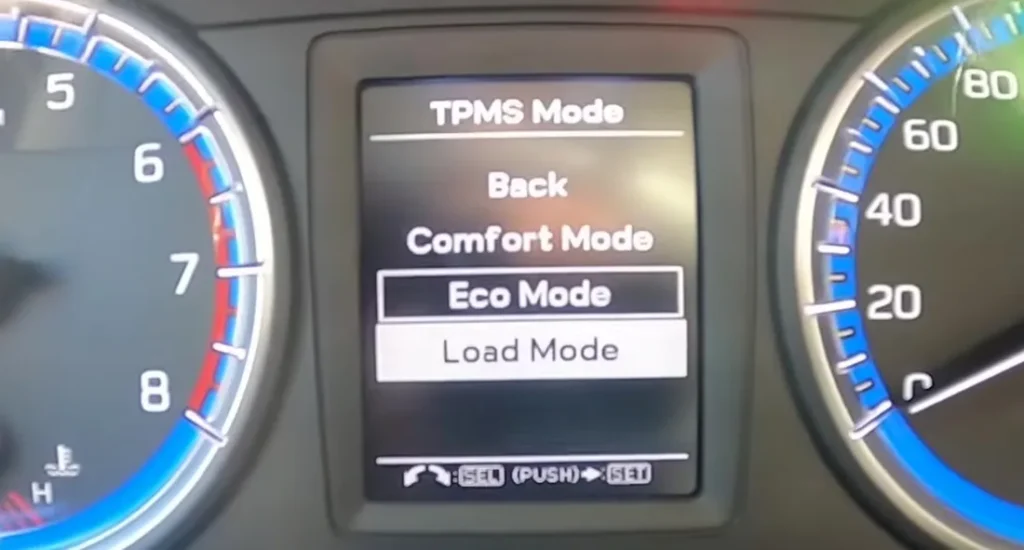
- Press and hold the info knob for 3 seconds.
- Turn the knob and select ‘TPMS’.
- Turn the knob again and select ‘TPMS mode’.
- Choose ‘Comfort’ or ‘Load’ to match your tyre pressures, then press the knob.
- ‘Reset successful’ appears on the display — done.
If the Light Stays On
- Re-check every tyre with a reliable gauge, including the spare if it has a sensor.
- Pick the right mode — choosing ‘Comfort’ with load-pressure tyres (or vice versa) can keep the warning on.
- Look for one low corner — a slow puncture from a nail or a weeping valve will keep dropping the same tyre.
- Cold snap? Pressures fall roughly 1 psi per 5 °C, so a warm-weather setting can trip the light overnight.
- After new tyres or a wheel swap, redo the menu reset so the new reference is stored.
- A steady-flashing TPMS light means a sensor fault (flat sensor battery or an unmatched sensor after a wheel change) and needs a tyre shop’s tool.
Once It’s Done
Once ‘Reset successful’ shows and the pressures are right, the amber symbol goes out immediately and stays off for the trip. If it returns after a short while, treat it as a real leak rather than a menu glitch and have the tyre checked.
Frequently Asked Questions
How do I reset the tyre pressure light on a Suzuki S-Cross?
Ignition on, hold the info knob 3 seconds, select TPMS → TPMS mode, choose Comfort or Load and press the knob until ‘Reset successful’ shows. Set the pressures correctly first, or the warning will simply come straight back after the reset.
What’s the difference between Comfort and Load mode?
They tell the system which tyre-pressure target you’re running — the everyday pressure or the higher fully-loaded pressure — so it judges ‘low’ correctly. Match the mode to the pressures you actually set; mixing them up is a common reason the light won’t clear.
Why won’t the light go out?
Either a tyre is still off the target or the wrong mode was selected. Re-check all four cold, pick the matching Comfort/Load mode, and repeat the reset. A persistent flash rather than a steady light means a sensor fault, which needs a workshop tool.
Do I have to reset it every time I check the tyres?
Only when you’ve changed the pressures, fitted different tyres, or rotated the wheels. A simple top-up back to the same target doesn’t always need a reset, but running the menu reset afterwards is quick and guarantees the reference matches what’s in the tyres.
Does cold weather trip the warning?
Yes. Air contracts as it cools, so pressures set in mild weather can drop below target on a cold morning and light the symbol. Top the tyres back up to the door-pillar figure while they’re cold, then run the menu reset if the light lingers.
Do I need a tool?
Not for a normal reset — only if a sensor was replaced or swapped between wheels, or if the light is flashing to signal a sensor fault. In those cases a tyre shop can match the sensors with their handset.
If a fault code is stored, look it up on autodtcs.com. To clear a service reminder, see our S-Cross Mk2 service reset.
Independent guide — not affiliated with Suzuki. Always follow your official service manual and safety precautions. Read our full disclaimer.