These instructions apply to the Alfa Romeo Giulia Mk1 (952) 2016-Present.
For other models, please choose your vehicle here.
Owners of the Alfa Romeo Giulia (Type 952, 2016–present) tend to notice the same thing when the fob battery gets tired: the saloon that used to unlock as you reached for the handle suddenly wants the button pressed, or the dash starts nagging about a weak key. Every Giulia — from the entry diesels to the Quadrifoglio — carries the same keyless smart fob, with a hidden metal blade and a coin cell you can change yourself in a couple of minutes. The only catch is that the cell is not held in a plain flat tray; Alfa used a little rotating carrier, and once you know that, the whole job is painless.
How to Tell the Fob Battery Is Dying
- Passive entry gets lazy. The doors no longer read the fob as you walk up, so you resort to the button or hold the fob against the handle — the classic opening symptom.
- A low-key message on the cluster. The Giulia warns you on the instrument display when the fob voltage falls; it is a heads-up rather than a breakdown, so there is no rush.
- Starting wants the fob held close. If the car only fires when you press the fob to the start button, it is falling back on the induction reader because the radio signal has faded.
- Cold snaps make it flaky. Lithium cells lose punch when it is freezing, so a fob that misbehaves on icy mornings and recovers by lunchtime is telling you the cell is nearly done.
Reckon on two to four years from a Giulia fob cell. Inside that range and showing the signs above, change the battery first — it fixes the overwhelming majority of these complaints.
The Battery You Need
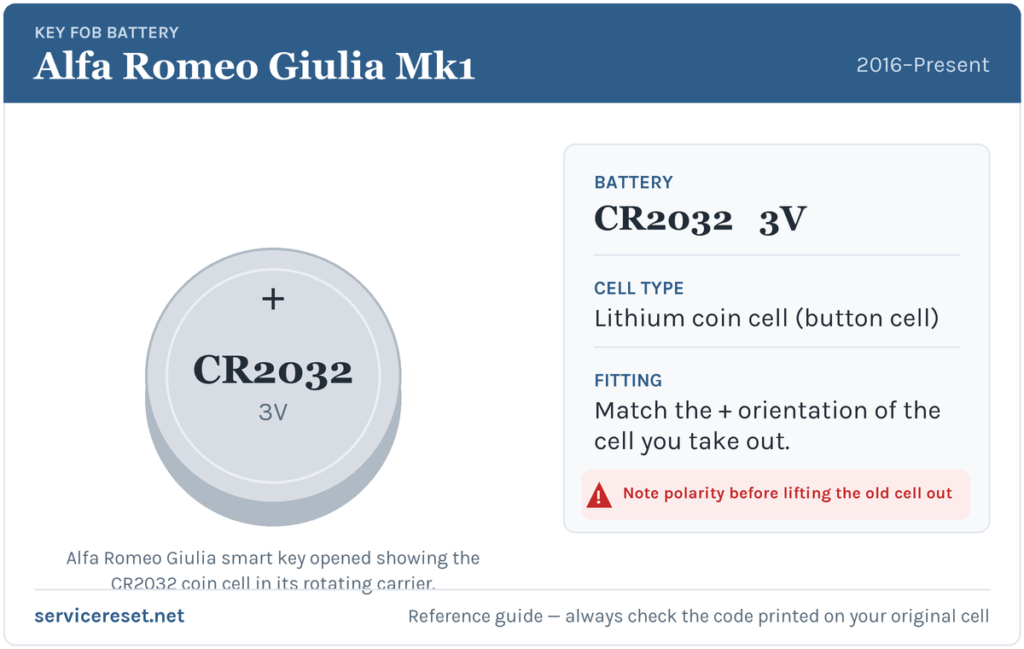
The Giulia smart key runs on a CR2032, the ubiquitous 3-volt lithium coin cell roughly 20 mm across. You will find it on the rack at any supermarket, pharmacy or DIY shop. Spend a little on a known brand rather than a no-name bulk pack — weak cells droop under the sharp current the transmitter pulls and can read as flat even when they are fresh.
How to Replace the Giulia Fob Battery
- Pull the emergency blade. Work the release catch on the end of the fob and draw the mechanical key blade out of the housing.
- Slide off the back cover. With the blade removed, squeeze the sides and slide the rear cover away — it comes off in a straight line rather than flipping open on a hinge.
- Turn the battery carrier. The CR2032 lives in a round carrier that unlocks with a quarter-turn anticlockwise. Rotate it first, then lift it clear; do not go straight in with a screwdriver under the cell.
- Fit the fresh cell. Take a mental note of which face is up, remove the old battery and set the new one in the carrier the same way — positive (+) uppermost on this fob.
- Put it back together. Drop the carrier in, twist it clockwise until it locks, slide the cover back until it snaps, and push the blade back into place.
⚠️ Get the polarity right. A CR2032 seated upside down simply will not drive the transmitter, and if left reversed it can bleed charge against the carrier contacts — so match the way the old cell was sitting instead of guessing which face goes up.
Make Sure It Took
Walk a few paces off and press lock, then unlock, and finally approach the car to confirm passive entry reads the fob again. The low-key warning disappears once the Giulia next sees a healthy fob, occasionally only after a drive cycle rather than at once. As a last check, make sure the engine now starts with the fob simply on you rather than pressed to the button.
If a Fresh Cell Doesn’t Fix It
- Make sure the carrier locked home. If the round holder is not turned fully back, its contacts do not meet the cell and the new battery does nothing.
- Wipe the contacts. Skin oil or a trace of corrosion on the terminals mimics a flat cell exactly — a clean, dry cloth on the faces and contacts often restores it.
- Fall back on the induction start. Hold the fob to the start button and press; if it fires, the transponder is healthy and only the radio side or a contact is suspect.
- Test the car’s 12 V battery. A weak vehicle battery produces erratic locking and no-start behaviour that can be mistaken for a dead fob, so have it checked if the fob itself is fine.
New Key or Spare — Why It’s a Dealer Job
Renewing the coin cell never disturbs the fob’s coding, so it keeps working the moment you close it up. A replacement key is a bigger ask: the Giulia’s immobiliser must enrol the new transponder through the security system, and blank smart fobs are supplied against the car’s VIN. That puts a spare or a lost-key replacement in the hands of an Alfa Romeo dealer or a well-equipped auto-locksmith — so keep the battery in your second fob healthy and you will never be down to a single key.
Frequently Asked Questions
Which battery fits an Alfa Romeo Giulia key fob?
One CR2032 3-volt lithium coin cell, sitting in a round twist-lock carrier inside the smart fob.
The battery will not come out — what am I missing?
It is held in a circular carrier that must be turned a quarter-turn anticlockwise before it releases. Rotate the carrier first and the cell lifts straight out; prying at the battery before turning can distort a contact.
Will I need to reprogram the fob after the swap?
No. Changing the cell leaves the coding untouched, so keyless entry and start carry on working. Programming is only needed for a brand-new key.
How many years should a Giulia fob battery give?
Generally two to four. If the fob habitually sits close to the car and keeps waking to transmit, it drains sooner — a spot further from the driveway helps.
New battery in and still nothing — where do I look?
Confirm the carrier is fully locked and the cell is the right way up, then clean the contacts. If a good CR2032 still gives no response yet the car starts with the fob held to the button, the transmitter or a contact has probably failed and is worth a locksmith’s look.
Can I drive the Giulia if the fob is totally dead?
Yes. Unlock the driver’s door with the emergency blade tucked in the fob, then hold the fob against the start button while you press it — the induction reader picks up the transponder and the car starts, so a flat cell will not immobilise you.
If the remote quit abruptly straight after the 12 V battery was disconnected, rather than fading gradually, the fault is more likely a lost pairing or a stored code than the coin cell — you can look up what any related code means on autodtcs.com.
Independent guide — not affiliated with Alfa Romeo. Always follow your official service manual and safety precautions. Read our full disclaimer.