These instructions apply to the Alfa Romeo MiTo Mk1 (955) 2008-2019.
For other models, please choose your vehicle here.
If the tire-pressure warning has come on in your Alfa Romeo MiTo (2008–2019) after you’ve adjusted the pressures or changed a wheel, you reset it by storing the new pressures and driving for a few minutes. Here’s how. The amber symbol appearing after a top-up, a cold night, or a wheel swap is normal — the system just needs a fresh reference once the pressures have changed, and it is not a sign of a fault.
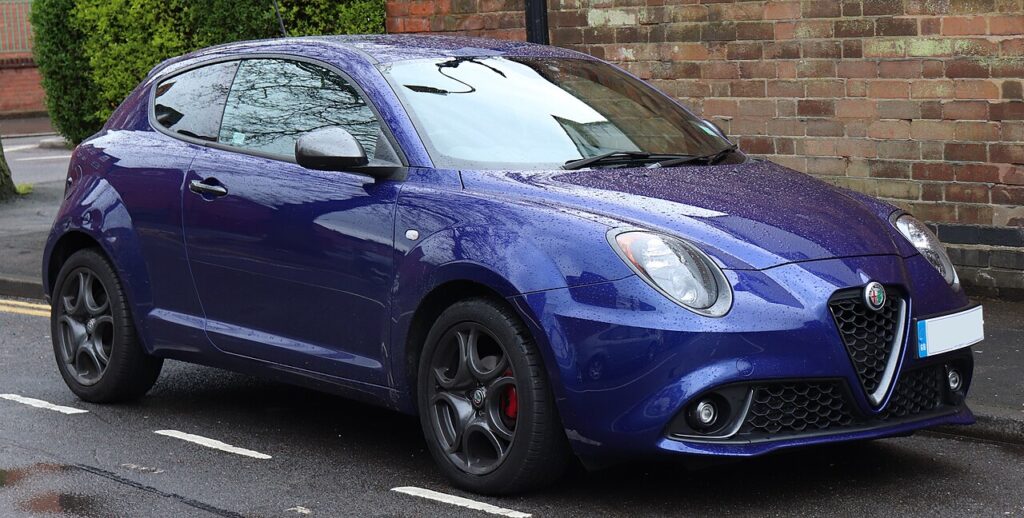
Alfa Romeo MiTo recommended tire pressures (2008–2019)
Most Alfa Romeo MiTos run 33 psi (2.3 bar) at the front and 30 psi (2.1 bar) at the rear when the tires are cold — that’s the figure for the common 16-inch wheel, and it is the same on every engine. On 17- and 18-inch wheels the pressures are higher and depend on your engine: the turbo petrol and the diesels run a little above the 1.4 non-turbo. Values below are front / rear, cold, at normal load; there is a higher fully-laden figure, so the exact numbers for your car are on the placard in the driver’s door shut.
| Tire size | 1.4 petrol (non-turbo) | 1.4 Turbo petrol | 1.3 / 1.6 JTDm diesel |
|---|---|---|---|
| 195/55 R16 | 2.3 / 2.1 bar (33 / 30 psi) | 2.3 / 2.1 bar (33 / 30 psi) | 2.3 / 2.1 bar (33 / 30 psi) |
| 205/45 R17 | 2.3 / 2.1 bar (33 / 30 psi) | 2.4 / 2.2 bar (35 / 32 psi) | 2.6 / 2.2 bar (38 / 32 psi) |
| 215/45 R17 | 2.2 / 2.1 bar (32 / 30 psi) | 2.3 / 2.1 bar (33 / 30 psi) | 2.4 / 2.2 bar (35 / 32 psi) |
| 215/40 R18 | 2.3 / 2.1 bar (33 / 30 psi) | 2.4 / 2.2 bar (35 / 32 psi) | 2.5 / 2.2 bar (36 / 32 psi) |
| 135/70 R16 (space-saver spare) | 4.2 bar (61 psi) | ||
Normal-load cold pressures from the Alfa Romeo owner’s handbook. Add about 0.3 bar (4 psi) for a long, fully-laden run or sustained speeds above 160 km/h (100 mph). Check pressures cold — tires stood 3+ hours or driven under a mile. The placard in the driver’s door shut is the authority for your exact tire size, engine and trim; set the pressures cold, then reset the monitor using the steps below.
How the MiTo Monitors Its Tires
The MiTo works from a stored reference rather than a live per-corner readout: you set the pressures accurately, tell the car those are correct, and it then watches for a tire that falls meaningfully below that stored baseline as you drive. This is why a short learn drive is part of the reset — the values are only committed once the car has been moving for a few minutes. Get the cold pressures right first and the system does the rest quietly in the background.
When to Reset
- After checking or adjusting the tire pressures.
- After changing wheels or tires, or fitting winter wheels.
Before You Start
- Check the tires cold — stood a few hours or driven under a mile; warm tires read high and mislead the baseline.
- Use the placard figures in the driver’s door shut; fronts and rears can differ, and there is a higher fully-laden figure.
- Set all four corners before you start, including the one that triggered the warning.
- Park level with the ignition ready so you can reach the menu if your car offers one.
- Allow time for a short drive straight after — the learn only completes on the move.
Resetting the System
- Park level and set all four tires to the correct cold pressures (placard in the driver’s door shut).
- Switch the ignition on and confirm/reset the tire-pressure setting in the menu if your MiTo offers one.
- Drive for about 5 minutes at over 20 km/h (12 mph) — the new pressures are then stored as the baseline.
If the Warning Stays On
- Recheck every tire — one below spec keeps the warning on.
- Complete the learn drive — a very short trip may not be enough to store the values.
- After a wheel change, make sure pressures are exactly to spec before driving.
- Check the spare or space-saver if fitted — a temporary wheel at low pressure counts as a low corner.
- Cold morning? Pressure falls roughly 1 PSI per 10 °C, so re-inflate to the placard figure and redo the learn drive.
- Same tire keeps returning after each reset — suspect a slow puncture and have it inspected.
- Still showing with correct pressures? A fault may be stored — look it up on autodtcs.com.
What to Expect After
Once the pressures are set and you complete the short learn drive, the warning clears and stays off for the rest of the journey and beyond, as long as the tires hold pressure. If it returns on a later trip, treat it as a genuine reading — check and correct the pressures rather than resetting again over a slowly deflating tire.
Frequently Asked Questions
How do I reset the tire pressure light on an Alfa Romeo MiTo?
Set the pressures, confirm in the menu if offered, then drive about 5 minutes above 20 km/h to store them.
Why won’t the warning clear?
Usually a tire still below spec, or the learn drive wasn’t long enough.
Do I need a tool?
No for a normal reset; a tool is only needed if a pressure sensor is replaced.
Does adjusting one tire need a full reset?
Yes — set all four correctly first, then do the learn drive so the baseline is right.

Why does it come on in cold weather?
Air contracts as it cools, so pressures read lower overnight and a borderline tire can dip under the alert point. Top up to the placard figure while the tires are cold, then complete the learn drive and the warning should clear.
Do I need to do anything after fitting winter wheels?
Yes — set the winter tires to the correct cold pressures, then repeat the reset and learn drive so the new wheels become the stored reference. Do the same again when you switch back to the summer set.
If the warning came on with other lights, decode the code on autodtcs.com.
Independent guide — not affiliated with Alfa Romeo. Always follow your official service manual and safety precautions. Read our full disclaimer.