These instructions apply to the Smart Fortwo Mk3 (W453) 2015-2024.
For other models, please choose your vehicle here.
If the remote for your Smart ForTwo (W453, 2015–2024) only locks the car when you are standing right next to it, or has stopped responding altogether, the coin cell inside the key has almost certainly gone flat. The W453 was the first ForTwo built on the Renault Twingo platform, and it inherited Renault’s key hardware too — which is why there is a catch here that trips a lot of owners up: early cars and later cars use different keys with different batteries. Smart started the W453 with a Renault-style fixed key and switched to the folding “flip” key after roughly the first year, so the cell you need depends on which key is in your hand. This guide covers both, how to tell a dying cell from a real fault, and why a spare key is still a dealer or locksmith job.
How to Tell the Fob Battery Is Dying
- Shrinking range. You have to be almost touching the car before it locks or unlocks. This is the first and most reliable sign.
- Intermittent button response. The remote works on the third or fourth press, or only some of the time — a cell that is nearly flat but not quite dead.
- Worse in the cold. A weak lithium cell loses voltage on a frosty morning, so range that was borderline in summer can disappear completely in winter.
- No response at all. A fully dead cell gives nothing on any button — but you can still get into the car and drive it (see the FAQ below).
A coin cell in a W453 key typically lasts two to four years. If yours is around that age and showing any of the above, fit a fresh cell before you start suspecting the car’s receiver or immobiliser.
The Battery You Need
Which cell you need depends on which of the two W453 keys you have — and they are not interchangeable, because the two key bodies are physically built around different cell thicknesses:
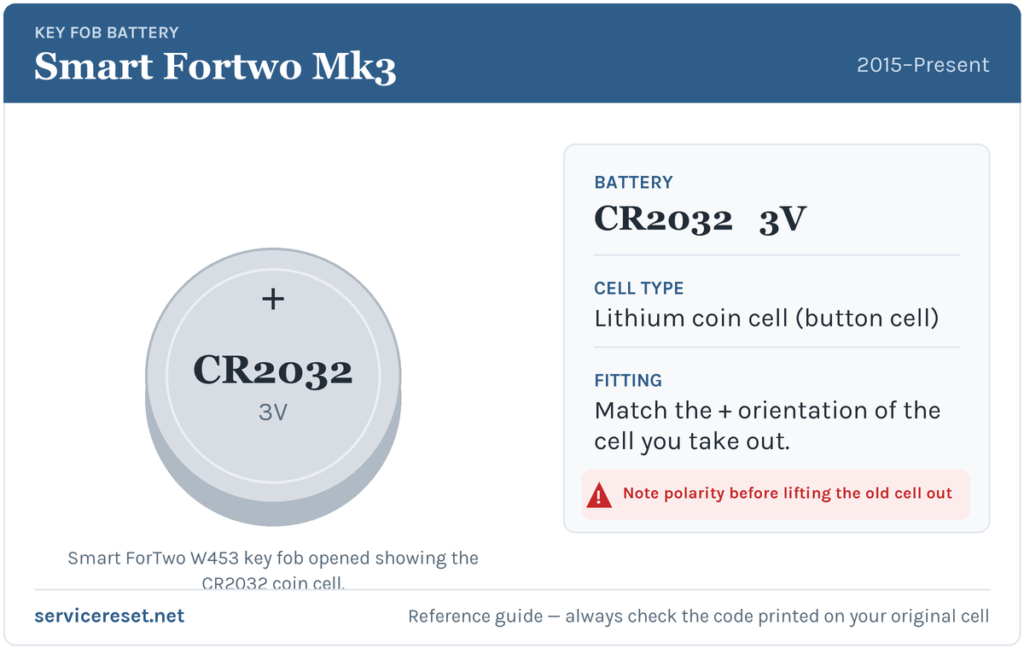
- Folding “flip” key (the common later W453 key, blade swings out of the fob): a CR2032 3-volt lithium coin cell.
- Original fixed Renault-style key (early W453, non-folding): a thinner CR2016 3-volt lithium coin cell.
Both are cheap and sold in any supermarket, and the CR2032 flip key tends to last longer than the CR2016 early key because it holds more charge. Buy a good-quality branded cell — budget cells can sag under the brief current spike the transmitter draws and give poor range even when new. If you are unsure which key you have, open it and read the code stamped on the cell you remove.
Method 1 — Folding “Flip” Key (CR2032)
- Fold the metal blade closed so the fob sits flat and is easier to hold.
- Find the seam that runs around the edge of the fob. Insert a flat tool — a small flat-blade screwdriver, a guitar pick or even a coin — into the gap and twist gently to split the two halves of the case apart.
- Lift out the old CR2032. Note how it sits before you remove it: on the W453 flip key the fresh cell goes in positive (+) side facing down, away from the buttons.
- Drop the new cell in, press the two halves firmly back together until the seam clicks shut all the way round, and test every button.
Method 2 — Original Fixed Renault-Style Key (CR2016)
- Turn the key over so the back of the fob faces up.
- Undo the small retaining screw with a fine cross-head (Phillips) screwdriver and keep it somewhere safe — it is tiny and easy to lose.
- Ease the two halves of the key apart. The CR2016 sits in the base of the fob; lift it out, noting which way up it was.
- Fit the new cell the same way round as the one you removed, close the two halves, and drive the screw back in snugly — do not overtighten, the housing is plastic.
⚠️ Get the polarity right. A coin cell fitted the wrong way round will not power the transmitter and can quietly discharge against the contacts. Always copy the orientation of the cell you took out — on the flip key that means positive (+) side down.
Confirm It Worked
Stand back several metres and lock, then unlock, the car. Full range should return straight away. If the remote works up close but still feels weak at a distance, re-open the key and check the new cell is seated flat under its clip and that nothing is holding the two halves slightly apart.
If a Fresh Cell Doesn’t Fix It
- Re-check the polarity and seating. The single most common mistake is fitting the cell upside down, or not clicking the case fully shut so the contact does not touch. Open it and look again.
- Confirm you fitted the right cell. A CR2016 rattling loosely in a flip-key housing built for a CR2032 will make poor contact — match the cell to the key.
- Clean the contacts. A smear of finger grease or a little corrosion on the terminals is enough to cause dropouts; wipe them with a dry cloth.
- Rule out the car. If the remote is fine up close but the car is slow to wake, a tired 12 V vehicle battery can occasionally mimic key faults — worth checking if the car itself feels sluggish.
New Key or Spare — Why It’s a Dealer Job
Changing the coin cell does not touch the key’s coding, so the remote keeps working straight away with no reprogramming. Cutting and coding a new key is a different matter: because the W453 shares Renault’s immobiliser architecture, a blank key has to be ordered against the car’s VIN and paired to the immobiliser with the correct diagnostic equipment. That makes adding a spare or replacing a lost key a job for a Smart / Mercedes dealer or an auto-locksmith — not something you can finish on the driveway. The cheap fix is prevention: keep the battery in your spare key fresh too, so you are never down to a single working remote.
Frequently Asked Questions
What battery does a Smart ForTwo W453 key take?
It depends on the key. The later folding flip key uses a CR2032 3-volt lithium coin cell; the earlier fixed Renault-style key uses a thinner CR2016. Open the key and read the code on the cell you remove if you are not sure which one you have.
Why are there two different batteries for the same car?
Smart changed the W453 key partway through production. Early cars got a Renault-style fixed key (CR2016); after roughly the first year Smart switched to the folding flip key (CR2032). Same car, two different key bodies, two different cells.
Which way up does the cell go?
In the flip key the CR2032 sits positive (+) side facing down, away from the buttons. Whichever key you have, the safe rule is to copy the orientation of the cell you just removed before it goes in the wrong way.
Do I need to reprogram the key after changing the battery?
No. A battery swap leaves the key’s coding untouched, so it works immediately. Only a brand-new key needs pairing to the car.
How long should a Smart ForTwo key battery last?
Usually two to four years. The CR2032 in the flip key generally lasts longer than the CR2016 in the early key because it stores more charge; heavy daily use of the remote shortens either.
Can I still drive the car if the key battery is completely dead?
Yes. Use the mechanical blade in the key to unlock the driver’s door manually, then start the car as normal — a dead remote battery does not stop the immobiliser recognising the key, so a flat cell will not strand you.
If your remote stopped working suddenly right after the car’s 12 V battery was disconnected — rather than fading gradually over weeks — the cause is more likely the electrics than the coin cell, and the car may have logged a fault in the process. You can look up what a stored code means on autodtcs.com.
Independent guide — not affiliated with Smart. Always follow your official service manual and safety precautions. Read our full disclaimer.