These instructions apply to the Nissan Juke Mk2 (F16) 2019-Present.
For other models, please choose your vehicle here.
The Nissan Juke (F16, 2019–present) uses the Nissan Intelligent Key with keyless entry and a push-button START/STOP ignition across the range. When the fob battery dies the remote stops responding, but the car still starts because the start button can read the key chip directly. Here is the emergency procedure, how to get in with the hidden blade, and how to fit a fresh coin cell.
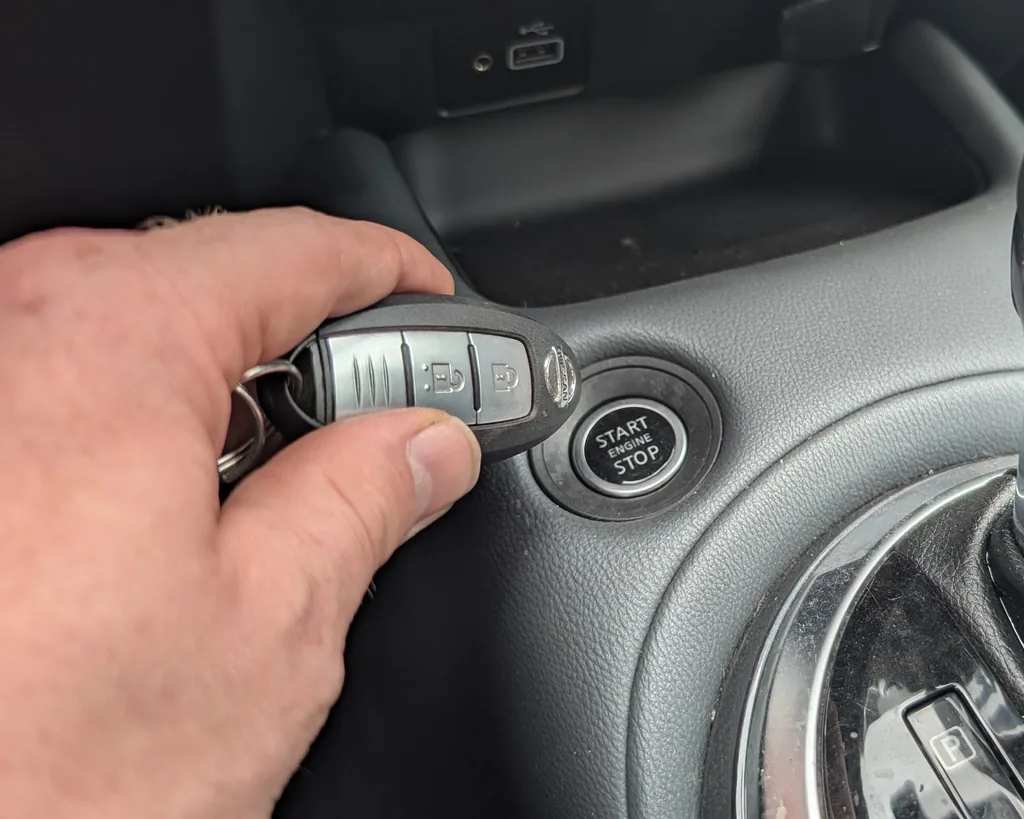
Start the second-generation Juke with a dead fob battery
Behind the START/STOP button sits a backup reader coil. Pressing the Intelligent Key against the button lets the car authenticate the transponder even with a flat battery.
- Get into the driver’s seat, close the door and press the brake pedal down firmly.
- Touch the Nissan-badge face of the Intelligent Key to the START/STOP button and hold it there.
- With the fob still touching, press the START/STOP button.
- The engine starts. Leave it running until you have fitted a new battery so you are not caught out again.
Unlock the doors with the mechanical key
With no fob power the proximity sensors and remote buttons are dead, so use the emergency blade tucked inside the Intelligent Key.
- Slide the release latch on the rear of the fob and withdraw the metal blade.
- The driver’s door lock cylinder may sit behind a small cover on the handle; pop it off and insert the blade.
- Turn to unlock and open the door. Any alarm chirp stops once the key is recognised inside and you start the car.
Immobiliser note
The Juke’s engine immobiliser checks a passive transponder embedded in the Intelligent Key. That chip draws its power from the start button’s radio field, so it keeps authenticating even with a dead coin cell. A flat fob battery only knocks out remote locking and the walk-up keyless features — never the ability to start.
Replace the key-fob battery
The current Juke Intelligent Key takes a CR2032 3 V coin cell.
- Slide out the mechanical blade, then split the fob at the seam with a coin or a thin flat-blade screwdriver.
- Note which way the old cell faces, lift it out, and drop the new one in the same orientation.
- Snap the case closed, reinsert the blade and confirm the lock and unlock buttons respond.
Frequently Asked Questions
My new Juke says “Key battery low” — can I still drive? Yes. The car will start every time using touch-to-start, but fit a CR2032 soon so remote locking and keyless entry come back.
Where exactly do I hold the fob? Flat against the START/STOP button itself, badge side touching, then press the button with the fob still in contact.
Does the Juke have a key slot instead? No. The F16 Juke uses the touch-to-start method against the button rather than a separate fob slot.
Will keyless entry come back after a battery swap? Yes. Once a healthy CR2032 is fitted, walk-up unlocking and remote locking work again immediately.
What if it still won’t start after touching the fob? Try again with firm contact and your foot on the brake. If it still fails, the 12 V vehicle battery may be flat rather than the fob — that needs a jump start or charge.
If a warning light or fault code appears on the dash at the same time, our sister site autodtcs.com decodes OBD-II trouble codes in plain English.
Independent guide — not affiliated with Nissan. Always follow your official service manual and safety precautions. Read our full disclaimer.