These instructions apply to the Nissan Juke Mk2 (F16) 2019-Present.
For other models, please choose your vehicle here.
If the Intelligent Key on your Nissan Juke Mk2 (F16, 2019–present) is getting weak — short range, fussy keyless entry, or a “key battery low” warning — the coin cell needs renewing. The Juke’s I-Key takes a CR2032 and opens with the hidden emergency blade. It’s a two-minute job, and the key keeps working straight afterwards.
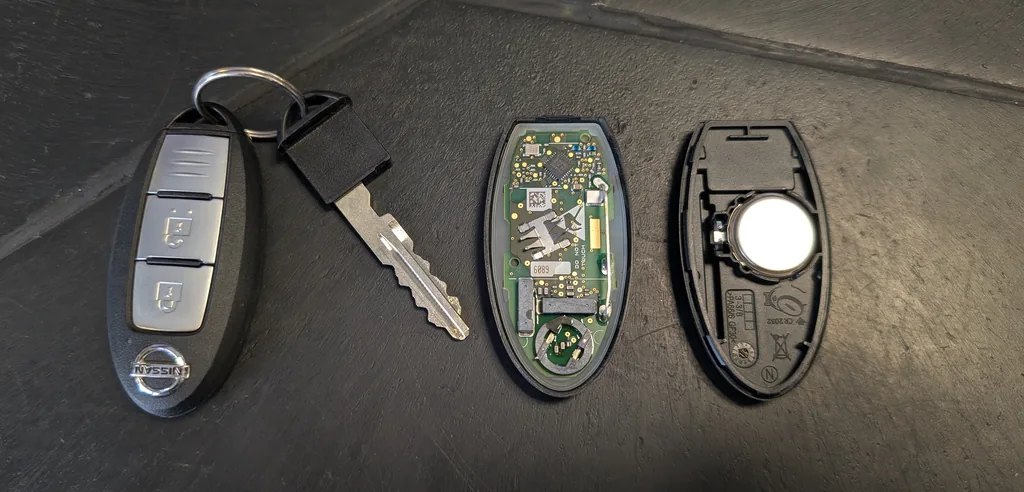
What You Need
- A fresh CR2032 3 V lithium coin cell.
- The metal emergency key inside the fob, plus a small flat screwdriver.
How to Replace the Juke I-Key Battery
- Slide out the emergency key blade — release the catch on the fob and pull it free.
- With the blade out, use a small screwdriver in the gap to split the case and remove the cover.
- Lift out the old CR2032, noting which way up it sits.
- Fit the new cell the same way round, handling it by the edges.
- Click the cover back together (line up the 1→2 tabs) and slide the blade home.
- Press a button, then test lock/unlock and keyless entry from a normal distance.
Does It Need Programming?
No — swapping the cell doesn’t affect the key’s pairing, so it works immediately. A lost or extra Intelligent Key can only be ordered and coded by a Nissan dealer, which isn’t an owner job.
If It Still Won’t Respond
Re-open the fob, check the cell orientation and clean contacts. If keyless entry is slow, you can still start the Juke by holding the I-Key against the start button (Nissan marks the backup spot), then press start.
Frequently Asked Questions
What battery does the Nissan Juke key take?
A single CR2032 3 V lithium coin cell.
Will the car start if the key battery is flat?
Yes — hold the Intelligent Key against the start button to start on the backup transponder, and use the emergency blade (behind the door-handle cap) to unlock.
Which way up does the cell go?
Match the orientation of the cell you removed; note it before lifting the old one out.
Can I program a spare key myself?
No — Nissan key coding needs the dealer system. Only the battery swap is owner-doable.
To clear a service reminder after maintenance, see our Juke service reset guide. For warning lights, look up the code on autodtcs.com.
Independent guide — not affiliated with Nissan. Always follow your official service manual and safety precautions. Read our full disclaimer.