These instructions apply to the Alfa Romeo Giulietta Mk1 (940) 2010-2020.
For other models, please choose your vehicle here.
Your Alfa Romeo Giulietta (2010–2020) switches the engine off at a standstill to save fuel, then restarts it as you pull away. If you’d rather keep it running — in heavy traffic or by preference — you can switch the system off in one press. Here’s how, and why it’s back on next drive.
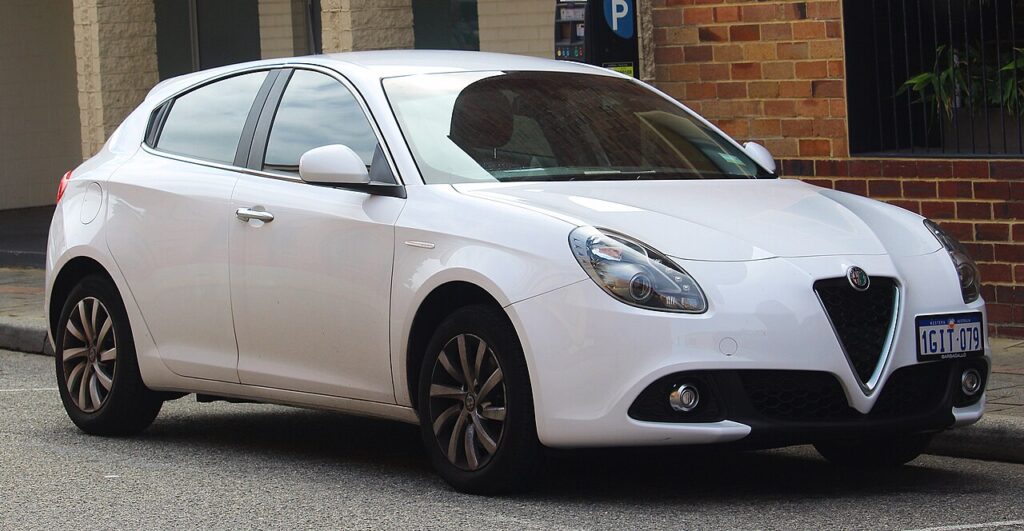
On the Giulietta this feature is branded Start&Stop, and the button carries an “A” wrapped in a circular arrow. If the engine goes quiet the moment you stop at lights and fires again as you lift off the brake, that is the system doing exactly what it should — it is not a fault, and it is not wearing the car out. Many owners simply prefer a settled idle in stop-start traffic, when reversing onto a driveway, or when the air-conditioning is working hard, and switching it off is a one-press job.
How Start&Stop Works on the Giulietta
The Giulietta only cuts the engine when a set of conditions is satisfied at the same time: the car has come to a complete stop, the 12 V battery is holding a good charge, the engine has reached operating temperature, and the cabin is close to the temperature the climate control is asking for. It monitors battery state continuously, so a tired or partly-charged battery is the single most common reason the engine simply keeps idling. When you switch the system off with the button, that choice lasts only for the current drive.
Getting Ready
- Have the engine running and the car at a standstill — the button does nothing useful while moving.
- Locate the Start&Stop button on the centre console (the “A”-in-arrow symbol) before you set off, so you are not hunting for it in traffic.
- Decide it is a per-drive action: there is no permanent “always off” menu setting on this car.
- If you tow or often crawl in queues, a single press at the start of the journey keeps the engine running throughout.
Turning the System Off
- With the engine running, press the Start&Stop button on the centre console (marked with an “A” inside a circular arrow).
- An indicator confirms the system is off; the engine now stays running at a standstill.
The system defaults back to on every time you start the Giulietta, so disabling it is a per-drive choice — press the button again to re-enable it.
When the Giulietta Disables Start&Stop Itself
Even with the system on, the Giulietta won’t stop the engine when it isn’t appropriate, so continued idling isn’t necessarily a fault. It keeps the engine running when, for example, the cabin is still reaching temperature, the engine is cold, or the 12 V battery charge is low. It will also hold the engine on when the demister is running hard, on a noticeable gradient, or during the first minute or two after a cold start while everything warms through.
If Start&Stop Stops Working
- Check the battery. The system relies on a healthy, charged 12 V battery; an ageing one is by far the usual reason the engine stops cutting out.
- Fasten your seat belt and close the doors and bonnet — any of these left open inhibits the function.
- Let it warm up. On a short, cold trip the engine may never reach the temperature it needs before you arrive.
- Ease off heavy climate demand. Full heating or cooling keeps the engine running to satisfy the cabin.
- Come to a full stop with the brake firmly pressed — a light or rolling stop won’t trigger a shutdown.
- Give it a longer run. After a battery disconnection or a spell of only short journeys, the car needs a good drive to recharge before it resumes stopping.
- Warning light flagging a fault? A charging or sensor issue stores a code — look it up on autodtcs.com.
What Happens Next
Once you press the button, the indicator shows the system is off and the engine idles normally at every stop for the rest of that drive. Nothing else changes — fuel economy is marginally worse in town, but there is no impact on reliability. Next time you start the car the system quietly re-arms itself, so if you like it off you will press the button again each drive.
Frequently Asked Questions
How do I turn off Start&Stop on an Alfa Giulietta?
With the engine running, press the Start&Stop button on the centre console — the one marked with an “A” inside a circular arrow. An indicator confirms the system is off, and the engine then idles normally at every stop until you next restart the car.
Does the setting stay off?
No. The Giulietta resets Start&Stop to on each time you start the engine, so there is no permanent off. If you prefer it disabled, press the button once at the beginning of every drive; it takes a second and applies for the whole journey.
Why has my Giulietta stopped switching the engine off?
Most often it is a low or ageing 12 V battery, which the system watches closely and protects. It can also be that the engine or cabin has not yet reached temperature, the climate control is working hard, or you have only done short trips that never fully recharge the battery.
Is it harmful to leave Start&Stop on?
No. The engine, starter and battery on the Giulietta are all specified for repeated stop-start cycles, so leaving the system on causes no extra wear. Switching it off is purely a comfort and preference choice, not a mechanical necessity.
Does turning it off stay off if I only stop the engine briefly?
If you switch the ignition fully off and restart, Start&Stop comes back on. A very brief pause where the car’s systems stay awake may keep your setting, but the safe assumption is that any full restart re-enables it, so press the button again when in doubt.
Should I turn it off in winter?
You don’t have to — the car already holds the engine on until it is warm and while the demister is working hard. Some owners still prefer to switch it off manually in very cold weather for a steadier idle and quicker cabin heat, which is a reasonable personal choice.
If a warning light appeared alongside the change, decode it and check the likely cause on autodtcs.com.
Independent guide — not affiliated with Alfa Romeo. Always follow your official service manual and safety precautions. Read our full disclaimer.