Service ResetService Reset
  • Home
  • Guides
  • Tools
    • Tire Pressure Calculator
    • Check DTC Codes
    • Request a Guide
    • Wheel Offset Calculator
    • Tire Size Comparison
    • Tire Pressure Converter
    • Torque Converter
    • Coolant & Antifreeze Mix
  • Blog
  • About
  • FAQ
  • Contact Us
  • Home
  • Guides
  • Tools
    • Tire Pressure Calculator
    • Check DTC Codes
    • Request a Guide
    • Wheel Offset Calculator
    • Tire Size Comparison
    • Tire Pressure Converter
    • Torque Converter
    • Coolant & Antifreeze Mix
  • Blog
  • About
  • FAQ
  • Contact Us
Home/Honda/Civic/Mk9 (FK) 2012-2017/Turn the Auto Idle Stop System On or Off

Turn the Auto Idle Stop System On or Off

Reviewed by the Service Reset editor · Updated August 31, 2026 · How we verify

These instructions apply to the Honda Civic Mk9 (FK) 2012-2017.
For other models, please choose your vehicle here.

The Honda Civic Mk9 (FK, 2012–2017) — on diesel and other idle-stop-equipped models — uses Auto Idle Stop to switch the engine off when you come to a halt and restart it as you pull away, saving fuel. If you would rather keep the engine running — in slow traffic, when manoeuvring, or before working under the bonnet — you can switch it off with one button.

Where the Button Is

The Auto Idle Stop OFF button — marked with an encircled A above OFF — is on the lower row of the climate control panel, between the heated-seat switches.
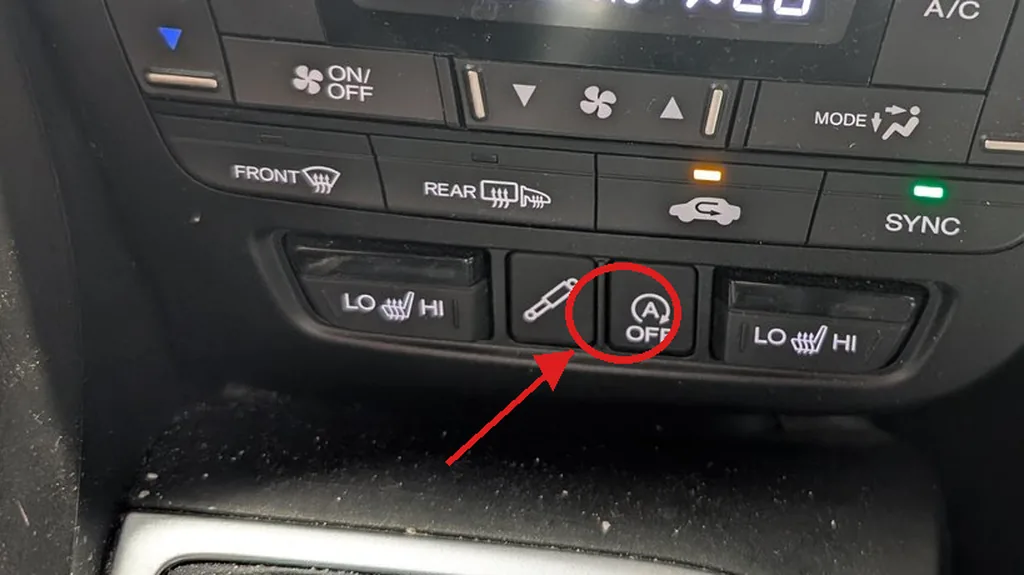
Auto Idle Stop OFF button on the Honda Civic (FK) climate panel, circled
The Auto Idle Stop OFF button (circled) on the lower climate panel switches the system off for the trip. Photographed by Service Reset.

How to Turn Idle Stop Off

  1. With the engine running, press the A OFF button on the climate panel.
  2. The A OFF indicator lights to show the system is disabled.
  3. The engine now stays running at a standstill until you switch it back on.

How to Turn It Back On

Press the A OFF button again, or simply restart the car — Auto Idle Stop returns to its default ON state every time you switch the ignition off and on, so it is never left disabled permanently.

Frequently Asked Questions

Does Idle Stop stay off after I restart the car?

No. It defaults back on each time you start the car, so press A OFF again if you want it off for that journey.

Why doesn’t my engine stop at the lights even with the system on?

Auto Idle Stop only stops the engine once conditions are met — engine warmed up, battery well charged, climate demand low, the car fully stopped and, on the manual, the clutch released in neutral. In cold weather or with a tired 12 V battery it may not trigger until things warm up and the battery recovers.

Is it bad to switch Idle Stop off?

No. The button simply keeps the engine running and affects nothing else. Many owners turn it off in stop-go traffic and leave it on for open-road driving.

If an Idle Stop or charging warning appears, look the code up on autodtcs.com.

Independent guide — not affiliated with Honda. Always follow your official service manual and safety precautions. Read our full disclaimer.

Related Articles
  • Run the Instrument Cluster Self-Test
  • Open the Hidden Diagnostic Menu
  • Start the Car With a Dead Key Fob Battery
  • Read the Climate Control Self-Diagnostic Codes
  • Reset a Frozen Infotainment Screen
  • Replace the Key Fob Battery

On This Page: [hide]

Where the Button Is

How to Turn Idle Stop Off

How to Turn It Back On

Frequently Asked Questions

Does Idle Stop stay off after I restart the car?

Why doesn’t my engine stop at the lights even with the system on?

Is it bad to switch Idle Stop off?

Service Reset

Independent step-by-step car reset & maintenance guides – not affiliated with any manufacturer. All trademarks belong to their respective owners.

© 2026 ServiceReset.net. All rights reserved.

POPULAR BRANDS
Toyota · Volkswagen · BMW · Ford · Audi · Mercedes · Nissan · Kia
EXPLORE
  • Guides
  • Blog
  • About
  • Contact
TOOLS
  • Dashboard Warning Lights
  • Tire Pressure Calculator
  • Tools
  • FAQ
  • Request a Guide
LEGAL
  • Privacy Policy
  • Terms of Use
  • Disclaimer
  • YouTube
  • Pinterest