These instructions apply to the Hyundai i10 Mk3 (AC3) 2020-Present.
For other models, please choose your vehicle here.
Your Hyundai i10 Mk3 (AC3, 2020–present) may have an Idle Stop & Go (ISG) system that switches the engine off when you stop to save fuel. If you’d rather keep it running, it’s one button to turn off. This is a normal economy feature rather than a fault — the light that shows when the engine cuts out just confirms ISG is active. Below is how to switch it off, how it behaves on this i10, and why it sometimes won’t cut the engine.
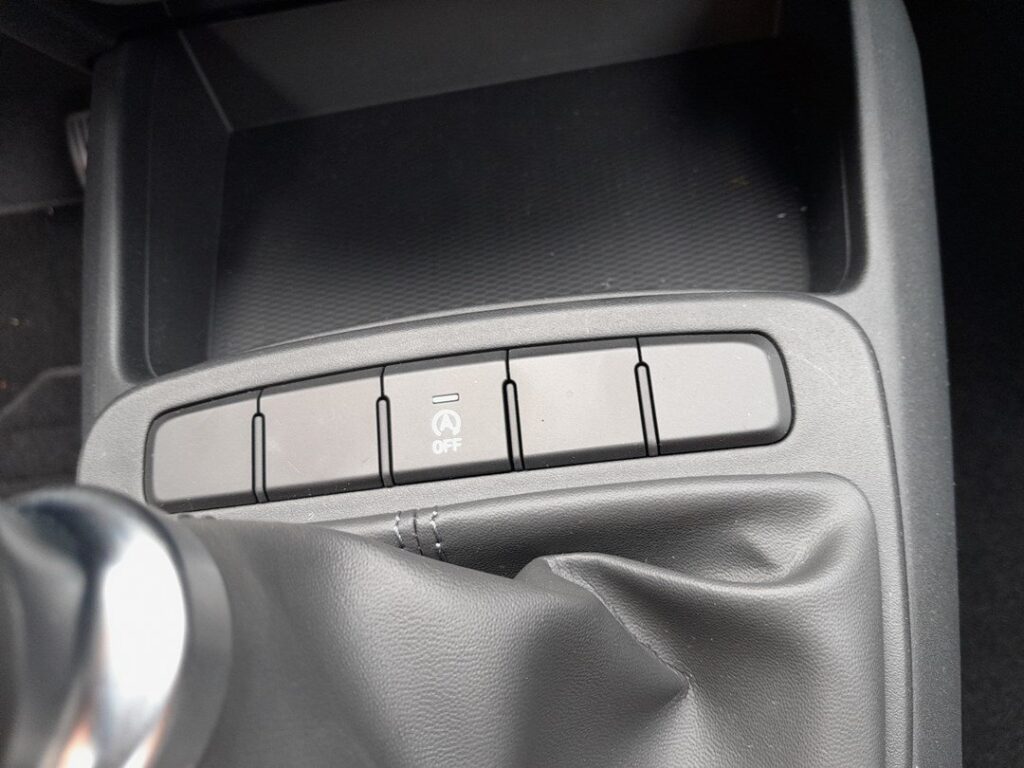
How ISG Works on the i10
Stop, select neutral and release the clutch (manual) or brake to a halt (AMT auto), and the engine shuts off; dip the clutch or lift the brake and it restarts. It only operates once the engine is warm and the battery is healthy.
The i10 checks several conditions before it will let the engine sleep. The 12 V battery needs enough charge, the coolant must be warm, the cabin climate demand must be modest, and the car must be fully stopped with the brake held firmly (or in neutral with the clutch up on a manual). Fail any one and the engine simply keeps idling, so ISG never leaves you stranded with a stop it can’t recover.
Before You Start
- Have the engine running and the car safely stationary — ISG is set while driving or stopped, not with the ignition off.
- Whatever you choose applies to the current journey only; the setting is not saved.
- Not every i10 trim has ISG — if there’s no “A” button, your car doesn’t have the system.
- If you want the engine to auto-stop, let it warm up first — ISG stays out while the engine is cold.
How to Switch It Off
- With the engine running, press the ISG / Auto Stop OFF button — an “A” inside a circular arrow, usually low on the dash.
- A dash light confirms it’s off, and the engine idles normally at a stop.
(Not every i10 trim has ISG — if there’s no button, your car doesn’t have the system.)
How to Switch It Back On
Press the button again, or simply restart the car — ISG defaults back on every time you switch the ignition off and on.
If the Engine Won’t Auto-Stop
If ISG is enabled but the engine keeps idling at every halt, run through these before assuming a fault:
- Cold engine — the usual reason. ISG stays out until the coolant is at normal temperature, so it rarely acts in the first mile or two from cold.
- Weak 12 V battery — an aged battery, or one not fully charged after short trips, causes the i10 to block ISG to protect starting. A charge or battery test often restores it.
- Recent battery disconnect — after a battery change ISG may sit out for several longer drives while the charge management relearns the battery’s state.
- Strong climate demand — hard heating, cooling, or demist keeps the engine running to hold cabin comfort.
- Not fully stopped — creeping, a light brake press, or reversing can all hold the engine on.
- Gradient — on a noticeable slope the system may decline to stop.
- Extreme ambient temperature — very hot or very cold outside conditions can suspend ISG entirely.
If ISG stopped working after a battery change, let the battery fully charge — see our i10 Mk3 battery guide.
What to Expect After
After you press the OFF button the confirmation light stays lit and the engine idles normally at every stop for the rest of that drive. Switch the ignition off and on again and ISG quietly returns to its default enabled state — nothing is wrong; the i10 simply prefers the fuel-saving mode from each fresh start.
Frequently Asked Questions
Does the i10 remember my ISG setting?
No. The i10 Mk3 resets ISG to on every time you switch the ignition off and back on, so you must press the button again each journey if you want it disabled. There is no menu or dealer option to make the “off” state stick — that is deliberate and common to almost every car with stop/start.
Is it bad to keep using ISG?
No. The i10’s starter motor and battery are designed for the extra cycles, and the system will not stop the engine at all when the battery is low or conditions are unsuitable. Left as intended, ISG saves fuel in traffic without shortening the life of the starter or driveline.
Why won’t the engine auto-stop?
Most often a cold engine, a low or ageing 12 V battery, or the climate system demanding heating, cooling, or demist. Gradients, the steering being turned, and not coming to a full stop will also keep the engine idling. Let the car warm and the battery charge before treating it as a fault.
My i10 has no ISG button — why?
Not all trims are fitted with Idle Stop & Go. If there is no “A” button on the dash and the engine never cuts out at a stop, your car simply wasn’t specified with the system — there is nothing to fix and nothing missing. Entry trims and some AMT combinations often go without it.
Does ISG drain the battery when the engine is off?
No. While ISG has the engine asleep the car runs on the 12 V battery only briefly, and the system monitors charge continuously. If the battery falls too low it restarts the engine automatically and blocks further stops, so it will not flatten the battery under normal use.
A warning light stayed on after restart — is that normal?
The normal ISG indicator lights only while the engine is asleep and clears as it restarts. If a separate amber warning stays lit, that points to a fault — often a tired 12 V battery — rather than the ordinary stop/start indicator, and is worth checking.
If a warning light appeared alongside the fault, look up the code on autodtcs.com. To clear a service reminder, see our i10 Mk3 service reset guide.
Independent guide — not affiliated with Hyundai. Always follow your official service manual and safety precautions. Read our full disclaimer.