These instructions apply to the Hyundai i30 Mk2 (GD) 2012-2017.
For other models, please choose your vehicle here.
The second-generation Hyundai i30 (GD, 2012–2017) has a standard 16-pin OBD-II diagnostic socket, so any generic code reader, Bluetooth dongle or professional scan tool plugs straight in without a Hyundai-specific lead. On the GD the port is tucked up under the driver’s side of the dashboard, behind a small cover marked FUSE OBD, and you can reach it without removing any trim.
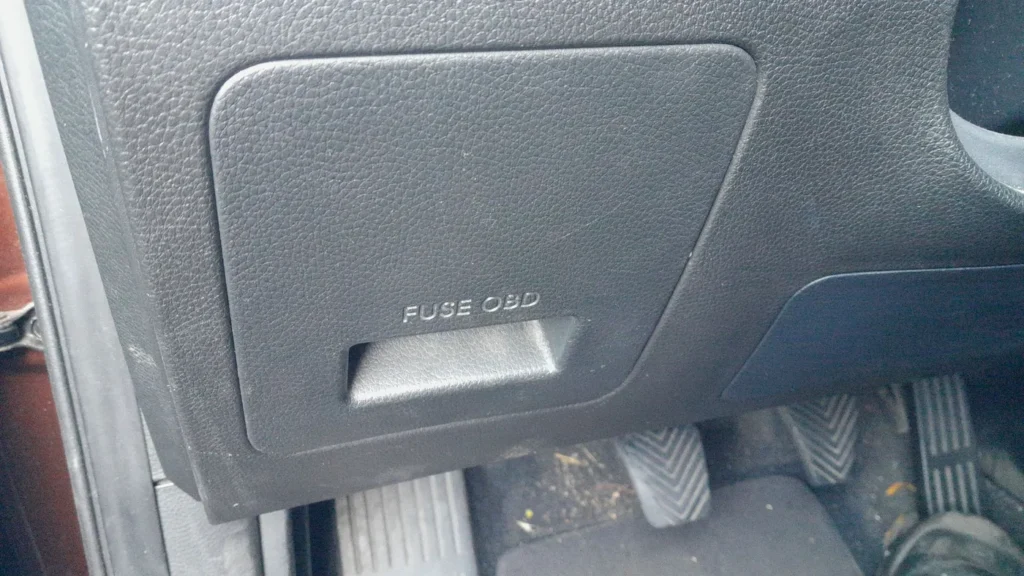
OBD-II Port Location
Look low on the driver’s side of the dashboard, just above the pedals near the centre console. You’ll see a hinged panel moulded with the words FUSE OBD — the interior fuse box and the diagnostic socket share this recess. Pull the cover open and the black 16-pin connector is behind it, angled down so a tool plugs in easily.
Before You Plug In
- Park on level ground, apply the handbrake and switch the ignition off before reaching under the dash.
- Open the FUSE OBD cover with a fingertip in the recess — it unclips, no tools needed.
- Slide the driver’s seat back and move the floor mat so you can see into the footwell.
- Check your tool uses the standard 16-pin OBD-II plug, which is what this i30 is fitted with.
How to Access the Connector

- Open the driver’s door and get low, kneeling by the sill or sitting sideways in the seat.
- Find the FUSE OBD cover under the dash above the pedals and unclip it.
- Behind the fuse rows, the black 16-pin socket faces down toward the footwell.
- Line your tool’s plug up squarely with the socket and push it home until it seats firmly.
Tips for Safe Use
- Insert and withdraw the plug straight and gently so you don’t bend a pin.
- Keep the ignition off while connecting, then switch it to “on” when the tool prompts.
- Unplug any dongle when you’re done — one left in place draws current and can drain the battery if the car sits.
- Use a scanner from a trusted brand; cheap no-name adapters can misbehave on the CAN bus.
Frequently Asked Questions
Where is the OBD-II port on a 2012–2017 Hyundai i30?
Under the dashboard on the driver’s side, above the pedals, behind a small hinged cover marked “FUSE OBD”. Open the cover and the black 16-pin socket is behind the interior fuse rows.
Do I need to remove any trim to reach the port?
No. The FUSE OBD cover unclips by hand and the socket is right behind it — no screws or panels to remove.
Will a generic OBD-II reader work on my i30 GD?
Yes. The GD i30 uses the standard 16-pin OBD-II connector with CAN, so any generic code reader, phone dongle or professional scan tool built for OBD-II will connect and communicate.
Why won’t my scanner power up when plugged in?
The socket is live with the ignition in the “on” position. If the tool stays dark, check the OBD/cigar-lighter fuses in the same fuse box behind that cover before suspecting the tool.
If a scan returns a specific trouble code and you want to know what it means before any repair, look it up on autodtcs.com.
Independent guide — not affiliated with Hyundai. Always follow your official service manual and safety precautions. Read our full disclaimer.