These instructions apply to the Hyundai i30 Mk2 (GD) 2012-2017.
For other models, please choose your vehicle here.
The Hyundai i30 Mk2 (GD/GDe, 2012–2017) — the second-generation i30 hatchback, also sold as the i30 Tourer estate and the i30 Coupe, built in Nošovice (Czech Republic) for European markets — uses a menu-driven service indicator reset accessed through the cluster’s trip-recorder button and the multifunction steering wheel. There’s no diagnostic tool needed; everything happens through the cluster’s small LCD readout. The procedure is identical across every Mk2 i30 engine variant (1.4 MPi, 1.6 GDi petrol; 1.4 / 1.6 CRDi diesel) and consistent between pre-facelift (2012–2015) and facelift (2015–2017) cars.
When to Reset the Service Indicator
- After completing an oil and filter change.
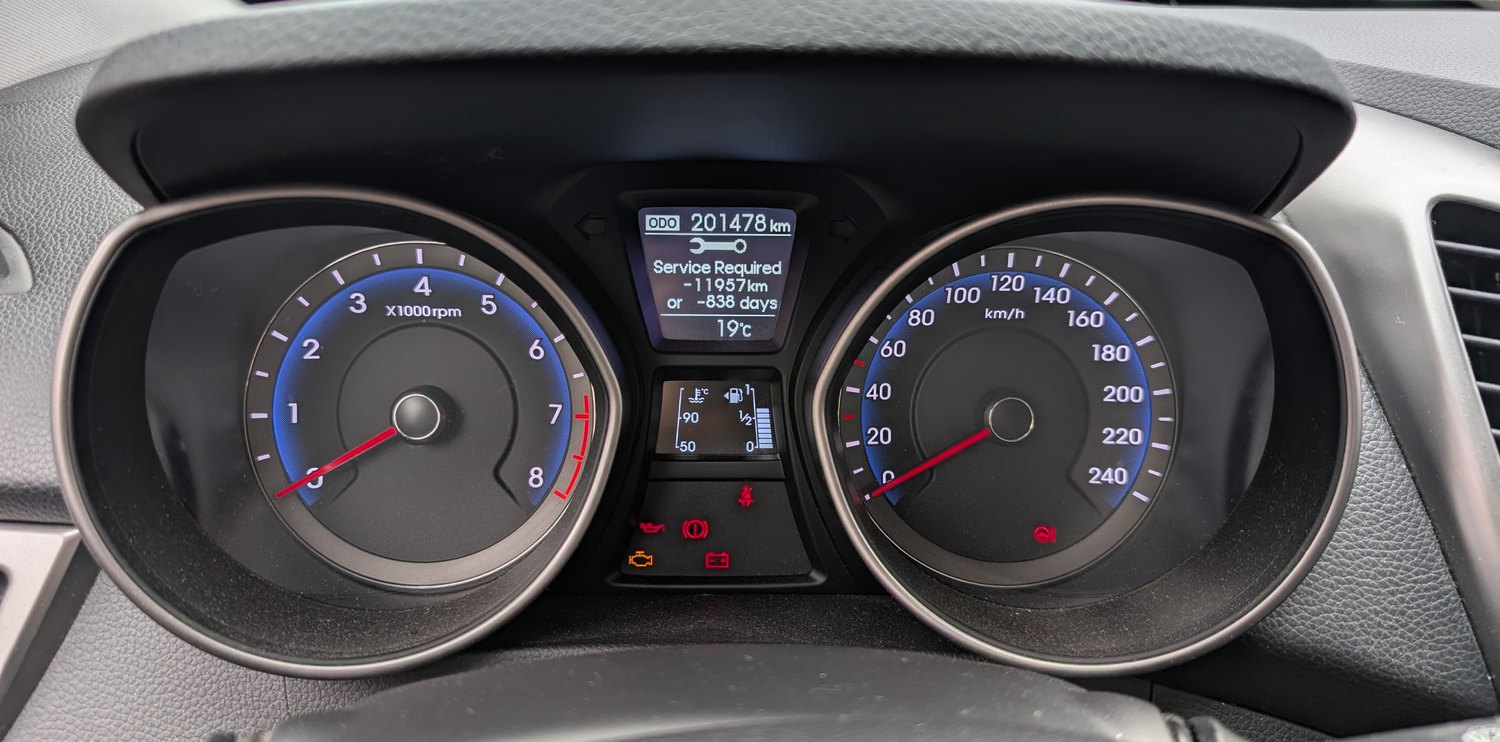
- If the spanner / wrench symbol with “OIL CHANGE INTERVAL” or “SERVICE REQUIRED” appears on the cluster at startup.
- If you bought the i30 second-hand and the previous owner didn’t clear the indicator.
⚠️ On the Mk2 i30 the service indicator tracks the oil-change distance counter. Other service items (brake fluid every 2 years, coolant at the manufacturer’s interval, timing belt at 90,000 miles on the diesel variants) aren’t tracked by the cluster — those follow the printed service schedule in the owner’s handbook.
First, a Few Checks
- Park on a level surface with the engine off. Complete the actual oil and filter change before the reset.
- Locate the trip-recorder button. On the Mk2 i30 it’s mounted on the centre of the instrument cluster, between the speedometer and the tachometer, near the bottom edge of the cluster face. It’s a small button labelled with a circular arrow or “TRIP” icon — the same button you use to switch between the trip meters and the odometer.
- Locate the reset button referred to in the procedure. On Mk2 i30 trims with the multifunction steering wheel, this is the OK or SET/RESET button on the left-hand spoke. On lower trims without multifunction controls, it’s the same trip-recorder button — short-pressed to confirm rather than long-pressed.
Kit and Supplies
None for the reset itself. For the oil change you’ll need fresh Hyundai-spec oil — 5W-30 ACEA A5/B5 / Hyundai Premium LF Gasoline 5W-30 for the 1.4 / 1.6 MPi / GDi petrol engines, 5W-30 ACEA C2 / C3 for the 1.4 / 1.6 CRDi diesels (with DPF), a new spin-on oil filter (different parts between petrol and diesel), a 17 mm sump-plug socket (petrol) or 21 mm (CRDi diesel), and a torque wrench rated to about 35 Nm (petrol sump plug) or 50 Nm (CRDi).
Service Indicator Reset — Step-by-Step
- Turn the ignition ON with the engine off. Key position II on key-start cars, or one press of START/STOP without a foot on the brake on push-button-start trims.
- Wait for the cluster to fully wake. The OIL CHANGE INTERVAL message should be visible if the service is due.
- Press the trip-recorder button repeatedly until “SETTINGS” appears on the central display.
- Once SETTINGS is shown, keep the trip-recorder button pressed. The cluster enters the settings sub-menu.
- Scroll through the menu until “Vehicle information menu” appears.
- Press the reset button (the OK / SET button on the multifunction steering wheel, or short-press the trip-recorder on cars without it) to enter Vehicle information.
- Press the trip-recorder button again to scroll through the sub-menu.
- Continue scrolling until “OIL CHANGE INTERVAL” is highlighted.
- Press the reset button once to select.
- Press and hold the reset button to confirm the reset. The cluster shows a confirmation message and the interval counter resets to the full value.
- Switch the ignition OFF to exit.
Verify the Reset Worked
Switch the ignition off, wait 30 seconds, then cycle ignition back on. The OIL CHANGE INTERVAL / spanner warning should be gone. Re-open the menu (trip-recorder → SETTINGS → Vehicle information menu → OIL CHANGE INTERVAL) — the remaining-distance value should now show the full new interval (typically 10,000 miles / 15,000 km or 12 months for European-spec Mk2 i30 cars).
Common Snags
- “SETTINGS” never appears when I press the trip-recorder button. You’re cycling the trip-meter readouts, not entering the settings menu. The trick on the Mk2 i30 is the duration of the press — short presses cycle the trip A / trip B / odometer; a press held for about 2 seconds enters the settings layer. Hold the button instead of tapping.
- I see the menu but “OIL CHANGE INTERVAL” isn’t listed. The cluster only displays the OIL CHANGE INTERVAL menu entry when an oil-change service is actually approaching due — within about 1,000 miles of the trigger point. If your i30 has plenty of distance remaining, the entry simply isn’t shown. Drive a few hundred miles or trigger an earlier reminder by adapting the warning threshold with a scan tool.
- Reset works but the spanner warning comes back after a few miles. Battery condition is the common cause on the Mk2 i30. The cluster EEPROM commits the new value, but voltage drop during cranking on a tired battery can corrupt the write. Load-test the 12V battery; replace if it’s older than 5 years.
- I have a Mk2 i30 1.6 CRDi diesel — does the DPF light reset the same way? No. The DPF regen / “service required” warning that’s specific to the diesel is a different system, handled by the engine ECU rather than the cluster. Active regen happens automatically during motorway driving. If the DPF lamp persists, that’s a different remedy entirely (forced regen via scan tool, or DPF cleaning).
- The procedure works for me but not for my partner’s 2015 i30. The 2015 facelift introduced a slightly redesigned cluster on some trims with the trip-recorder button moved to the end of the wiper stalk on Premium-trim cars. On those, button presses go through the stalk button rather than the cluster-mounted button. The menu structure is otherwise identical.
- I drive an N-line / N performance variant — same procedure? N-line trim (2017+ facelift) uses the same cluster as standard trims and the procedure is identical. The full-fat i30 N didn’t arrive until the Mk3 (PD), so on Mk2 only the N-line cosmetic package was available.
Frequently Asked Questions
What does the spanner symbol on the Hyundai i30 mean?
On the Mk2 i30 the spanner / wrench icon is the oil-change reminder. It’s a mileage-based timer set by the cluster, not a sensor-driven warning. It tells you the car has driven its programmed oil-change interval since the last reset. The icon does not indicate an engine fault — engine faults trigger the orange check-engine light (a separate engine-outline icon).
How often does the service indicator come up on a Mk2 i30?
Hyundai’s official European-market schedule for the Mk2 i30:
- 1.4 / 1.6 MPi petrol: 10,000 miles (15,000 km) or 12 months.
- 1.4 / 1.6 GDi petrol: 10,000 miles (15,000 km) or 12 months.
- 1.4 CRDi diesel: 12,500 miles (20,000 km) or 24 months.
- 1.6 CRDi diesel: 12,500 miles (20,000 km) or 24 months.
UK severe-service (short-trip / urban) driving typically halves the petrol interval to 5,000 miles or 6 months. The cluster doesn’t auto-adjust to conditions — you’ll need to apply the shorter interval manually.
Does the reset clear engine fault codes?
No. The reset zeros the service-distance counter only. Engine fault codes are stored in the engine ECU and need a scan tool. For DTC interpretation see autodtcs.com.
Will this work on the i30 Tourer or i30 Coupe?
Yes. The i30 Tourer (estate, 2012–2017) and i30 Coupe (3-door, 2013–2015) share the GD platform’s instrument cluster and firmware. The reset procedure is identical.
What about the Mk3 i30 (PD/PDe, 2016–2024)?
The Mk3 i30 moved to the newer 4.2-inch supervision cluster (or 7-inch full-TFT on N-line / Premium trims) and the reset path moves into a different menu hierarchy: Driver Information → User Settings → Service Interval → Reset. Same logic, different button mapping. We’ll publish a dedicated Mk3 i30 guide.
And the Mk1 i30 (FD, 2007–2011)?
The Mk1 i30 uses an older cluster with a button-and-ignition-hold sequence (similar to the contemporary Kia Ceed Mk1). Different procedure entirely — see our forthcoming Mk1 i30 guide.
I drive a Kia Ceed Mk2 — is the procedure similar?
The Kia Ceed Mk2 (JD, 2012–2018) shares the i30 Mk2’s platform, engines, and cluster generation. The menu structure and reset path are essentially identical, just with Kia-branding instead of Hyundai. The same procedure works on both. We’ll publish a dedicated Ceed Mk2 guide.
For DTC code interpretation on Hyundai / Kia vehicles see autodtcs.com.
Independent guide — not affiliated with Hyundai. Always follow your official service manual and safety precautions. Read our full disclaimer.