These instructions apply to the Hyundai Kona Mk2 (SX2) 2023-Present.
For other models, please choose your vehicle here.
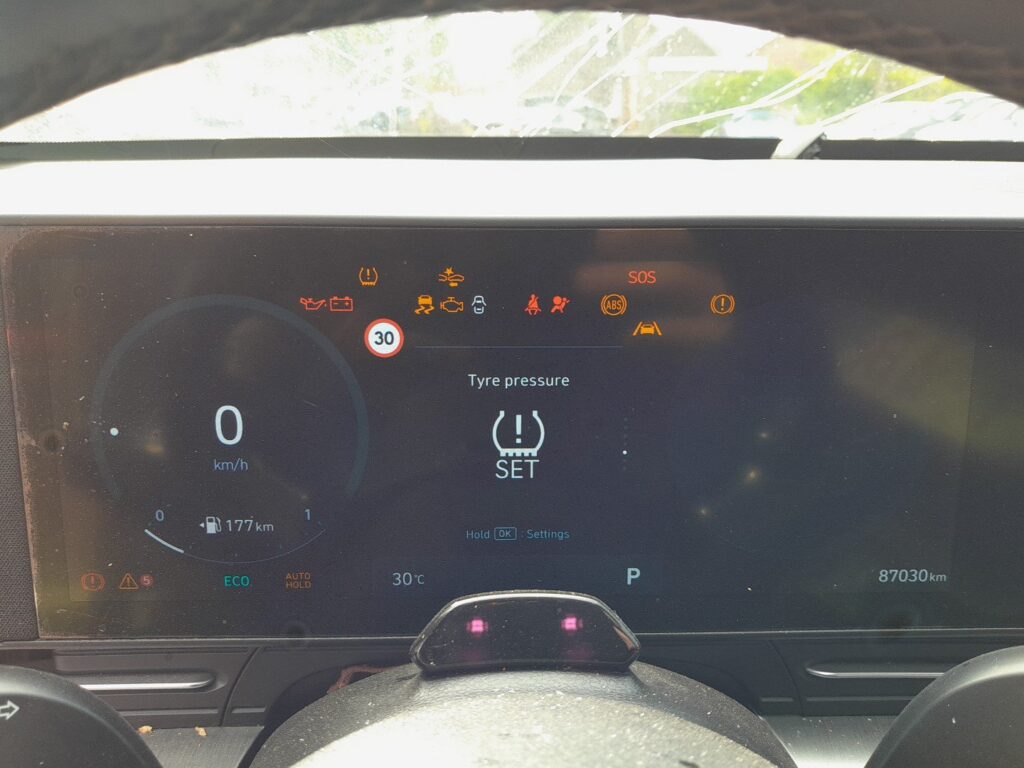
The second-generation Kona uses an indirect tyre pressure monitoring system. After changing a tyre, rotating your wheels or adjusting the pressures, you tell the car the new correct baseline through the “Tyre Pressure” menu in the instrument cluster so it can warn you accurately again.
Before you start
- Set every tyre to the pressures on the driver’s door-pillar placard while the tyres are cold.
- Park the car and switch the ignition on, but you do not need the engine running.
- With all tyres inflated cold to the placard pressures, park the car and turn the ignition on.
- Use the UP and DOWN buttons on the steering wheel to open the cluster menu and select “Tyre Pressure.”
- Press and hold the OK button, then choose “Set.”
- Wait for the cluster to confirm with a message such as “Standard tyre pressures saved.”
- Watch the TPMS warning light blink for about four seconds to confirm the reset was accepted.
- Drive normally so the system relearns each wheel’s rolling behaviour at the new pressures.
FAQ
Why must the tyres be cold when I set the pressures?
The placard values are cold specifications. Driving heats the air and raises the reading, so setting pressures on warm tyres stores a false baseline and the system may warn incorrectly later.
The TPMS light stays on after I reset. What now?
An indirect system needs a short drive at steady speed to relearn. If the light does not clear after a normal drive, recheck that all four tyres are at the correct cold pressure and repeat the “Set” step. A persistent light can also mean one tyre is genuinely low.
Do I need to reset after just topping up one tyre?
If you have brought all tyres back to the placard pressures, re-running “Set” gives the system a clean baseline. It is good practice after any pressure change, wheel swap or seasonal tyre change.
Independent guide — not affiliated with Hyundai. Always follow your official service manual and safety precautions. Read our full disclaimer.