These instructions apply to the Hyundai Tucson Mk3 (TL) 2015-2020.
For other models, please choose your vehicle here.
When the tyre-pressure warning light comes on in your Hyundai Tucson Mk3 (TL, 2015–2020), it usually just means the system needs to relearn your current pressures after a check, top-up or wheel change. The Tucson relearns itself as you drive — there is no reset button. This guide explains how to clear the light correctly.
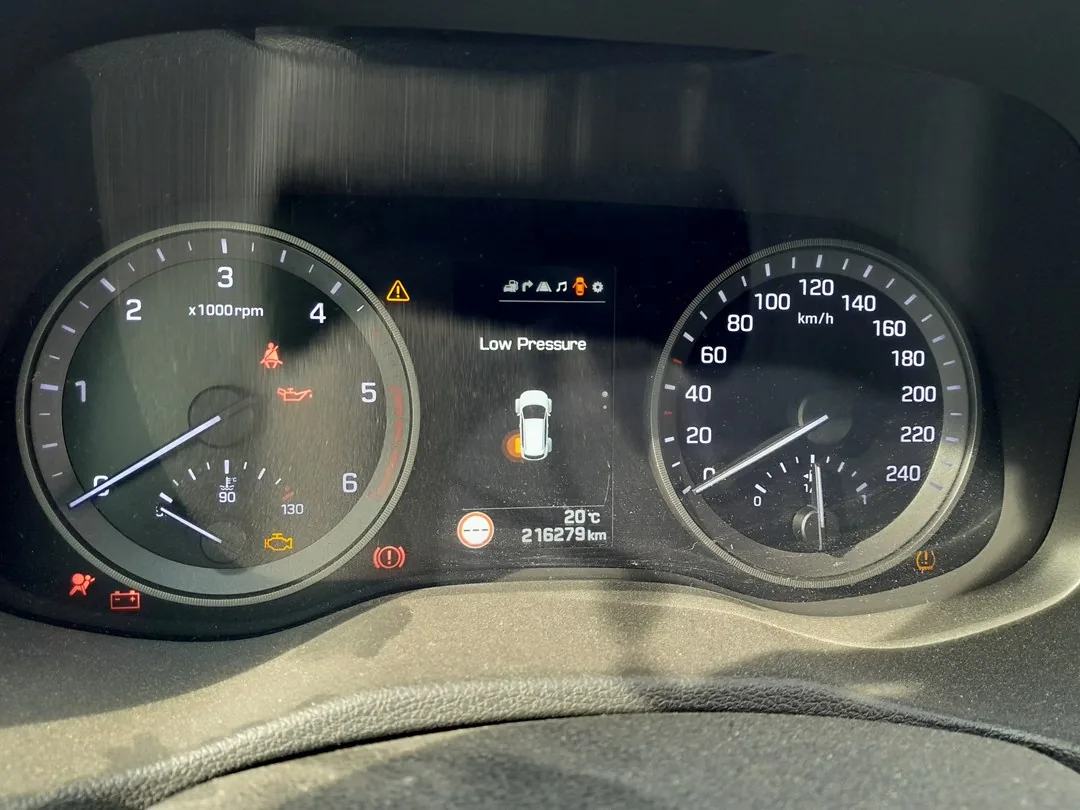
How the Tucson System Works
The Mk3 Tucson uses a direct tyre-pressure monitoring system with a sensor in each wheel, and it relearns automatically: once the pressures are correct, you simply drive the car and the system stores the new readings. There is no menu step or button — the light clears on its own provided the tyres are actually at the right pressure and you drive far enough.
When the Light Comes On
- After a tyre-pressure check or adjustment.
- After changing one or more wheels or tyres.
- After rotating the wheels.
- In cold weather, when pressures drop naturally.
Set Your Pressures First
The system learns from whatever is in the tyres, so they must be correct before you drive. Set all four (cold) to the figures on the placard in the driver’s door aperture, using the laden column for a full load. Do not try to clear the light while a tyre is still low — fix the pressure first.
Hyundai Tucson TL Tire Pressures by Wheel Size
The recommended cold tire pressure for the Hyundai Tucson Mk3 (TL) is 2.4 bar (35 psi) front and rear across the standard wheel sizes. Always confirm against the placard in the driver’s door opening — it is the final authority for your exact car.
| Tire size | Front (cold) | Rear (cold) |
|---|---|---|
| 215/70 R16 | 2.4 bar / 35 psi | 2.4 bar / 35 psi |
| 225/60 R17 | 2.4 bar / 35 psi | 2.4 bar / 35 psi |
| 225/55 R18 | 2.4 bar / 35 psi | 2.4 bar / 35 psi |
| 245/45 R19 | 2.4 bar / 35 psi | 2.4 bar / 35 psi |
| Temporary spare (T135/90 R17) | 4.2 bar / 60 psi | |
Set the pressures when the tires are cold (driven less than about 2 km). Hyundai specifies the same 2.4 bar at both normal and maximum load for the TL, so there is no separate higher full-load figure. The values above are from the European Tucson owner manual; a fitment not listed here follows whatever the door placard states for that size.
How to Reset the Tucson TPMS
- Check and adjust all four tyre pressures (cold) to the placard figures.
- Switch on and drive the car for about 20 minutes at normal road speeds.
- The system relearns the readings and the warning light goes out once it confirms all four pressures are correct.
There is nothing to press inside the car — correcting the pressures and driving is the whole procedure.
Light Won’t Go Out? Work Through This
- A tyre is genuinely low: the system is doing its job — find and fix the leak, re-inflate, then drive again.
- You didn’t drive long enough: the relearn needs about 20 minutes of normal driving.
- Light flashes then stays on (not a low tyre): a flashing TPMS light points to a sensor fault — often a flat sensor battery. The car may store a code you can look up on autodtcs.com.
Frequently Asked Questions
Is there a TPMS reset button in the Tucson Mk3?
No — the system relearns automatically as you drive. Correct the pressures and drive for about 20 minutes and the light clears itself.
How far do I need to drive?
Around 20 minutes of normal driving is enough for the system to relearn all four wheels.
Why does the light return after a few days?
Either a tyre is slowly losing air, or it was a little low when you reset. Re-check all four cold pressures.
The light flashes instead of staying steady — what does that mean?
A flashing TPMS light usually indicates a sensor fault rather than a low tyre — often a flat sensor battery. It will not clear by driving and needs the sensor checked.
After tyre or seasonal-wheel work it is worth confirming the service reminder is clear — see our Hyundai Tucson service indicator reset guide.
Independent guide — not affiliated with Hyundai. Always follow your official service manual and safety precautions. Read our full disclaimer.