These instructions apply to the Kia Picanto (TA) 2011 - 2017. For other models, please choose your vehicle here.
The Kia Picanto (2011–2017) uses a 12 V battery that powers all vehicle electronics. When servicing, replacing the battery, or storing the car, follow the correct procedure to prevent damage or data loss. This guide explains how to safely disconnect and reconnect the battery and how to reinitialize vehicle systems afterward.
Before You Start
- Park safely, switch the ignition OFF, and remove the key.
- Ensure all electrical systems (lights, infotainment, HVAC) are off.
- If the vehicle is equipped with airbags or seat-belt pretensioners, wait at least 3 minutes after switching off the ignition before disconnecting the battery.
- Use insulated tools and avoid touching both terminals at once.
Battery Location
The 12 V battery is positioned in the engine bay on the left-hand side (driver’s side on LHD models) and secured by a clamp bracket.
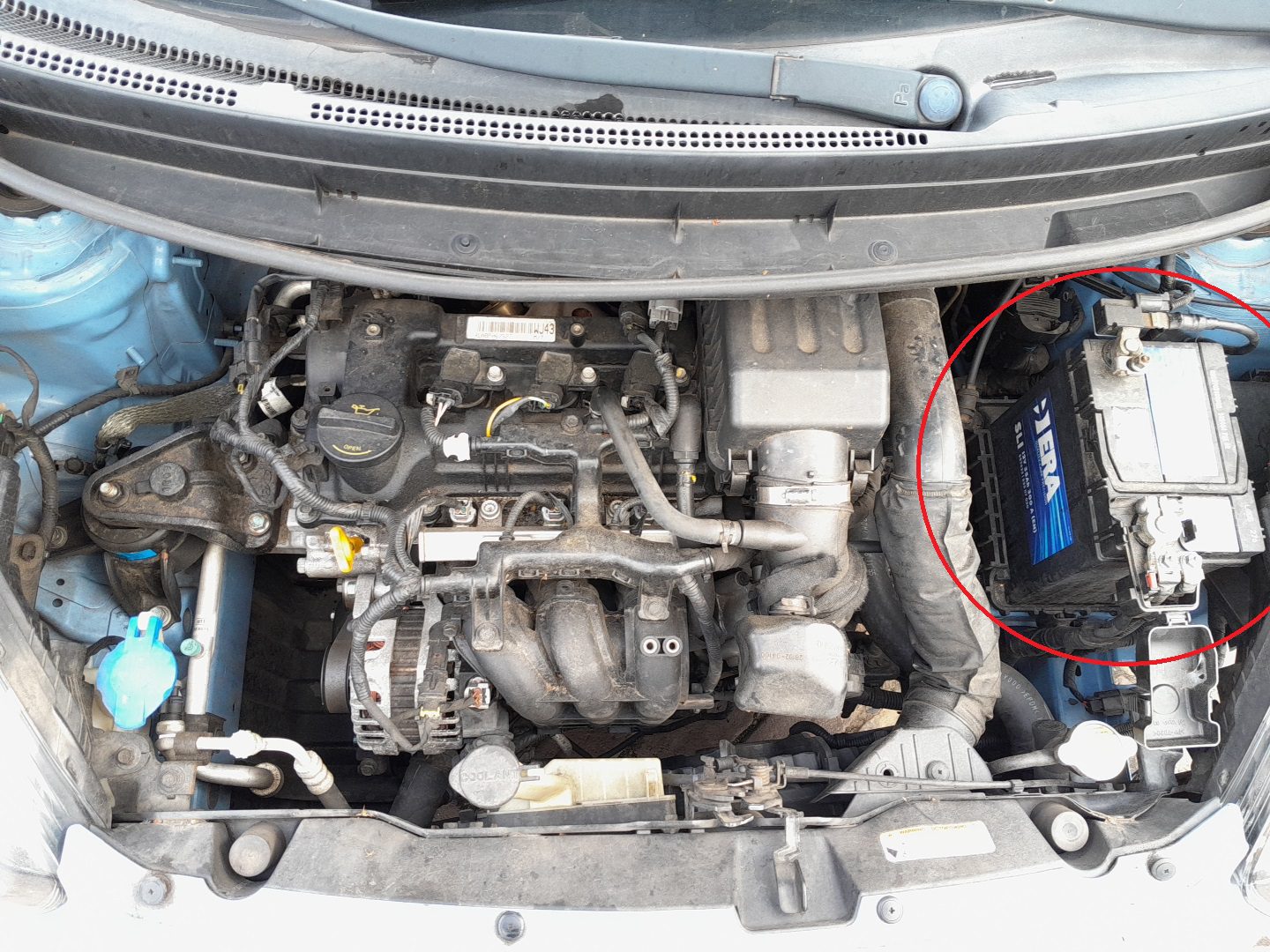
How to Disconnect the Battery
- Confirm the ignition is OFF and the key is removed.
- Loosen and remove the negative (–) terminal first; move the cable aside to prevent contact.
- Loosen and remove the positive (+) terminal.
- If removing the battery completely, undo the clamp bracket and lift the battery out carefully — it is heavy.
How to Reconnect the Battery
- Place the battery in its tray and secure it with the hold-down clamp.
- Connect the positive (+) terminal first and tighten securely.
- Connect the negative (–) terminal last.
- Ensure both clamps are tight and free of corrosion.
After Reconnecting
- Reset the date and time on the dashboard display.
- Re-enter radio stations and user preferences.
- Initialize the trip computer settings if applicable.
- Re-initialize the power windows — close each window fully, hold the switch up for 2 seconds, then open fully and hold down for 2 seconds.
- Re-initialize the electric sunroof (if equipped) by fully opening and closing it once using the control switch.
Tips for Safe Handling
- Always disconnect the negative terminal first and reconnect it last to prevent short circuits.
- Do not use open flames or smoke near the battery.
- Apply a small amount of dielectric grease to terminals to reduce corrosion.
- If the car will sit unused for more than two weeks, connect a battery maintainer to keep the charge stable.
Disclaimer: The information on this page is provided for general guidance only. Always follow your official service manual and safety precautions when working on your vehicle. We are not responsible for errors, omissions, or any damage resulting from the use of this information.
This website is an independent resource and is not affiliated with, endorsed by, or sponsored by Kia. All trademarks and brand names belong to their respective owners.