These instructions apply to the Kia Picanto Mk2 (TA) 2011-2017.
For other models, please choose your vehicle here.
The Kia Picanto (2011–2017) has a manual headlight-leveling dial that lets you drop the beam when the car is loaded, so you do not dazzle oncoming drivers. The switch is on the dashboard, to the right of the steering wheel near the other controls.
How the dial works
The leveling switch is a numbered thumbwheel, with 0 as the normal setting for an unladen car. The higher the number, the lower the beam sits, so you turn it up as the car gets more heavily loaded and the rear squats.
Adjust the dial whenever the load changes, and always keep the beam at the correct height — too high dazzles others, too low shortens how far you can see.
How to set it by load
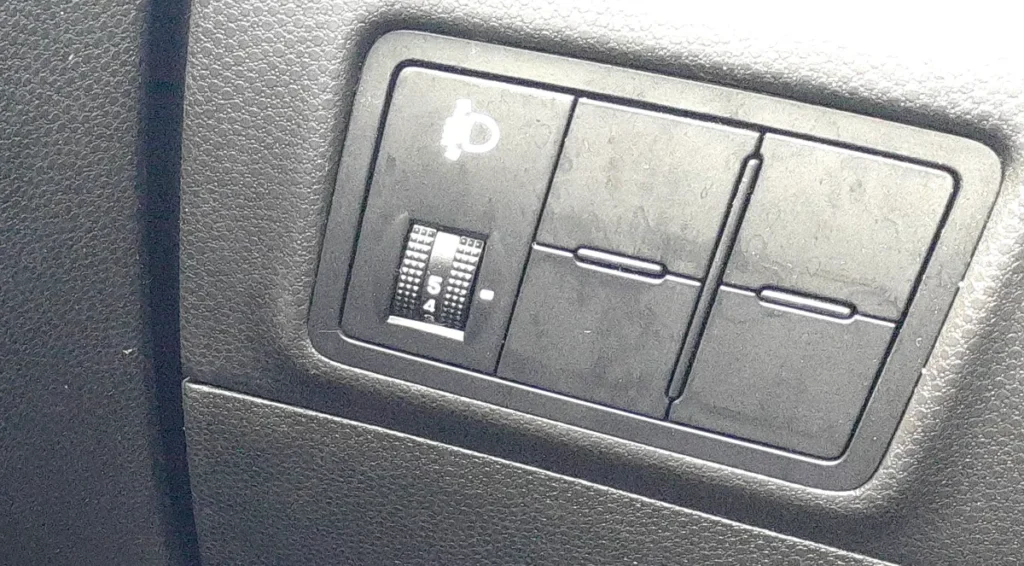
- Lowest setting (0): driver only, or driver plus a front passenger, with little or no load in the back.
- Middle of the range: all seats occupied, with light luggage.
- Highest setting: a full car with passengers and a laden luggage area.
For loads in between, pick the setting that brings the beam nearest to its normal height. On a dark road you can watch the cut-off line move up or down as you turn the dial, so set it just below dazzling an imaginary car ahead.
Frequently asked questions
Where is the headlight-leveling switch on a Picanto?
On the dashboard to the right of the steering wheel, near the mirror and instrument-dimmer controls. It is a small rotary dial marked with numbers.
Which way lowers the beam?
Turning to a higher number lowers the beam. Position 0 is the highest (normal) setting for an unladen car.
Does the Picanto adjust the headlights automatically?
No. The TA uses a manual dial that you set yourself according to the load; it does not self-level.
For warning-light and trouble-code references, see autodtcs.com.
Independent guide — not affiliated with Kia. Always follow your official service manual and safety precautions. Read our full disclaimer.