These instructions apply to the Kia Picanto (TA) 2011 - 2017. For other models, please choose your vehicle here.
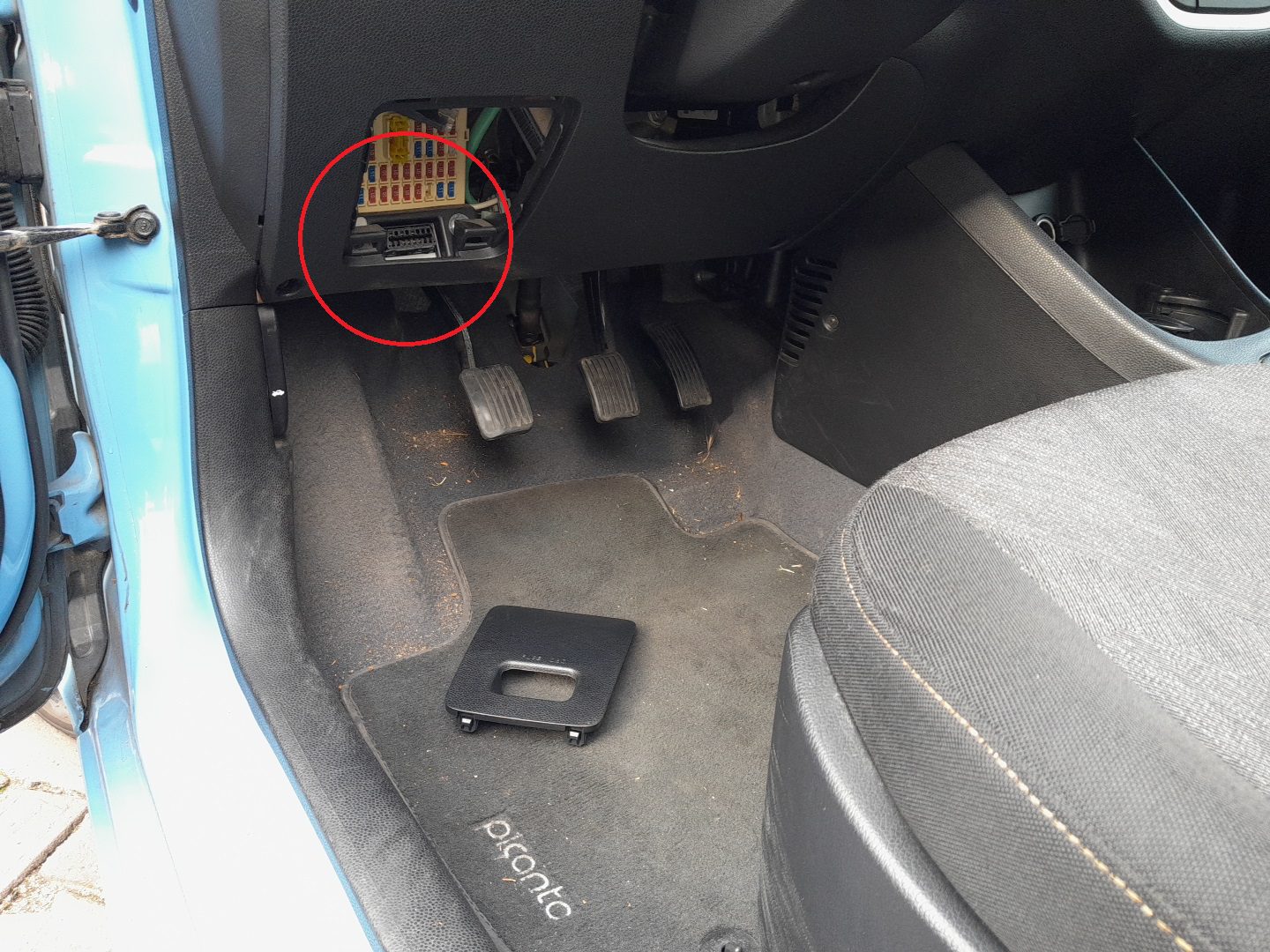
The Kia Picanto (2011–2017) is equipped with a 16-pin OBD-II diagnostic port for reading and clearing fault codes or performing live data scans. The connector is located behind the lower fuse/relay panel on the driver’s side of the dashboard.
OBD-II Port Location
The diagnostic connector sits behind the fuse/relay panel located below the steering column, just above the pedals. On the outer surface of the panel cover, the label reads “FUSE OBD.”
To access the port:
- Open the driver’s door and look at the lower dashboard area near the pedals.
- Locate the fuse/relay panel cover marked “FUSE OBD.”
- Grip the panel at the sides and pull it gently outward to remove it.
- The OBD-II connector is positioned directly behind the panel, facing downward.
Tips for Safe Use
- Always switch the ignition to ON (engine off) before connecting a scan tool.
- Insert the plug gently—its trapezoidal shape ensures it fits only one way.
- Support the connector with your hand while inserting or removing the adapter.
- After diagnostics, refit the FUSE OBD cover securely to protect the port from dust and moisture.
Recommended Tools
- Compact Bluetooth or Wi-Fi OBD-II adapter for use with mobile diagnostic apps.
- Professional handheld scan tool for reading live data and clearing stored DTCs.
Disclaimer: The information on this page is provided for general guidance only. Always follow your official service manual and safety precautions when working on your vehicle. We are not responsible for errors, omissions, or any damage resulting from the use of this information.
This website is an independent resource and is not affiliated with, endorsed by, or sponsored by Kia. All trademarks and brand names belong to their respective owners.