These instructions apply to the Kia Sportage Mk4 (QL/QLE) 2016-2022.
For other models, please choose your vehicle here.
The Kia Sportage Mk4 (QL/QLE, 2016–2022) — the fourth-generation Sportage compact SUV, built in Žilina (Slovakia) for European markets across pre-facelift (2016–2018) and facelift (2018–2022) variants, with a wide engine range covering 1.6 GDi (G4FD, 97 kW), 1.6 T-GDi (G4FJ, 130 kW), 1.7 CRDi (D4FD, 85/104 kW, pre-facelift only), 1.6 CRDi (D4FE, 85/100 kW, post-facelift), 2.0 CRDi (D4HA, 100/135 kW, including 48V MHEV from 2019), 2.0 MPi (G4NA, 115 kW), and the GT Line 2.4 GDi (G4KJ, 135 kW) — uses a cluster-menu reset: you scroll to Service Interval in the instrument-display menu and confirm. There’s no diagnostic tool needed; it’s done with the steering-wheel MENU and OK buttons. The procedure is identical across every QL engine variant and across both pre-facelift and facelift cars.
When to Reset the Service Indicator
- After completing an oil and filter change.
- After a scheduled inspection service.
- If the spanner / wrench icon with “Service required” appears at startup, typically counting down from a 1,000 km warning.
First, a Few Checks
- Park on a level surface with the engine off, then turn the ignition on without starting (push START with foot off the brake on push-button cars; turn the key to “ON” on key-start cars).
- Complete the actual service work before the reset.
- Locate the steering-wheel MENU and OK buttons — the multifunction-display controls on the right-hand spoke that open, scroll and confirm the cluster menus.
Kit and Supplies
None for the reset itself. For the oil change, fresh Kia-spec oil — 5W-30 ACEA C3 / Hyundai/Kia Premium LF is the modern fill for most QL engines; the 2.0 CRDi MHEV uses 5W-30 ACEA C2/C3. A new spin-on filter (different parts for the petrol G4F-series and the CRDi D4-series); a 17 mm sump-plug socket on petrol, 19 mm on the diesels; torque 40 Nm petrol / 35 Nm diesel. The 1.6 GDi takes 3.6 L with filter; the 2.0 CRDi takes 7.1 L with filter — confirm capacity by the engine code, not by displacement alone.
The Service Reset Procedure
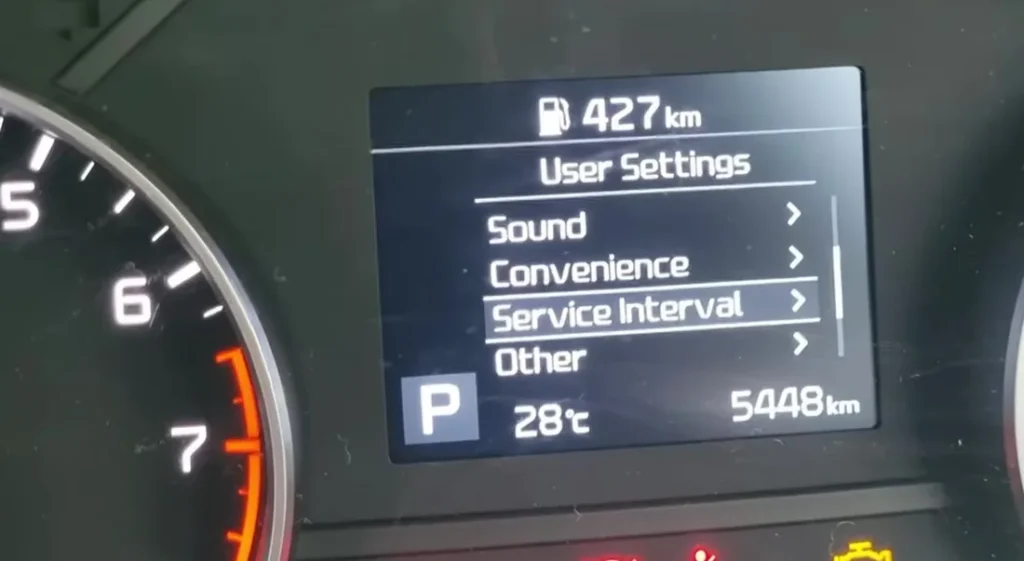
- Turn the ignition ON (engine off, instruments live).
- Press the MENU button on the steering wheel to open User Settings in the instrument-cluster display.
- Scroll down to Service Interval and select it — the screen shows “Service in … km / … days”.
- On the Service Interval screen, press and hold the steering-wheel OK button for a few seconds until a “Reset time and distance?” prompt appears.
- Highlight Yes and press OK to confirm.
- The service counter jumps back to the full interval. Switch the ignition off to finish.
Verify the Reset Worked
Switch the ignition off, wait 30 seconds, then cycle back on. The spanner / “Service required” icon that was appearing at startup should be gone, and the cluster LCD should return to the standard trip / odometer screen without a service-distance overlay. Typical QL Sportage intervals after the reset:
- 1.6 GDi / 1.6 T-GDi / 2.0 MPi petrol: 10,000 miles (15,000 km) or 12 months, whichever comes first.
- 1.6 CRDi / 1.7 CRDi / 2.0 CRDi diesel: 12,500 miles (20,000 km) or 24 months, whichever comes first.
- 2.4 GDi (GT Line, non-EU): 10,000 miles (15,000 km) or 12 months.
UK severe-service / short-trip driving requires halving the interval manually. Diesel models with frequent short-trip use should follow the petrol interval (halved) to keep the DPF healthy.
Common Snags
- The “Reset time and distance?” prompt doesn’t appear. Make sure you’re on the Service Interval screen (User Settings → Service Interval) before holding OK, and that the ignition is fully ON (some Sportage QL cars need two presses of the START button without the brake to reach IGN-ON; one press is ACC only).
- The reset prompt appears but cycles away before I can confirm. You only have a few seconds — highlight Yes and press OK promptly. If it clears, reopen User Settings → Service Interval and hold OK again.
- I reset the indicator but the spanner returns after a few miles. Either (a) the 12V battery is weak and the cluster lost the reset between starts — load-test, replace if older than 5 years; or (b) you confirmed on the wrong screen — only the Service Interval screen’s “Reset time and distance?” prompt zeros the service counter, not a plain trip reset.
- 2018 facelift Sportage QLE — anything different? The 2018 facelift updated the front-end styling, added the 48V mild-hybrid 2.0 CRDi MHEV variant, and revised the infotainment, but kept the cluster LCD and OK-button reset path unchanged. Procedure unchanged.
- 2.0 CRDi MHEV (mild-hybrid) — anything different? The MHEV variant adds the 48V starter/generator system but uses the same cluster, same OK button, and same reset path. The MHEV-specific battery-management warnings are separate from the service-indicator system.
- Push-button vs key-start cars — same procedure? Yes. The reset uses the cluster OK button, not the ignition control. Push-button cars need to be in IGN-ON (two presses without brake), key-start cars in the “ON” key position.
Frequently Asked Questions
What does the spanner symbol on the Sportage QL mean?
On the QL Sportage the spanner / wrench icon is the service-distance reminder — it indicates the service interval has been reached or is about to be reached (the 1,000 km countdown warning). The icon does not indicate an engine fault; that’s a separate amber engine-check / yellow malfunction-indicator lamp.
Do I need a diagnostic tool?
No. Every QL Sportage uses the owner-accessible cluster-menu method (Service Interval → hold OK). Kia’s GDS dealer tool and aftermarket scan tools can also reset the service counter, but they’re rarely needed for this procedure.
Does the reset clear engine fault codes?
No. The reset zeros the service-distance counter only. Engine fault codes need a scan tool. For DTC interpretation see autodtcs.com.
Is the procedure the same as the Hyundai Tucson Mk3 (TL)?
Yes — the Kia Sportage QL and Hyundai Tucson Mk3 (TL, 2015–2020) share the same Hyundai-Kia compact-SUV platform and the same cluster architecture. The menu-based Service Interval reset is the same idea, just with slightly different menu labels. Same applies to the Hyundai i30 Mk2 (GD, 2012–2017) and other Hyundai-Kia models of the era.
Is the procedure the same as the Sportage Mk3 (SL)?
Close, but not identical. The Mk3 Sportage (SL, 2010–2016) used the older Kia trip-recorder method on lower trims and a menu-based reset only on cars with the multifunction cluster — the Mk4 standardised on the Service Interval menu reset across every trim.
How often does the Sportage QL service indicator come up?
Kia’s UK-market schedule for the QL Sportage is 10,000 miles (15,000 km) or 12 months on petrol engines and 12,500 miles (20,000 km) or 24 months on the diesel engines. The 7-year Kia warranty assumes you stick to this schedule.
What about the Sportage Mk5 (NQ, 2021+)?
The Mk5 Sportage (NQ, 2021-onwards) switched to a full digital cluster with the reset moved into the touchscreen / digital cluster menus rather than a button hold. We’ll publish a dedicated NQ guide.
For DTC code interpretation on Kia / Hyundai vehicles see autodtcs.com.
Independent guide — not affiliated with Kia. Always follow your official service manual and safety precautions. Read our full disclaimer.