These instructions apply to the Land Rover Freelander Mk2 (L359) 2006-2014.
For other models, please choose your vehicle here.
The key for the Land Rover Freelander 2 (L359, 2006–2014) is one of the more misunderstood fobs on the road, and it catches a lot of owners out. Unlike almost every other car of its era, the Freelander 2 remote was not designed with a pop-in coin cell you can change on the driveway. Instead it hides a rechargeable cell soldered onto the circuit board, in a sealed case that tops itself up whenever the key is sitting in the ignition barrel. So if your Freelander 2 remote has gone weak or dead, the fix is genuinely different from the usual “drop in a CR2032” job — and knowing that before you start prying will save you a broken key.
How to Tell the Fob Battery Is Dying
- Shrinking range. You have to stand right beside the Freelander before it will lock or unlock — the first sign the internal cell is no longer holding much charge.
- It works only just after a drive. Because the cell recharges in the ignition, a failing battery often works for a while after you have been driving, then dies again after the car has sat — a telltale unique to this key.
- Intermittent buttons that no drive cycle cures. Once the rechargeable cell can no longer hold charge, even a long run stops reviving it.
- Damp-related failures. The Freelander 2 fob is notorious for water creeping past its seals; corrosion on the board causes the same dead-remote symptoms and is common enough to suspect if the key has had a wet life.
A healthy rechargeable cell can last many years because the car keeps topping it up. When it finally fails it is usually because the cell has aged out or worked loose from the board — not a simple flat coin cell you can swap in seconds.
The Battery You Need
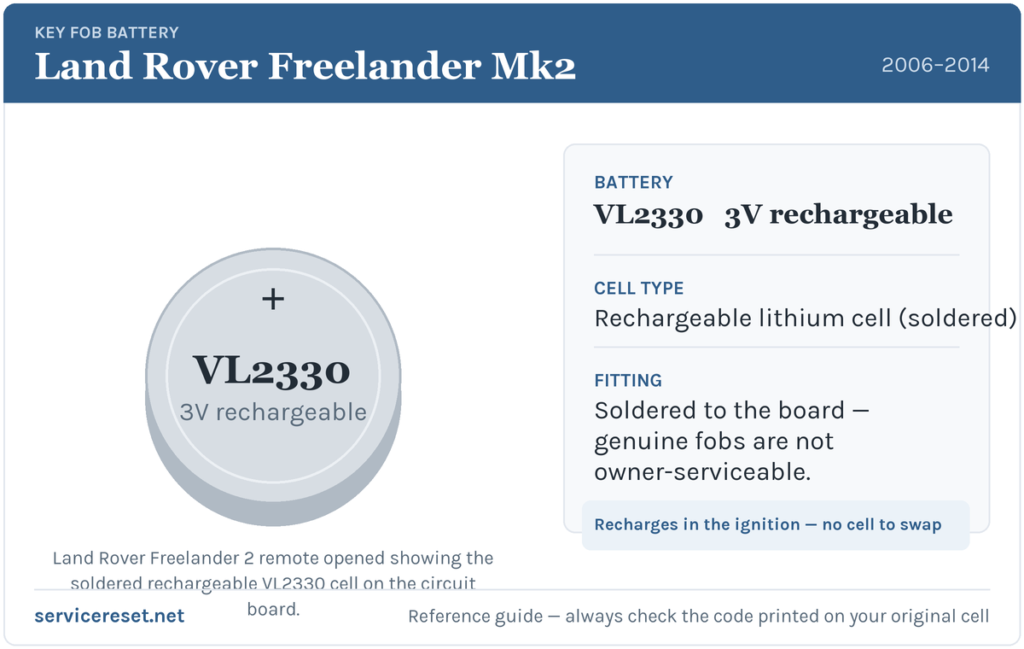
The genuine Freelander 2 remote uses a rechargeable lithium cell, a Panasonic VL2330 (a 3-volt cell with solder tags), not a standard CR2032. It is soldered to the circuit board, which is why the fob has no removable battery cover. You can buy the VL2330 from electronics suppliers, but fitting it means desoldering the old one and soldering the new cell in place — not a coin-cell change. Some aftermarket replacement Freelander 2 fobs are built differently and do take a normal removable cell, so if you have had a non-genuine key fitted, check the code printed on whatever cell is actually inside yours before buying.
How the Battery Is Replaced (Why It Is Not a Coin-Cell Swap)
- Release the emergency blade. Press the small catch and slide the mechanical key blade out of the fob body.
- Ease the sealed case apart. With no battery cover to remove, the two halves have to be carefully parted along the seam with a thin tool — take real care, because the case is tight and forcing it splits the plastic or lifts the board. This is where many owners come unstuck.
- Desolder the old cell. The VL2330 is fixed to the board by two solder tags. It has to be removed with a soldering iron and desoldering braid, using as little heat as possible so the board is not damaged.
- Solder in the new cell. Fit the replacement VL2330 the same way round as the original and solder the two tags — then reassemble. Owners often find the case will not re-clip cleanly and needs a dab of adhesive to hold shut.
⚠️ Orientation and heat both matter. Solder the new cell in the same polarity as the one you removed — a reversed cell will not power the board — and keep the iron on the tags as briefly as possible, as excess heat easily ruins the delicate circuit. If you are not confident with a soldering iron, this is a job to hand to a key-repair specialist rather than risk the board.
Did It Work?
Once the case is back together, stand back and test lock and unlock — range should be back to normal. Then leave the key in the ignition through a drive or two so the car can top the cell up, and confirm the remote still works reliably after the vehicle has sat overnight. A remote that works right after soldering but fades again may have a poor solder joint or an aged cell that will not hold charge.
If a New Cell Doesn’t Fix It
- Suspect water damage. These fobs corrode internally when moisture gets past the seals; green or white deposits on the board mean the remote may need cleaning or replacing rather than just a cell.
- Check the solder joints. A cell that is not properly bonded to both tags behaves like a flat battery — reflow the joints if they look dull or loose.
- Consider a professional refurbishment. Because the case, seals and soldered cell all fight against a clean DIY fix, many owners send the fob to a Land Rover key specialist for a battery-and-reseal service.
- Rule out the car’s 12 V battery. A weak vehicle battery can cause erratic central-locking behaviour that mimics a dead fob, so have it checked if the remote itself looks sound.
New Key or Spare — Why It’s a Dealer Job
Reviving the existing fob keeps its coding, so no programming is needed. A replacement remote is a different matter: the Freelander 2’s immobiliser has to enrol the new key’s transponder through the car’s security system, the blade has to be cut to the locks, and a genuine remote is ordered against the VIN. That means a spare or a lost-key replacement is a job for a Land Rover dealer or a JLR-capable auto-locksmith — and given how awkward these fobs are to service, keeping a working spare is well worth it.
Frequently Asked Questions
Does the Land Rover Freelander 2 key take a CR2032?
The genuine remote does not — it uses a rechargeable Panasonic VL2330 soldered to the circuit board, which is why there is no removable battery cover. Only certain aftermarket replacement fobs use a standard removable cell.
Why doesn’t my Freelander 2 key have a battery cover?
Because the cell is not meant to be user-replaced. Land Rover sealed the case and made the battery rechargeable, topping it up each time the key sits in the ignition, so there is no flip-off panel like on most fobs.
Can I just solder in a new cell myself?
If you are handy with a soldering iron, yes — desolder the old VL2330 and fit a new one the same way round, using minimal heat. If not, it is safer to let a key-repair specialist do it, as the board is easily damaged.
Why does my remote only work right after driving?
That is the classic sign of a failing rechargeable cell. The ignition tops it up enough for it to work briefly, but it can no longer hold charge once the car is parked.
My Freelander 2 remote is dead even after a battery — what now?
Check for water corrosion on the board and for cold or loose solder joints, which are both common on these fobs. If the board is corroded, a refurbishment or replacement remote is usually the answer.
Can I still drive the Freelander 2 if the remote is completely dead?
Yes. Use the emergency blade in the fob to unlock the driver’s door and start the car as normal — the immobiliser reads the transponder chip in the key, which does not rely on the remote’s rechargeable cell.
If the remote stopped working suddenly right after the 12 V battery was disconnected, rather than fading over time, the cause may be a lost pairing or a stored fault rather than the cell — you can look up what any related code means on autodtcs.com.
Independent guide — not affiliated with Land Rover. Always follow your official service manual and safety precautions. Read our full disclaimer.