These instructions apply to the Mercedes Citan Mk1 (W415) 2012-2020.
For other models, please choose your vehicle here.
The Mercedes-Benz Citan W415 (2012–2020) shows a spanner icon with a “Service A” or “Service B” message when its ASSYST service counter decides the next service is due. The Citan is a rebadged Renault Kangoo II, but Mercedes uses the standard cluster-button reset — no scan tool needed.
Before you start
- Park on a level surface with the engine off.
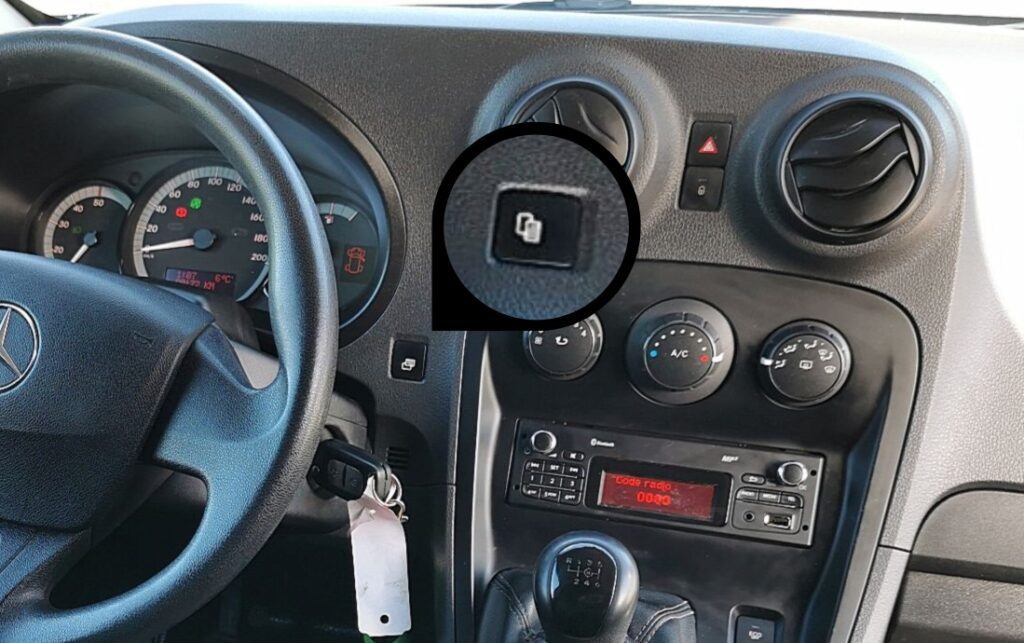
- The cluster display button is on the right side of the cluster face, near the speedometer — the same button that cycles between trip and service displays.
- Turn the ignition key to position II (ON, cluster live, engine not running).
⚠️ Reset only after the work has been done. The Citan uses a flexible service interval (ASSYST) that tracks driving conditions; resetting without the underlying maintenance means it will fire again at the wrong time.
Maintenance Indicator Reset — Step-by-Step
- Turn the ignition key to position II (do not start the engine).
- Press the instrument cluster button repeatedly to cycle through display modes until the service indicator (spanner icon and current days-or-distance-to-service value) appears.
- Press and hold the same button for about 10 seconds.
- The display will refresh and show the new maintenance interval — typically 20,000 km or 12 months from now, depending on which service was being tracked.
- Release the button.
Verify the Reset Worked
Switch the ignition off, wait 5 seconds, then turn it back to position II. The service indicator should no longer appear; the cluster should show the full new interval (typically “Service in 20,000 km” or “Service in 365 days,” depending on configuration).
When It Won’t Cooperate
- Service display doesn’t appear when cycling the button. The Citan has multiple display modes — some trims default to hiding the service display except in the days/distance leading up to a due service. Press the button more times; the service info eventually shows in the cycle.
- Display doesn’t refresh after the 10-second hold. The hold was too short or the button was released momentarily. Press and hold continuously for at least 10 full seconds; longer is harmless.
- New interval is wrong (too short). The Citan’s ASSYST-style algorithm uses driving data to set the next interval — heavy idling, lots of cold starts, and dusty conditions shorten it. The “wrong” interval may actually reflect what the car has measured.
- Reset works but the spanner returns at next ignition. A stored fault code in the engine ECU can trigger a service display in parallel with the interval timer. Scan with a Mercedes-aware tool (Star Diagnosis, Autel Mercedes module, FORScan with Renault plug-in for the Kangoo-side codes).
- The cluster shows “Service Now” rather than a distance. The interval has expired. Complete the maintenance, then run the reset — the display refreshes to the new countdown.
Frequently Asked Questions
What does ASSYST mean on the Citan?
ASSYST (Active Service System) is Mercedes’ name for the flexible service interval that adjusts based on driving conditions. On the Citan W415 it monitors short-trip ratio, oil temperature, average speed, fuel quality (via emissions readings) and idle time, then shortens or extends the next interval accordingly. Typical range is 15,000–25,000 km for petrol trims, 20,000–30,000 km for diesel.
The Citan is a Kangoo with a Mercedes badge — can I use Renault reset procedures?
The hardware is shared but the cluster firmware is Mercedes-specific. The button location is the same as the Renault Kangoo II but the Mercedes cluster requires the 10-second hold rather than the Renault’s shorter sequence. Use the Mercedes procedure for the Citan; the Renault one won’t work.
Does this reset apply to the Citan W420 (2021+)?
No — the W420 is a different platform (based on the Renault Kangoo III) with a fully digital cluster. The reset procedure on the W420 goes through the head-unit infotainment menu rather than the cluster button. This guide covers the W415 (2012–2020) only.
Is “Service A” the same as the oil change?
Service A is the lighter maintenance service on Mercedes vehicles — typically oil and filter change, fluid checks, brake inspection. Service B is more comprehensive (cabin filter, spark plugs, brake fluid). On the Citan the alternating A/B pattern means roughly every other service is the “big one.” The reset procedure above resets whichever service was just completed.
The ASSYST maintenance indicator is separate from the engine management warning light. If a warning lamp is actually a stored fault code rather than a service reminder, you can look the code up on autodtcs.com.
Independent guide — not affiliated with Mercedes. Always follow your official service manual and safety precautions. Read our full disclaimer.