These instructions apply to the Mitsubishi Eclipse Cross EV Mk1 (2025-present).
For other models, please choose your vehicle here.
The Mitsubishi Eclipse Cross EV has an electronic parking brake (EPB) that applies and releases automatically, plus an Auto Hold function that keeps the car stopped at lights and in traffic. Both are controlled from the two switches low on the dash, to the left of the wheel: the parking-brake switch marked (P) and the Auto Hold switch marked (A).
How the parking brake works automatically
With the car stationary, the parking brake applies on its own when you switch the car off, unfasten the driver’s seatbelt, open the driver’s door, or select P. The warning light on the instrument panel and the light on the switch confirm it is on.
It releases automatically as soon as you pull away or shift out of P with the car ready to drive. On some versions it does not self-apply in every case — then you apply it by hand.
Apply or release the parking brake by hand
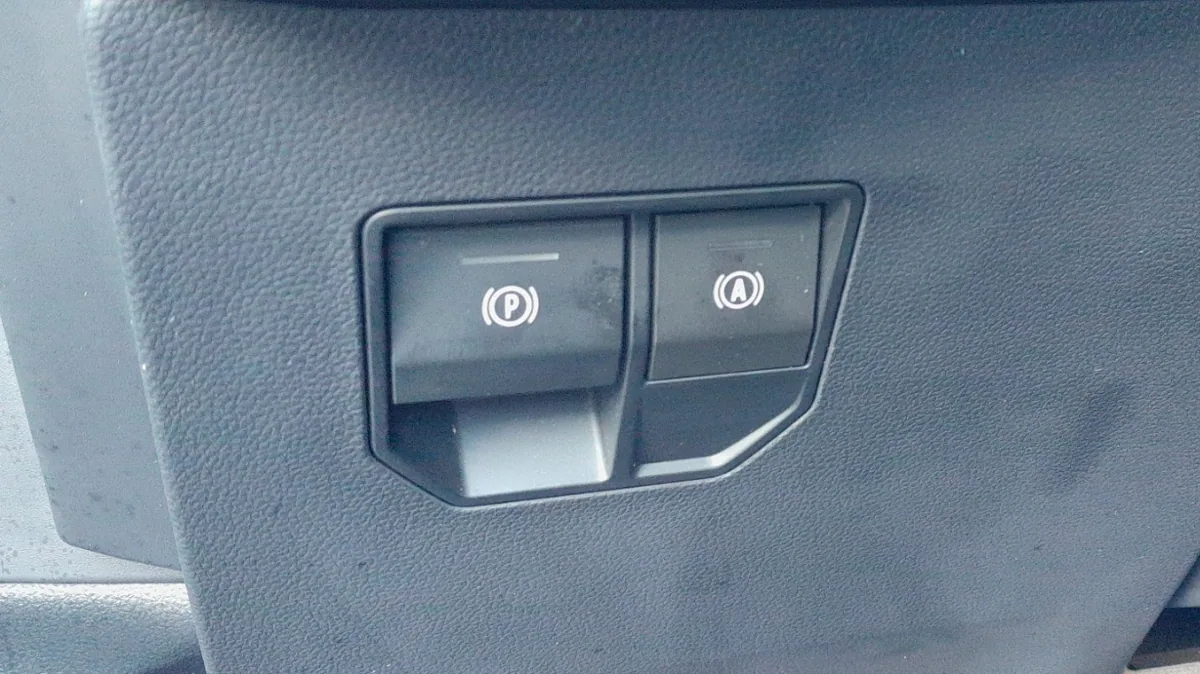
- To apply: pull up the (P) switch. The switch light and the parking-brake warning light come on.
- To release: press the start/stop button to switch the car on (without pressing a pedal), press and hold the brake pedal, then pull the (P) switch. The warning light goes out.
For a short stop at a light with the car running, pull the (P) switch and let go — it releases automatically when you drive off again.
Use Auto Hold
Auto Hold keeps the brakes applied after you stop, so you can take your foot off the pedal. Press the (A) switch to turn it on — the light in the switch confirms it. The hold releases as soon as you press the accelerator with a gear engaged.
While Auto Hold is holding the car, the electronic parking brake applies automatically if you open the driver’s door, unfasten your seatbelt, or stay stopped for more than about three minutes. Each time you switch the car on, Auto Hold is in whatever state it was in when you last switched off.
Release the brake to roll in a car wash
To let the car roll in neutral (for example through an automatic car wash), select N: with the car running, press the P button, move the selector one click up or down to N, then switch off; or with the car off and ignition on, move the selector one click and switch the ignition off.
Parking on a hill or with a trailer
When parking on a slope or with a trailer or caravan attached, pull and hold the (P) switch for a few seconds for maximum holding force.
Frequently Asked Questions
Why won’t the parking brake release?
If you see “Check parking brake” or a brake-system warning, that is a fault for a dealer. Otherwise, the release conditions are not met — switch the car on, press the brake pedal firmly, then pull the (P) switch.
How do I put it in neutral for a car wash?
Select N as described above. The drive wheels are mechanically locked in P, so you must shift to N before the car can be pushed or pulled or roll through a wash.
Does the parking brake apply by itself?
Yes — when you switch off, unbuckle, open the driver’s door, or select P with the car stopped. Always check the warning light is on before you leave the car.
Independent guide — not affiliated with Mitsubishi. Always follow your official service manual and safety precautions. Read our full disclaimer.