These instructions apply to the Mitsubishi Eclipse Cross EV Mk1 (2025-present).
For other models, please choose your vehicle here.
How to use the one-touch power windows on the Mitsubishi Eclipse Cross EV, reset a window that won’t close on its own, open or close the windows remotely, and fold and adjust the door mirrors. The window and mirror switches are on the driver’s door.
One-touch windows
Press a window switch down to the first notch to lower the window while you hold it; press it fully for one-touch (automatic) opening. Pull it up the same way to raise the window, with one-touch close on the driver’s switches marked AUTO.
If a window won’t work (thermal cut-out)
The power-window switch has thermal protection. If you press a switch more than about 16 times in a row, it goes into a protected mode and the window locks. Use the switches in short bursts about 30 seconds apart. With the car running, the window frees again after the switch has been left unused for about 20 minutes.
Reset a window that won’t auto-close
If one-touch closing stops working, reset the window like this:
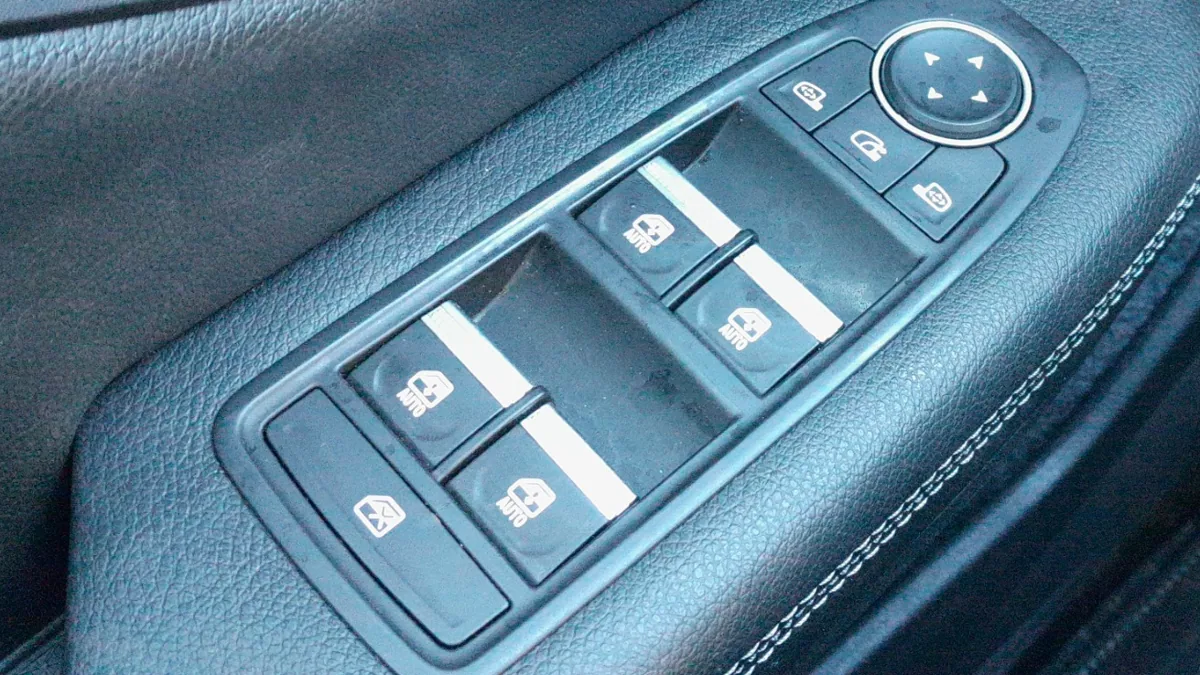
- Operate the switch to raise the window fully, pressing it repeatedly if needed so it rises step by step to the top.
- With the window fully closed, hold the switch in the close direction for about one second.
- Then let the window fully open and close once. This resets the one-touch function.
Open or close all windows remotely
While unlocking the doors from outside, hold the unlock button on the card to open all the windows. While locking from outside, hold the lock button to close them all. Only do this when you can see the car clearly and no one is inside.
Door mirrors: adjust, fold and heat
With the car stationary, select the left or right mirror with switch 3, then adjust it with switch 2. The mirror heating comes on with the rear-window heater. The mirrors fold in automatically when you lock the car and out when you unlock it; you can turn that off with switch 1, which also folds or unfolds them on demand.
If you fold a mirror by hand, press switch 1 until you hear it click back into the driving position. Cars with memory seats also store the mirror positions together with the seat position.
Frequently Asked Questions
Why won’t my window go up with one touch?
Either the thermal cut-out has tripped (after many presses in a row — wait, then use short bursts) or the one-touch function needs resetting. Follow the reset steps above.
How do I fold the door mirrors?
They fold automatically when you lock the car. To fold or unfold them on demand, press switch 1 on the driver’s door.
Can I close the windows from outside?
Yes. Hold the lock button on the key card while locking the car from outside to close all the windows at once.
Independent guide — not affiliated with Mitsubishi. Always follow your official service manual and safety precautions. Read our full disclaimer.