These instructions apply to the NIO EL7 (2022-2024).
For other models, please choose your vehicle here.
The NIO EL7 (2022–2024) — the large electric SUV sold in China as the ES7 and in Europe as the EL7 — is unusual for a key-fob article, because the fob is the part you were probably never meant to carry. NIO built the EL7 around battery-free access: a passive NFC card and a Bluetooth phone key in the NIO app are the primary ways in, and the plastic Smart Key fob is an optional extra. So if your NIO won’t respond to the fob, the first thing to know is that you almost certainly are not locked out — and the second is that when the fob itself goes quiet, it takes a CR2477 coin cell, not the CR2032 most cars use. Here is how the EL7’s access system fits together, how to spot a dying fob cell, and the exact way to change it.
The Battery-Free Keys Come First
Before you worry about a coin cell, remember the EL7 gives you two ways in that have no battery to go flat:
- NFC card. A slim contactless card that draws its power from the car’s reader. Hold it to the NFC sensing area on the driver’s-side B-pillar to unlock, then place it on the wireless charging pad (or the marked reader) to enable Start. Because it is passive, it never needs charging and cannot “die.”
- Phone Bluetooth key. Once the Bluetooth digital key is enabled in the NIO app, your phone unlocks and starts the car and you can leave the fob at home entirely.
If the fob is dead and you need to get moving right now, use the NFC card or your phone — the fob’s battery is a convenience item, not a single point of failure.
How to Tell the Fob Battery Is Dying
- Shrinking range. You have to stand right beside the EL7, or almost touch the fob to the door, for lock/unlock to register. This is the classic first sign of a tired cell.
- Remote functions get patchy. Lock, unlock and the powered tailgate respond only on the second or third press, or not at all from a distance.
- Cold-weather dropouts. A near-flat lithium cell sags further when cold, so a fob that just about works in summer can fail on a frosty morning.
- The card and phone still work perfectly. If those let you in but the fob doesn’t, the problem is the fob’s battery, not the car.
A CR2477 in a lightly used EL7 fob commonly lasts three to four years — often longer than in other cars precisely because many owners rely on the card or phone and barely touch the fob. If yours is that age and showing the symptoms above, fit a fresh cell before suspecting anything deeper.
The Battery You Need
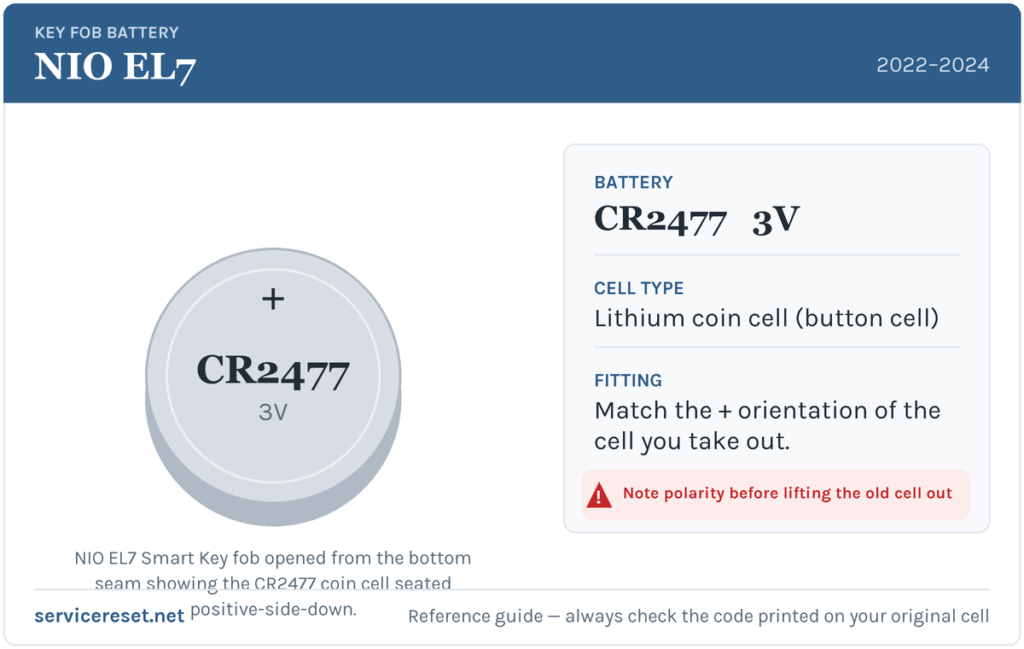
The EL7 Smart Key takes a single CR2477 3-volt lithium coin cell. This is a large-diameter cell (about 24 mm across and notably thicker than the everyday CR2032), so don’t assume the drawer full of CR2032s will do — they won’t make contact. It is less common on the supermarket shelf, so you may need a battery specialist or an online order. Buy a good-quality branded CR2477; a cheap cell can sag under the brief current the transmitter draws and give poor range even when “new.” As always, whatever code is printed on the cell you remove is the definitive answer — match it exactly.
How to Change the CR2477 Cell
- Hold the fob correctly. Pinch the two sides of the Smart Key firmly between your finger and thumb so the front and rear halves are squeezed together — this makes the seam easier to work.
- Start at the bottom gap. Slide a fingernail, or a thin plastic sheet or opening tool, into the small gap at the bottom edge of the fob.
- Run the tool along the side slit. Work it along the seam that runs up the side of the case until the rear cover releases and lifts away. Take it slowly so you don’t crack the plastic or snap a clip.
- Note the orientation, then lift the old cell out. Photograph or memorise which way it sits before you disturb it.
- Fit the new CR2477 positive (+) side DOWN. On the EL7 fob the marked + face points down, into the case — the opposite of many fobs, so don’t default to “plus up.” Seat it so the contacts line up cleanly.
- Close it up. Align the rear cover and press it back on until the seam closes flush all the way round, then test lock, unlock and the tailgate.
⚠️ Get the polarity right. NIO’s own instructions specify the cell goes in positive-terminal-down. Fitting a coin cell the wrong way round means it makes poor contact or none at all, so the fob simply stays dead — always copy the orientation of the cell you took out.
Check It Worked
Step back a few metres and lock, then unlock, the car with the fob. Full range should return at once. Give the powered tailgate button a try too, since it’s often the first function to fade and the clearest confirmation the new cell is doing its job.
If a Fresh Cell Doesn’t Fix It
- Confirm it’s really a CR2477. A CR2032 or CR2025 will physically rattle in the holder and never touch the contacts — the single easiest mistake to make with this fob.
- Re-check polarity and seating. Positive side down, sitting flat under its retainer against clean metal.
- Wipe the contacts. A little finger grease or corrosion on the terminals is enough to cause dropouts; clean them with a dry cloth.
- Fall back to the card or phone. Because the EL7’s NFC card and Bluetooth key don’t depend on the fob at all, you can keep using the car normally while you sort a stubborn fob — there’s no urgency and no risk of being stranded.
New Key or Spare — Why It’s a NIO Job
Swapping the coin cell keeps the fob’s existing pairing, so nothing needs reprogramming. Adding a new Smart Key or replacement NFC card is different: NIO’s access credentials are tied to your car and account, so a new key or card must be issued and paired through NIO service (digital keys are added via the app) against the vehicle’s identity. That makes a genuine spare a service matter rather than a driveway job — but with a card, a phone key and the fob all available, most EL7 owners have plenty of redundancy already.
Frequently Asked Questions
What battery does the NIO EL7 key fob take?
A single CR2477 3-volt lithium coin cell — a large, thick cell, not the common CR2032. Always match the code printed on the cell you remove.
Which way up does the cell go in the EL7 fob?
Positive (+) side down, per NIO’s instructions. Fitting it the other way leaves the fob dead because the contacts don’t meet, so copy the orientation of the old cell.
How do I open the NIO EL7 Smart Key?
Pinch the sides of the fob, then slide a fingernail or thin plastic tool into the bottom gap and run it along the side seam until the rear cover pops off.
Do I need the fob at all on an EL7?
No. The EL7 is designed around a battery-free NFC card and a Bluetooth phone key in the NIO app; the plastic fob is optional. Many owners rarely carry it, which is also why its battery tends to last a long time.
Do I have to reprogram the fob after a battery change?
No. A battery swap doesn’t affect the pairing, so the fob works immediately. Only a brand-new key or card needs to be issued and paired through NIO.
Can I still drive if the fob battery is dead?
Yes, easily. Unlock and start the EL7 with the NFC card at the driver’s B-pillar, or with your phone’s Bluetooth key — neither relies on the fob’s coin cell, so a flat fob never strands you.
If the fob went dead suddenly right after the car sat unused for a long time or the high-voltage system was serviced — rather than fading gradually — the cause is more likely a pairing or 12 V-system hiccup than the cell, and the car may have logged a fault. You can look up what a stored code means on autodtcs.com.
Independent guide — not affiliated with NIO. Always follow your official service manual and safety precautions. Read our full disclaimer.