These instructions apply to the Nissan Note Mk2 (E12) 2013-2017.
For other models, please choose your vehicle here.
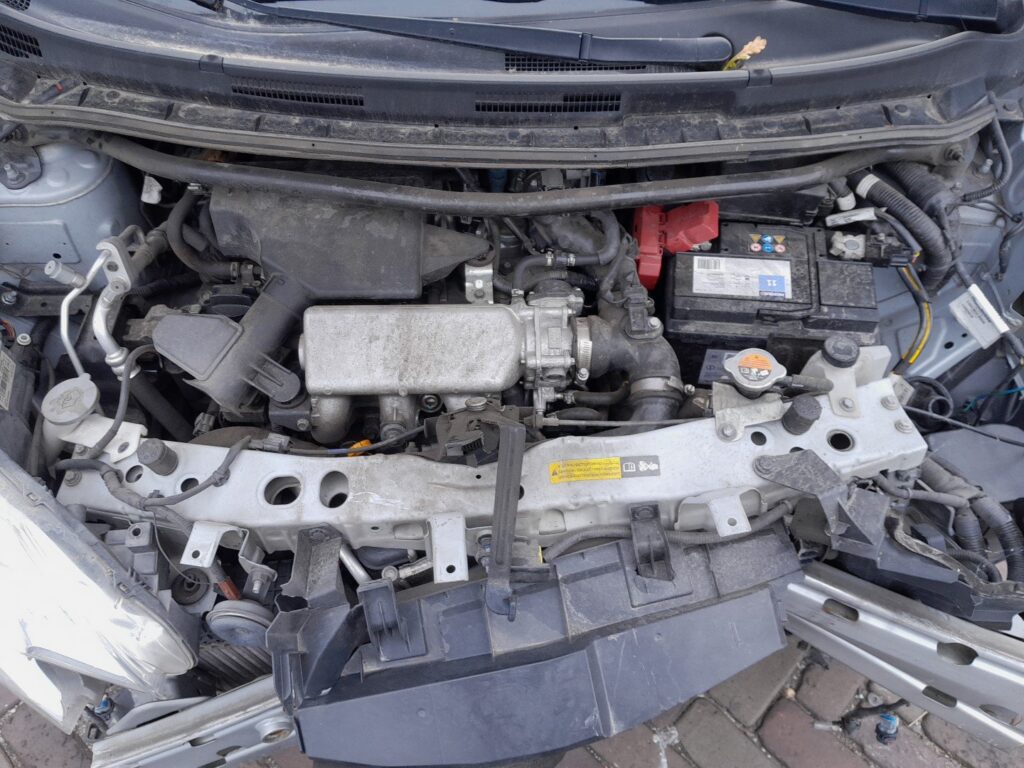
The battery in your Nissan Note (also known as the Versa Note) powers the vehicle’s electrical systems. Whenever you replace the battery or work on the electrics, follow this procedure to disconnect and reconnect it safely and to re-initialize the affected features afterwards.
Tools You Will Need
- 10 mm spanner or socket wrench
- Protective gloves and safety glasses
- Optional: memory saver tool (to retain presets)
Before Disconnecting the Battery
- Park on a level surface and engage the parking brake. Switch the ignition OFF and remove the key.
- Wait about 4 minutes for control modules to shut down.
- Loosen and remove the clamps in the correct order:
- First disconnect the negative (–) terminal.
- Then disconnect the positive (+) terminal.
- If removing the battery, lift it out carefully (it’s heavy).
Safety Note
If working near pyrotechnic systems (airbags or seat belt pretensioners), wait an additional 3 minutes after disconnecting the battery before beginning work.
Reconnecting the Battery
- Check the tray and clamps for corrosion or dirt; clean if necessary.
- Secure the battery in place.
- Connect the clamps in reverse order:
- First connect the positive (+) terminal.
- Then connect the negative (–) terminal.
- Tighten the clamps firmly (do not overtighten). Optionally apply a thin layer of dielectric grease to the posts.
After Reconnecting the Battery
- Restore radio stations and user preferences.
- Reset the date and time on the display.
- Re-initialize the electric windows (fully down, then fully up and hold for 2 seconds).
- If fitted with a sunroof, perform its initialization procedure.
- Drive for 10–15 minutes to allow the ECU to relearn idle and trims.
Tips for Longer Battery Life
- A healthy resting voltage is around 12.6 V (fully charged).
- Avoid frequent very short trips that limit alternator charging.
- Typical replacement interval is 4–6 years, depending on use and climate.
- For storage, disconnect the negative terminal or use a maintenance charger.
Disclaimer: This guide is for general information. Always follow your vehicle’s official service information and safety instructions. Perform repairs at your own risk.
Independent guide — not affiliated with Nissan. Always follow your official service manual and safety precautions. Read our full disclaimer.