These instructions apply to the Nissan Note Mk2 (E12) 2013-2017.
For other models, please choose your vehicle here.
The power windows on the Nissan Note E12 (2013–2017) use a learned end-stop position to enable the one-touch (express) auto-up and auto-down functions. When the battery is disconnected — for replacement, electrical work, or extended storage — the window control modules lose this position memory. You can still raise and lower the glass by holding the switch, but a single tap won’t drive the window all the way until the modules are re-initialised. The procedure is per-window and takes about a minute each.
When Window Initialisation Is Needed
- After a battery disconnect or replacement.
- After replacing a window regulator, motor, or door wiring.
- If the auto-up / auto-down (one-touch) function stops working — a brief tap on the switch no longer moves the window through its full travel.
- If anti-pinch trips unnecessarily during normal closing.
- After a power-window fuse blows and is replaced.
Before You Begin
- Park on a level surface with the engine off.
- Close all four doors fully. The body control module disables window auto-functions while any door is ajar.
- Check the window channels for ice, leaves, or debris. The anti-pinch sensor will abort calibration if anything seems to obstruct the glass.
- The ignition must be in ON — engine off is fine, but the cluster must be powered.
What You’ll Need
None. The whole procedure uses only the door-mounted window switches.
Power Window Initialisation — Step-by-Step
Repeat the sequence below for the driver’s window first, then for any other window that has lost its one-touch function.
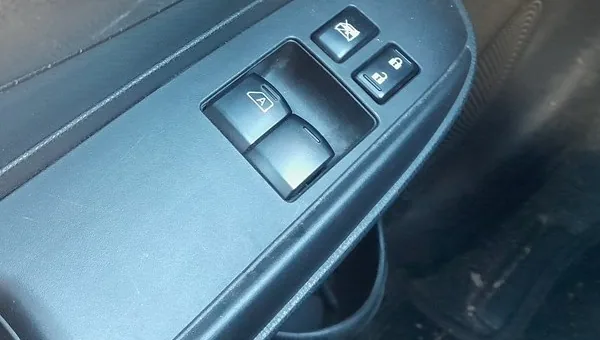
- Switch the ignition to ON.
- Confirm all doors are fully closed.
- Press and hold the window switch DOWN until the window is fully open inside the door.
- Release the switch.
- Pull and hold the window switch UP until the window is fully closed against the top seal.
- Continue holding the switch for about 3 seconds after the window has stopped moving. This extra hold is what tells the control module “this is the upper end stop.”
- Release the switch.
- Test the auto function — a brief tap on the switch should now drive the window through its full travel without you holding it.
- Repeat the procedure for the front passenger window if it also lost auto operation, then for the rear windows (note: most rear windows on the Note E12 don’t have one-touch in the first place — see FAQ).
Verify the Initialisation Worked
- Tap (don’t hold) the driver’s window switch in the UP direction — the glass should auto-close all the way to the top.
- Tap the switch in the DOWN direction — the glass should auto-open fully.
- If both work without you holding the switch, the procedure was successful.
- If the auto function still fails, repeat the procedure for that specific window.
If Something Goes Wrong
- Window reverses partway up. The anti-pinch sensor thinks there’s an obstruction. Inspect the seal and the channel for ice, grit, or worn weather strip. Wipe clean and lubricate the rubber with a silicone-based seal protector — never WD-40 or petroleum-based oils, which deteriorate the rubber over months.
- The driver’s window works but passenger windows don’t auto-function. On most Note E12 trims, only the driver’s window has both one-touch up and one-touch down. Passenger windows have one-touch down only (or sometimes no one-touch at all). Check your trim’s specification before assuming a fault.
- None of the windows responds after the battery reconnect. Check the power-window fuse in the engine-bay fuse box. The Note also has a window-lockout button on the driver’s door — make sure it’s not engaged.
- Initialisation works briefly then resets after the next ignition cycle. Indicates a fault in the door control module (DCM) — a scan-tool read of body-CAN codes will identify the affected door. No longer a calibration issue.
- Window stops short of fully closed during initialisation. The seal rubber may be sticky from cold or sun-perished. Run the procedure with the cabin warm; if it still fails, the seal needs lubrication or replacement.
Frequently Asked Questions
Do all four windows on the Note E12 need re-initialising?
Initialise any window that has lost its auto-function. In practice that usually means just the driver’s window (which has both auto-up and auto-down). The front passenger and rear windows typically have manual operation or one-touch-down only, neither of which needs re-initialisation.
How long does the procedure take?
30–60 seconds per window. The driver’s window is usually the only one that needs the full procedure, so the whole job takes a minute or two.
Will this fix a window that physically won’t move?
No. Initialisation only re-teaches end-stop positions to a working window. If the motor is dead, the regulator cable is broken, or the switch is failed, the window won’t move at all and you have a mechanical / electrical fault that’s separate from calibration. Hold the switch firmly — if nothing happens, this guide isn’t your answer.
I disconnected the battery for 10 seconds. Do I still need this?
Probably yes. Even a brief disconnect on the Note E12 can drop the door control module out of memory. If your driver’s window’s one-touch function still works after a short disconnect, you got lucky — but if it’s acting up, run the initialisation.
Does the procedure work on the Versa Note (North American Note E12)?
Yes — the Versa Note uses the same E12 chassis and electrical architecture. The trim names differ (“S,” “SV,” “SR”) but the door modules and window switches are identical. The procedure works the same.
Independent guide — not affiliated with Nissan. Always follow your official service manual and safety precautions. Read our full disclaimer.