These instructions apply to the Nissan Note Mk2 (E12) 2013-2017.
For other models, please choose your vehicle here.
The Nissan Note (E12, 2013–2017) has a hidden cluster self-test built in at the factory that any owner can launch with just the trip-reset button and the ignition. Nissan’s name for it is the combination meter self-diagnosis mode. It runs a gauge sweep, lights every segment of the trip display and switches on all the warning lamps at once — the fastest way to tell whether a dodgy fuel gauge or a flickering telltale is a real fault, with no scan tool needed.
What the hidden mode does
The E12 Note cluster uses a unified meter control unit driving an analogue speedometer and tachometer, a fuel and coolant-temperature gauge, and a dot-matrix LCD for the odometer, trips and computer. The routine exercises all of them:
- Gauge sweep — speedometer, tachometer, fuel and temperature pointers move from zero to maximum and back; a needle that fails to move is a flagged fault.
- All LCD segments on the odo/trip meter light up, revealing dead pixels or missing blocks.
- Every warning and indicator lamp the cluster controls illuminates regardless of switch position — a quick bulb/LED check.
- Internal error codes the cluster stores for the fuel gauge, coolant-temperature indicator, tachometer, speedometer and the meter control switch — so a fault can be pinned to the gauge or the meter itself.
How to enter the self-diagnosis mode
- With the ignition ON, select Trip A or Trip B on the display with the trip stalk button, then turn the ignition fully OFF.
- Press and hold the odo/trip reset button.
- While holding it, turn the ignition back ON (engine not running).
- Press the odo/trip reset button at least three times within seven seconds of the ignition coming on.
The cluster enters the mode: the LCD dots flash alternately, all odo/trip segments light, and the fuel and temperature gauges return to zero with the low-fuel indicator on.
Stepping through the tests
Each press of the reset button advances to the next stage — the internal code screens, the pointer sweep (speedometer and tachometer run 0–max twice), the gauge/switch error codes, and finally the all-lamps test. Watch the gauges complete the sweep; if one pointer stays put while the rest move, the fault lies in that gauge or the cluster, not in a sensor.
How to exit
The mode runs only with the ignition ON and ends as soon as you switch it OFF. It also cancels itself if the reset button is left untouched for about 20 seconds. Nothing is altered — odometer, trip counters and settings all stay as they were.
Frequently Asked Questions
Does this work on the Note e-POWER hybrid version? The procedure is for the standard E12 combination meter described here. If your gauges are analogue needles with a trip stalk button, the trip-reset sequence applies; verify against your exact cluster as some hybrid market variants differ.
Will it clear a fault or reset the service light? No. It is a display self-test only. It shows cluster-internal codes but does not read or erase engine, ABS or airbag faults, and it does not touch the service reminder.
My fuel gauge needle did not sweep — is the tank sender bad? If the needle fails the sweep test, the problem is in the gauge or cluster itself, not the sender. A sender fault would still allow a normal sweep here.
The mode refused to start. The usual culprits are not selecting Trip A/B first, or missing the seven-second window for the three presses. Switch off, wait, and repeat the sequence a little faster.
Can I run it as often as I want? Yes. The routine is read-only, writes nothing to memory and is completely safe to repeat.
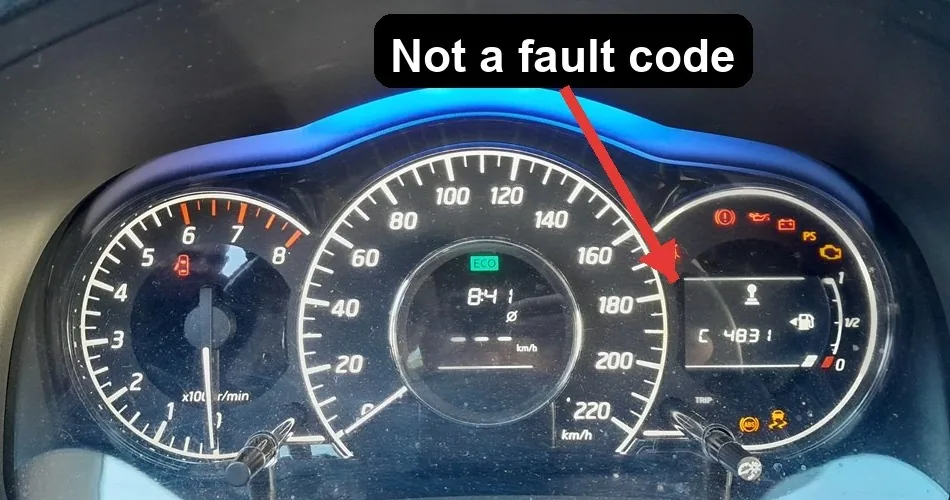
What does a code like C 4831 mean?
It is one of the cluster’s internal identification codes — its part number, software, EEPROM, hardware and PCB revisions — which the self-test steps through as you press the button. These are not diagnostic trouble codes and there is nothing to look up. The screens that actually flag a problem read 0 when healthy, and a needle that fails the sweep or a lamp that does not light points to the gauge or cluster itself.
If a warning lamp is still lit once the cluster has passed its self-test, decode the real fault before acting — look the trouble code up at autodtcs.com to find out what it means.
Independent guide — not affiliated with Nissan. Always follow your official service manual and safety precautions. Read our full disclaimer.