These instructions apply to the Nissan Qashqai Mk1 (J10) 2006-2013.
For other models, please choose your vehicle here.
Disconnecting the 12V battery cuts power to the car for accessory fitting, long-term storage, or clearing an electrical fault. On the first-generation Qashqai the battery sits in the engine bay, at the front on the driver’s side of most cars. Follow the correct terminal order to stay safe.
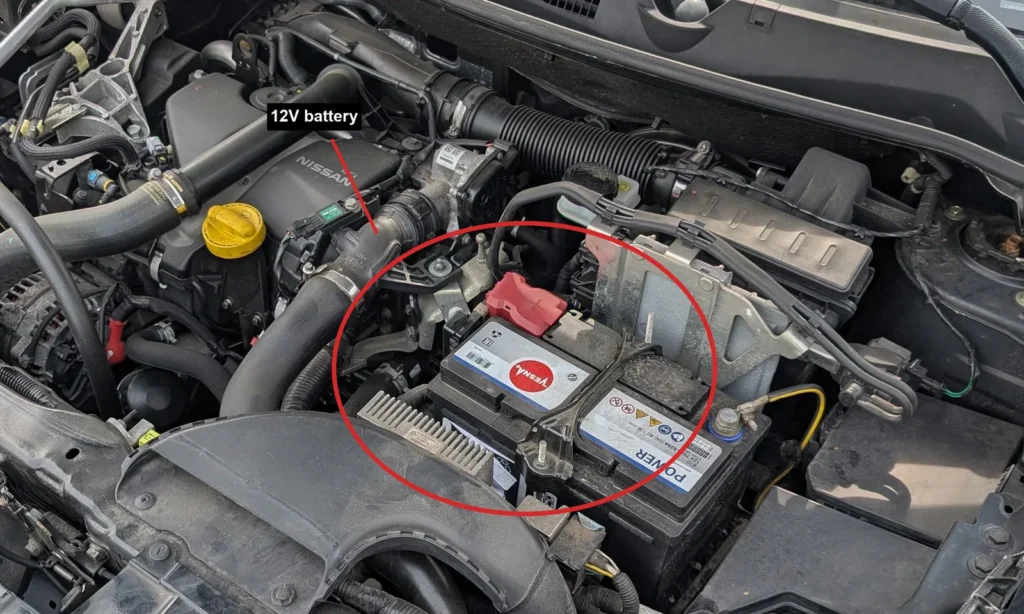
- Turn the ignition off, remove the key, and switch off all electrical consumers (lights, climate, radio).
- Disconnect the negative (minus) terminal first, then move the clamp aside so it cannot spring back onto the post.
- Disconnect the positive terminal.
- If you will work near pyrotechnic components such as airbags or seat-belt pretensioners, wait three minutes after disconnecting before you start.
- To reconnect, reverse the order: fit the positive terminal first, then the negative last. Tighten both clamps securely.
- Reset the radio preset stations and your user and comfort settings, as these are lost on disconnect.
- Re-initialise the electric windows so the one-touch function works again (a separate quick procedure).
Good to know
Wear eye protection and keep sparks and open flames well away from the battery, as the gases it gives off are explosive. Expect the clock and radio presets to be wiped when power is removed.
On this generation, simply reconnecting the same battery needs no coding or workshop tool. You only have to restore your own settings and re-initialise the windows.
FAQ
Which terminal do I disconnect first?
Always take the negative (minus) terminal off first when disconnecting, and put the positive on first when reconnecting. This reduces the risk of a short circuit against the bodywork.
What will I lose when I disconnect the battery?
The clock and radio presets are cleared, along with your saved user and comfort settings. The electric windows also lose their one-touch function until you re-initialise them.
Do I need to wait before working on the car?
If you are working near airbags or seat-belt pretensioners, wait three minutes after disconnecting the negative terminal before you begin. For general jobs you can carry on straight away.
Why do the windows stop working properly afterwards?
Cutting power resets the window control unit, so one-touch up and down will not work until you re-initialise each window. It is a short, separate procedure you run once after reconnecting.
Independent guide — not affiliated with Nissan. Always follow your official service manual and safety precautions. Read our full disclaimer.