These instructions apply to the Nissan Qashqai Mk1 (J10) 2006-2013.
For other models, please choose your vehicle here.
After an oil change or scheduled service, the spanner (wrench) reminder needs clearing so it stops flashing at start-up and the countdown to the next service restarts. You can do this yourself from the dash in under a minute, no diagnostic tool needed.
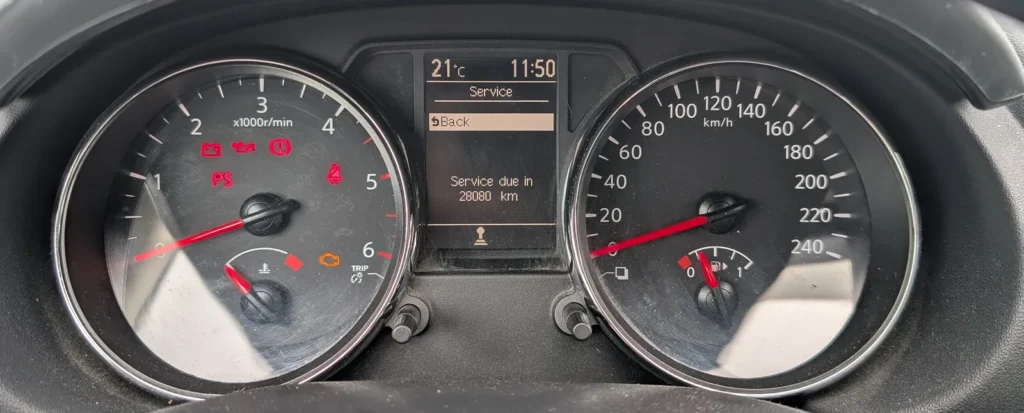
- Turn the ignition on, but do not start the engine.
- Press button 1 repeatedly until ‘Settings’ appears on the display.
- Turn button 2 to highlight ‘MAINTENANCE’, then press button 2 to select it.
- Turn button 2 to highlight ‘SERVICE’, then press and hold button 2 for about 3 seconds.
- Turn button 2 to highlight ‘RESET’, then press button 2.
- Turn button 2 to highlight ‘CONFIRM’, then press button 2. The spanner reminder clears and the service counter restarts.
Good to know
The steps above are for the Qashqai fitted with the colour multifunction display, using the two menu buttons (button 1 and button 2). If your car has the simpler dash without that display, the method is different: turn the ignition on and, within 5 seconds, press and hold the trip button until the remaining distance and the spanner symbol flash. Release the button, then press it again. The display shows the remaining distance; wait for it to stop flashing and the reset is done.
On that basic dash, while the display is still flashing you can turn button 1 repeatedly to change the distance shown to the next service, if you want to set your own interval.
FAQ
Do I need a diagnostic tool to reset the Qashqai service light?
No. On both dash types the spanner reminder is reset entirely from the dashboard buttons with the ignition on, so it is an owner-doable job with no scanner or garage visit required.
Why does the spanner symbol keep coming back?
Almost always because the reset was not fully completed. If you did not reach the ‘CONFIRM’ step (colour display) or the distance was still flashing when you finished (basic dash), the counter never actually reset. Run through the full sequence again and wait for the display to settle.
Which method applies to my car?
It depends on the instrument cluster. If your Qashqai has the colour multifunction display with menus, use the numbered steps above. If it has the simpler trip/odometer display with no menus, use the press-and-hold trip-button method described under ‘Good to know’.
Independent guide — not affiliated with Nissan. Always follow your official service manual and safety precautions. Read our full disclaimer.