These instructions apply to the Peugeot 208 Mk2 (P21) 2019-Present.
For other models, please choose your vehicle here.
When the spanner or a “Service” message lights up on your Peugeot 208 Mk2 (P21, 2019–present) — including the electric e-208 — the service-interval counter has run out. You can clear it yourself in under a minute with the reset button; here’s the exact Peugeot sequence (slightly different on the keyless 208 because you press Start instead of turning a key).
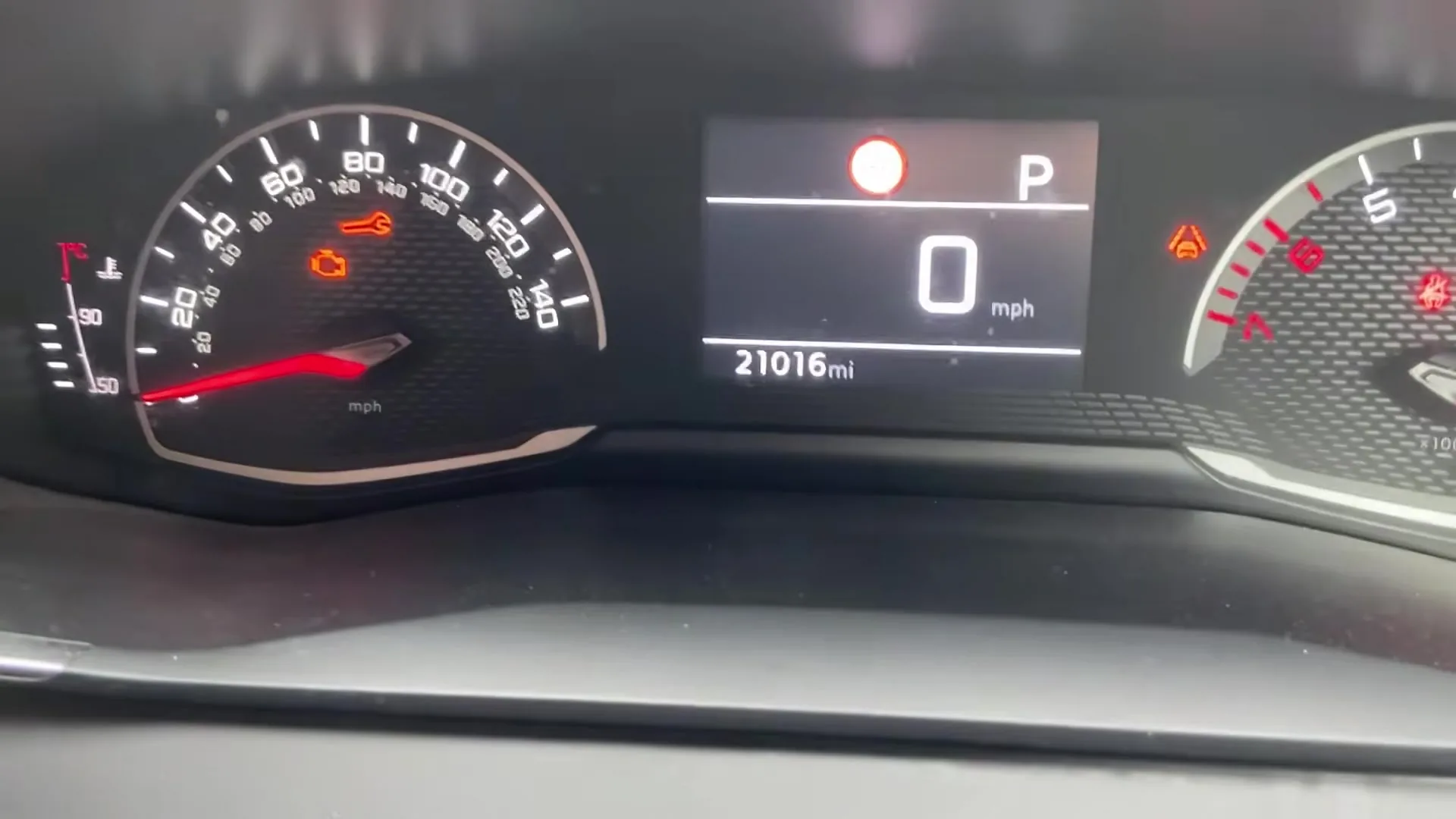
What the Service Light Means on the 208 Mk2
The spanner symbol — sometimes shown alongside a “Service” message and a countdown to the next due date or distance — is the 208’s maintenance reminder. It is not a fault. It is simply the car telling you that the pre-set interval since the last service has now elapsed. Nothing has broken; the counter has just reached zero and wants acknowledging.
Peugeot ties the 208 Mk2 to a scheduled maintenance plan that combines distance traveled with elapsed time, so the reminder can appear either because you have covered the set mileage or because enough months have passed since the last reset — whichever comes first. Short-trip and low-mileage cars therefore often trigger on time rather than distance.
Because the exact figures vary by market, engine (petrol PureTech, diesel BlueHDi or the electric e-208) and service plan, check the interval printed in your own service booklet rather than assuming a number. The important point is that the light reflects the plan, not the actual condition of the oil, so it needs a manual reset once the work is done.
Getting Ready
Only reset the counter after the service has actually been carried out — typically an oil and filter change plus the plan’s inspection items. Resetting first tells the car it has fresh oil when it does not, and the next interval will then be measured from the wrong point.
- Park on level ground with the handbrake or electronic parking brake applied.
- You need the car powered up but not running — ignition on, engine off (on the keyless 208 that means pressing Start without your foot on the brake).
- No tools are required; the whole thing is done from the dashboard reset button.
Reset Only After the Service
The counter just measures distance and time since the last reset. Clear it only once the oil and filter have actually been changed, so the next interval is calculated from the right point.
How to Reset the 208 Mk2 Service Indicator
- Make sure the car is off.
- Press and hold the reset button (the trip/zero button on the dash or wiper stalk).
- While still holding it, press the START/STOP button (without your foot on the brake, so the car powers up but doesn’t start).
- The ‘maintenance key’ symbol appears and a countdown begins.
- Keep the reset button held until the display shows ‘0’.
- Release the button — the maintenance symbol disappears and the service is reset.

Reset complete — the cluster shows a wrench icon and ‘Reinitialisation done’ (Peugeot’s own on-screen wording).

The sequence turns on the maintenance display, counts down while you hold the button, and confirms the reset at zero. If you release before the countdown finishes, the counter is not cleared and you simply start again.
What Happens Next
Once the maintenance symbol disappears, the spanner should not return the next time you switch on. The service distance and time-to-next-service figures roll back to their full values, and the display returns to its normal trip and range readouts. If you look at the maintenance information in the on-board computer menu, it should now show the full interval remaining rather than zero or a warning.
If the Reminder Comes Back
- Released the button too early — hold it until the countdown reaches 0; repeat if needed.
- A different warning is on — an amber engine/oil light is a fault, not the service timer, and won’t clear this way.
A few other things are worth checking if the spanner will not clear. Make sure the car is in the ignition-on state (powered up, engine off) rather than fully off, because the reset button does nothing when the car is asleep.
Do not start the engine partway through — if you knock the brake and the car cranks, begin again. And give the button a firm, continuous hold; a series of short taps will not open the countdown.
How Often It Comes Up
Reset the indicator once after every service, immediately following the oil and filter change. You should not need to touch it again until the next scheduled service falls due. The 208 Mk2’s service interval depends on engine and market, so rather than resetting to a number from memory, follow the schedule in your service booklet and let the car’s own countdown tell you when the next one is near.
Frequently Asked Questions
Where is the reset button on the 208 Mk2?
It’s the trip-reset (zero) button — on the wiper stalk or instrument panel, the one you use to zero the trip distance.
Why do I press Start instead of turning a key?
The 208 Mk2 has keyless start, so you power the car up with the START/STOP button (no brake) while holding the reset button — the same idea as “ignition on” on an older car.
How long is the countdown?
A few seconds — keep holding until ‘0’ shows, then release.
Does the e-208 reset the same way?
Yes — the electric e-208 uses the same maintenance-counter reset.
Does resetting the light change anything mechanical?
No. The reset only zeroes the maintenance counter in the display. It does not touch the engine, the oil itself, or any other system — which is exactly why you must do the physical service first.
What if the spanner stays on constantly rather than counting down?
A steady spanner or oil symbol that will not enter a countdown usually means a genuine fault rather than a due service. In that case the reset procedure won’t apply; have the car checked and read any stored code before assuming it is just the service reminder.
If a warning light appeared with the service message, look it up on autodtcs.com. After battery work, see our 208 Mk2 battery guide.
Independent guide — not affiliated with Peugeot. Always follow your official service manual and safety precautions. Read our full disclaimer.