These instructions apply to the Tesla Model 3 (2017-2024).
For other models, please choose your vehicle here.
The Tesla Model 3 (2017–2024) is unusual: it doesn’t ship with a traditional key at all. Every car comes with two NFC key cards and the phone key (the Tesla app talking to the car over Bluetooth) as the primary ways in — and neither of those has a battery to go flat. The familiar button remote is an optional key fob Tesla sells as an accessory, and on the Model 3 it’s a small rectangular fob, not the car-shaped fob you’ll see on an older Model S or X. That distinction matters, because the two fobs take different coin cells. If your Model 3 fob has stopped locking, unlocking or opening the boot from across the car park, here’s exactly what it needs, how to open it without a tool that scratches it, and why the card and phone are your instant fallback.
How to Tell the Fob Battery Is Dying
- Shrinking range. You have to be almost touching the car before the fob will lock or unlock it, or open the frunk/boot. This is the classic first sign of a fading coin cell.
- Buttons work only intermittently. A press registers sometimes and not others — a near-flat cell struggling to push out a full signal, and worse in cold weather.
- Nothing at all. With the fob completely dead, no button does anything. Because the Model 3 doesn’t show a “key fob battery low” warning the way a conventional car does, a sudden total no-response — while your key card and phone still work fine — usually points straight at the fob cell.
A Model 3 fob cell typically lasts around one to two years, shorter than many conventional-car fobs because the Tesla fob is a passive, always-listening device. If yours is a year or more old and behaving as above, fit a fresh cell before assuming the fob has failed.
The Battery You Need
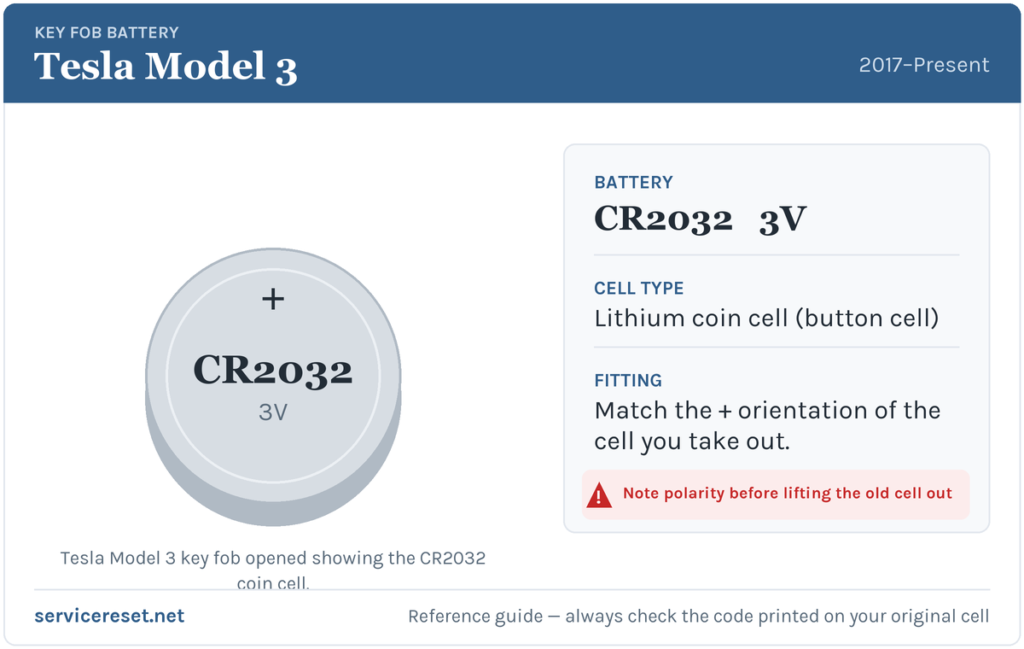
The rectangular Model 3 fob uses a single CR2032 3-volt lithium coin cell — the most common fob battery there is, sold in any supermarket, hardware shop or pharmacy. Do not reach for a CR2354: that larger cell is what the older car-shaped Model S / Model X fob uses, and it will not fit the Model 3 remote. Buy a good branded CR2032; budget cells can sag under the brief current spike the transmitter draws and give poor range even when brand new.
Method — Replacing the CR2032 in the Model 3 Fob
- Turn the fob button-side down and rest it on a soft surface (a cloth or a mouse mat) so you don’t scuff the finish.
- Find the small indent near one end of the fob’s back cover. There is no screw and no emergency key blade to remove — the cover simply clips on.
- Slip a plastic pry tool (a spudger, a guitar pick, or a fingernail) into that indent and gently lever up. The bottom cover pops off and exposes the coin cell held under retaining clips.
- Ease the old CR2032 out from under its clips. Handle the new cell by its edges — skin oils on the flat faces raise contact resistance.
- Seat the new cell with the positive (+) side facing up, so the marked face is what you can see. Press it fully under the clips.
- Hold the cover at a slight angle, line the tabs up with their slots, and press it back down until it snaps flush. Test every button.
⚠️ Get the polarity right. The Model 3 cell sits positive-side-up — the printed “+” and the battery type code face you as you look into the open fob. A cell fitted upside down won’t power the fob and can slowly discharge against the contacts, so double-check the orientation before you click the cover shut.
Check It Worked
Stand back a few metres and press lock, then unlock. Full range should return straight away, and the frunk/boot buttons (a double-press on the Model 3 fob) should respond too. There’s no dashboard message to clear on a Model 3 — if the buttons work at normal distance, you’re done.
If a Fresh Cell Doesn’t Fix It
- Re-check polarity and seating. Positive side up, sitting firmly under both clips against clean metal — the single most common cause of a “dead after a new battery” fob.
- Wipe the contacts. A smear of finger grease or light corrosion on the terminals is enough to cause dropouts; clean them with a dry cloth.
- Try your card and phone. If the key card still unlocks and the phone key still works, the car’s receiver is fine and the problem is isolated to the fob — likely the cell or, rarely, the fob’s transmitter.
- Re-pair if needed. A fob that stays dead with a known-good cell may have dropped its pairing; it can be re-added to the car through the vehicle’s Locks settings, or replaced.
New Key or Spare — Why It’s Different on a Tesla
Swapping the coin cell keeps the fob’s existing pairing, so nothing needs reprogramming afterwards. Adding a new fob, card or phone key is different — but, unlike a conventional car, you don’t need a dealer or a diagnostic tool for it. A new Model 3 accessory fob or a spare key card is paired by the owner directly through the car’s touchscreen under Controls → Locks, and a phone key is added by pairing the Tesla app over Bluetooth. That means you can always keep at least two working keys without a locksmith visit — a good reason to have a card or phone set up before you ever need it.
Frequently Asked Questions
What battery does a Tesla Model 3 key fob take?
The rectangular Model 3 accessory fob uses a single CR2032 3-volt lithium coin cell. The older car-shaped Model S / Model X fob uses a larger CR2354 — don’t confuse the two.
Which way up does the battery go?
Positive (+) side up, so the marked face of the cell is visible as you look into the open fob. Fitting it upside down leaves the fob dead and can flatten the new cell.
Do I need to reprogram the fob after changing the battery?
No. A battery swap doesn’t affect the pairing, so the fob works the moment the cover clicks back on. Only adding a brand-new key needs pairing.
How long should a Model 3 fob battery last?
Usually about one to two years. The fob is an always-listening passive device, so it drains its cell faster than a press-only remote — and heavy use shortens that further.
My fob still won’t work after a new battery — is the car broken?
Almost certainly not, especially if your key card and phone still open the car. Re-check the cell’s polarity, seating and the contacts first. If it stays dead with a known-good CR2032, the fob may need re-pairing or replacing — but the car’s receiver is clearly fine if the other keys work.
Can I still get in and drive if the fob is completely dead?
Yes — easily. Tap your NFC key card on the door pillar to unlock, then place it on the centre console to enable driving, or just use the phone key, which works over Bluetooth with no fob involved at all. A flat fob never strands a Model 3.
If your Model 3 threw a warning or stored a fault at the same time the key trouble started — rather than the fob simply fading — it’s worth checking what any logged code actually means before blaming the key; you can look one up on autodtcs.com.
Independent guide — not affiliated with Tesla. Always follow your official service manual and safety precautions. Read our full disclaimer.