These instructions apply to the Toyota Yaris Mk2 (P9) 2005-2013.
For other models, please choose your vehicle here.
If the one-touch (auto up/down) function on your Toyota Yaris Mk2 (P9, 2005–2013) has stopped working — usually after a battery disconnection or a flat battery — the window needs re-initialising so it relearns its end positions. It is a 20-second job per window with no tools. This is expected behaviour after the power is cut, not a fault with the switch or motor, and the guide below shows exactly how to put it right.
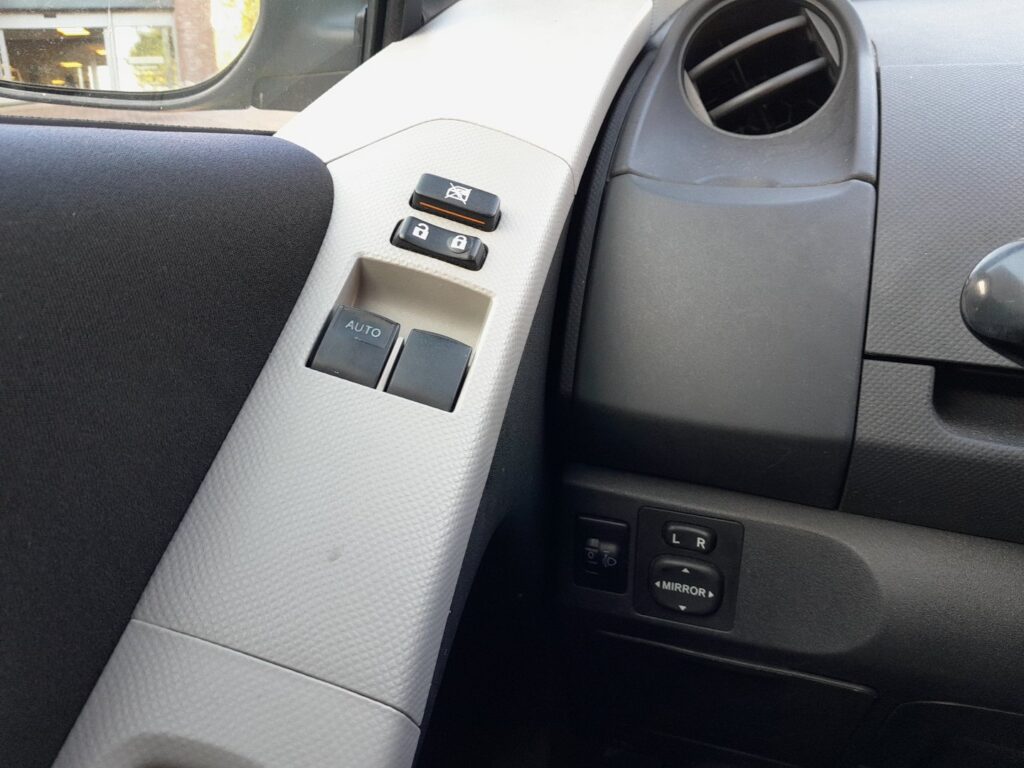
Why One-Touch Stops Working
The window motor remembers its fully-open and fully-closed positions so the auto and anti-trap (pinch protection) functions work. Cutting power clears that memory, so the window only moves while you hold the switch. Re-initialising restores it.
How It Works on the Yaris
The auto window on this Yaris is position-aware: the control tracks the motor’s travel so it knows where the glass sits without a separate sensor. That reference is what lets a single tap run the window fully up or down, and it also feeds the anti-trap, which reverses the glass if it meets resistance near the top. When the 12V supply is broken — a disconnect, a flat battery, or a blown fuse — that reference is erased. The window still works while you hold the switch because that is a direct input, but the automatic behaviour stays off until the end positions are relearned.
First, a Few Checks
- Make sure the battery is charged and reconnected so the learn is not interrupted.
- Sit inside with the door closed so the glass runs in its normal frame.
- Turn the ignition on before you begin.
- Clear the window opening and check the runners are not clogged with grit — common on a car of this age.
- Do one window at a time from that door’s own switch.
How to Re-initialise a Yaris Window
Do this with the ignition on, one window at a time:
- Pull and hold the window close switch until the window is fully closed, then wait 1 second.
- Press and hold the window open switch until the window is fully open.
- Repeat the close-then-open cycle a few times to lock in the learned positions.
- Check the one-touch function works, then repeat for the passenger’s window.
If It Still Won’t Auto-Close
- Repeat the procedure — the hold at each end stop is what registers the limits.
- Make sure the glass reaches the very top and bottom — grit or perished runners can stop it short on a car of this age.
- Check the battery is healthy during the learn; a weak battery on an older car can cause the relearn to fail part-way.
- Inspect the window fuse if a window won’t move at all rather than simply losing its auto function.
- Slow the movement down — do not release the switch the instant the glass stops; give it a clear moment at each end.
- If one window never relearns while the other does, suspect that door’s switch or motor rather than the method.
Once It’s Done
Once the positions are relearned, a single tap should send the glass all the way up or down again, and the anti-trap protection comes back with it. The setting stays until the battery is next disconnected, so you should not have to repeat it in normal use. On this Yaris the driver’s window is the usual one-touch fitment, so start there.
Frequently Asked Questions
Why did my Yaris window lose auto after the battery was off?
Disconnecting power wipes the stored end positions, so auto and anti-trap switch off until you re-teach the window. The motor no longer knows where the top and bottom are, which is why only hold-to-move works. Running the close-then-open cycle a few times restores the learned limits and the one-touch function.
The window goes up a bit then stops — why?
That’s the anti-trap protection reacting because the limits aren’t learned. With no stored top position the system treats normal travel as a possible obstruction and stops or reverses. Complete the close-then-open routine, making sure the glass reaches the very top each time, and it clears once the limits register.
Do I need any tools?
No — just the door switch and the ignition on. There is no menu and no diagnostic equipment involved. If the window still refuses to relearn after several clean attempts, that points to a fuse, switch, motor or worn-runner issue rather than anything the hand procedure can fix.
Is it safe to use the window before I re-initialise it?
Yes, but take care. The glass still raises and lowers while you hold the switch, so the window works. What is missing is the one-tap convenience and the anti-trap that reverses the glass on an obstruction. Because that protection is off until you relearn, keep fingers and objects clear while closing the window.
Why does an older Yaris seem harder to re-initialise?
Age is the usual reason. Dry or perished window runners and a build-up of grit add friction, so the glass can stop just short of the true top or bottom the system needs to store. Cleaning and lubricating the channels, then running the cycle slowly so the glass reaches each full stop, usually lets the learn complete.
Do I have to relearn both front windows?
Only the ones that have one-touch. On most P9 Yaris models that is the driver’s window, with the passenger side depending on trim. Re-teach each affected window from its own switch, one at a time, and leave any manual-only windows alone — they have nothing to relearn.
If you have just done battery work, run this alongside the other resets — see our Yaris battery disconnect/reconnect guide. For warning lights, look up the code on autodtcs.com.
Independent guide — not affiliated with Toyota. Always follow your official service manual and safety precautions. Read our full disclaimer.