These instructions apply to the Toyota Yaris Mk4 (XP210/P21) 2020-Present.
For other models, please choose your vehicle here.
Disconnecting the 12 V battery on a Toyota Yaris Mk4 (XP210, 2020–present) is a straightforward job for a battery change or before electrical work. There is no dealer registration to worry about, but a couple of driver-assist settings need a quick relearn afterwards. This guide covers the safe order of work for the petrol Yaris.
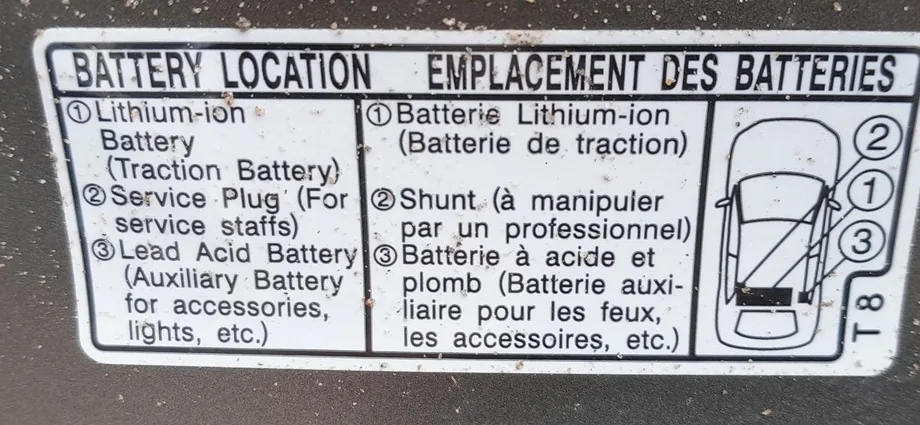
Note: this guide is for the 12 V battery of the petrol Yaris. On the Yaris Hybrid the same 12 V auxiliary battery procedure applies, but never touch the orange high-voltage system — that is dealer/technician work.
Where the Battery Is
The 12 V battery is in the engine bay (on the hybrid it is a small AGM-type battery, also in the engine bay rather than the boot). Lift any cover to reach the two clamps. Fit a like-for-like battery if you are renewing it.
Before You Disconnect
- Note your radio stations and personal settings (and any audio security code, if used).
- Turn the ignition off and make sure all electrical consumers are switched off.
- After switching off, wait 2 minutes before disconnecting — this lets the modules power down cleanly.
- If working near airbags or seat-belt pretensioners, allow the system to discharge before handling those parts.
Disconnecting — Correct Order
- Turn the ignition off and wait 2 minutes.
- Slacken the negative (−, earth) terminal first and lift the lead clear.
- Only undo the positive (+) terminal if you are removing the battery completely.
- If removing the battery, undo the hold-down clamp and lift it out upright.
Reconnecting — Correct Order
- Refit the battery and secure the hold-down clamp.
- Connect the positive (+) lead first, then the negative (−) earth lead last. Tighten both firmly.
- Turn the ignition on for a few seconds before starting the engine.
Initialise the Parking-Assist System
After reconnecting, the Yaris’s parking-assist/steering reference needs a quick relearn so the parking sensors and steering-related assists work correctly:
- Park on level ground and turn the ignition on.
- Apply the parking brake and depress the brake pedal.
- Move the gear lever to P.
- Turn the steering wheel fully to the right, then fully to the left.
- Return the wheel to centre. The system has now relearned its reference.
What Else to Reset
- Reset the date and time and reprogram your radio stations and preferences.
- Re-initialise the tyre-pressure system once your pressures are correct (see our Yaris TPMS reset guide).
If a Warning Light Stays On
One or two lights right after reconnecting is normal and should clear on a short drive (or after the steering relearn). If the airbag, ABS or engine light stays on, a fault code was logged — reading it needs an OBD scanner, and you can look up what a Toyota code means on our sister site autodtcs.com.
Frequently Asked Questions
Do I need to register a new battery on a Yaris Mk4?
No — Toyota does not require battery coding on this model. Fit the correct battery, reconnect, and restore your settings.
Why do the parking sensors or assists act up after a battery change?
The system loses its steering reference. The full-right-then-left steering sweep above relearns it; a short drive completes the calibration.
How long should I leave it disconnected to reset the electronics?
Around 10–15 minutes with the doors shut lets the modules power down fully.
Is the Yaris Hybrid the same job?
The 12 V auxiliary battery follows the same order. Never touch the orange high-voltage system — that is dealer/technician work.
To clear the service reminder after maintenance, see our Toyota Yaris service indicator reset guide.
Independent guide — not affiliated with Toyota. Always follow your official service manual and safety precautions. Read our full disclaimer.