These instructions apply to the Volkswagen Golf Mk7 (5G) 2012-2020.
For other models, please choose your vehicle here.
The Volkswagen Golf Mk7 radio hides a “Service mode” screen that lists your infotainment software and HMI versions and the unit part number. It is handy before a software update or when a dealer asks which version you are running. No diagnostic tool is needed – just the buttons on the head unit.
Set expectations first: this Service mode is a read-only screen that only displays the head unit’s software train, HMI version and part number. It is not the VCDS or OBDeleven “engineering” (green) menu used to code active tweaks such as Apple CarPlay, driving profiles or the needle sweep – those changes need a diagnostic tool. If you are here to enable features, this menu cannot do it; it only shows information.
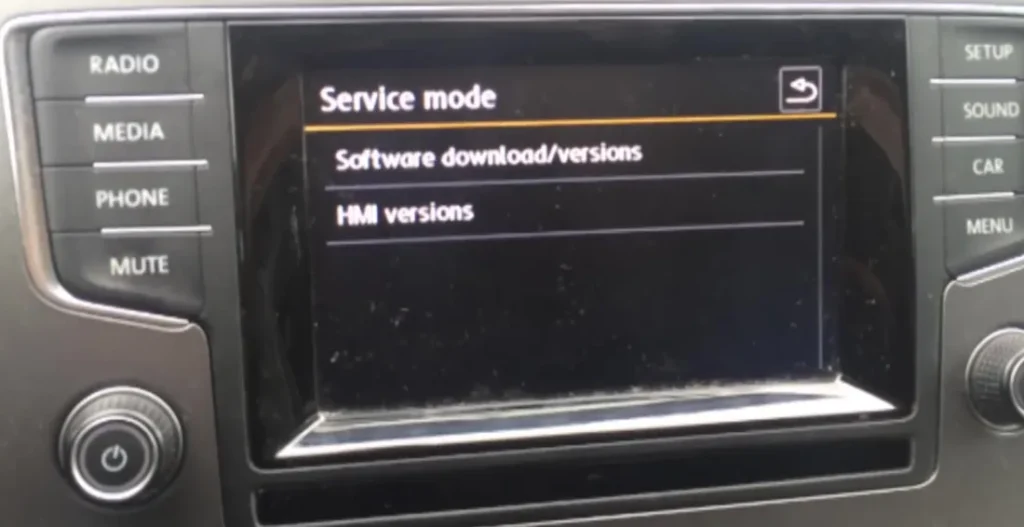
What this menu shows
Service mode is a read-only information screen on the Composition/Discover Media touchscreen. It is not the same as the driver settings under the CAR or SETUP buttons. From here you can open:
- Software download/versions – the installed SW train version (for example MSTD_EU_VW_P3163), the SW MU version and the unit part number.
- HMI versions – the on-screen interface software build.
Owners usually check this screen to: confirm the installed SW train and MU version before or after an official software update; read the part number when buying or matching a used MIB head unit (Composition or Discover) or after a unit swap; and verify the unit’s identity and firmware so a workshop or firmware-map site knows exactly which build you are running.
It is an information display only. Do not select Software download or start an update from this screen – infotainment software updates are done through the official VW SD-card or dealer process, and forcing or interrupting a flash here can corrupt (brick) the unit. Use this menu for viewing only.

How to open the hidden Service menu
- Switch the ignition on (or start the engine) so the radio is powered.
- Press the power/volume knob on the left of the screen once to wake the display if it is off.
- Press and hold the MENU button (right-hand column of hard keys) for about 3–4 seconds.
- Keep holding until the Service mode screen appears on the display.
- Tap Software download/versions, then the Versions tab, to read the installed SW train, MU version and part number; or tap HMI versions for the interface build.
- To leave, tap the back arrow (top right), then press the MENU button to return to the normal radio screen.
If it won’t open
Make sure the ignition is on and the display is awake first – the combination does nothing on a sleeping screen. Hold MENU steadily for the full 3–4 seconds; a quick tap only opens the normal menu. On some builds the sequence is the SETUP or CAR button held instead of MENU, so if MENU does nothing try holding those. The exact wording can differ slightly between the Composition Media and Discover Media units, but the version list is the same.
Frequently asked questions
Does this need VCDS or OBDeleven? No. This Service mode is opened with the radio’s own MENU button and shows information only. VCDS/OBDeleven are separate tools used for coding active features (CarPlay, driving profiles, needle sweep), which is a different job this menu cannot do.
Is it safe to open? Yes, viewing Software download/versions and HMI versions is read-only. Only the “Update” function writes to the unit, so do not start an update unless you have the correct official VW file.
What is the SW train version for? It identifies the infotainment software build (for example MSTD_EU_VW_P3163). Dealers and firmware-map sites use it to confirm which update your radio can take, and it lets you check the version matches after an update or a used-unit swap.
Why does my screen look different? The Golf Mk7 shipped with several radios (Composition Touch, Composition Media, Discover Media, Discover Pro). The button layout and menu names vary a little, but the held-MENU Service mode is common to the touchscreen MIB units.
Will it reset anything? No. Reading the versions changes nothing. Exiting with the back arrow and MENU returns you to normal use.
Once you have your software version you can pair it with a fault-code read to plan a fix – look up any stored codes and what they mean on autodtcs.com.
Independent guide — not affiliated with Volkswagen. Always follow your official service manual and safety precautions. Read our full disclaimer.