These instructions apply to the Kia Picanto (TA) 2011 - 2017. For other models, please choose your vehicle here.
The Kia Picanto (2011–2017) is equipped with an automatic Start/Stop system (ISG) that helps save fuel by turning off the engine when the car is stationary. You can temporarily deactivate or reactivate the system via the dashboard button. This guide explains both actions, plus the operating conditions and common reasons why Start/Stop may not work.
Before You Start
- Park safely and switch ignition ON.
- The system only operates when all safety/operating conditions are satisfied.
- Deactivation is temporary — ISG turns back on at the next ignition cycle.
How to Deactivate the Start/Stop System
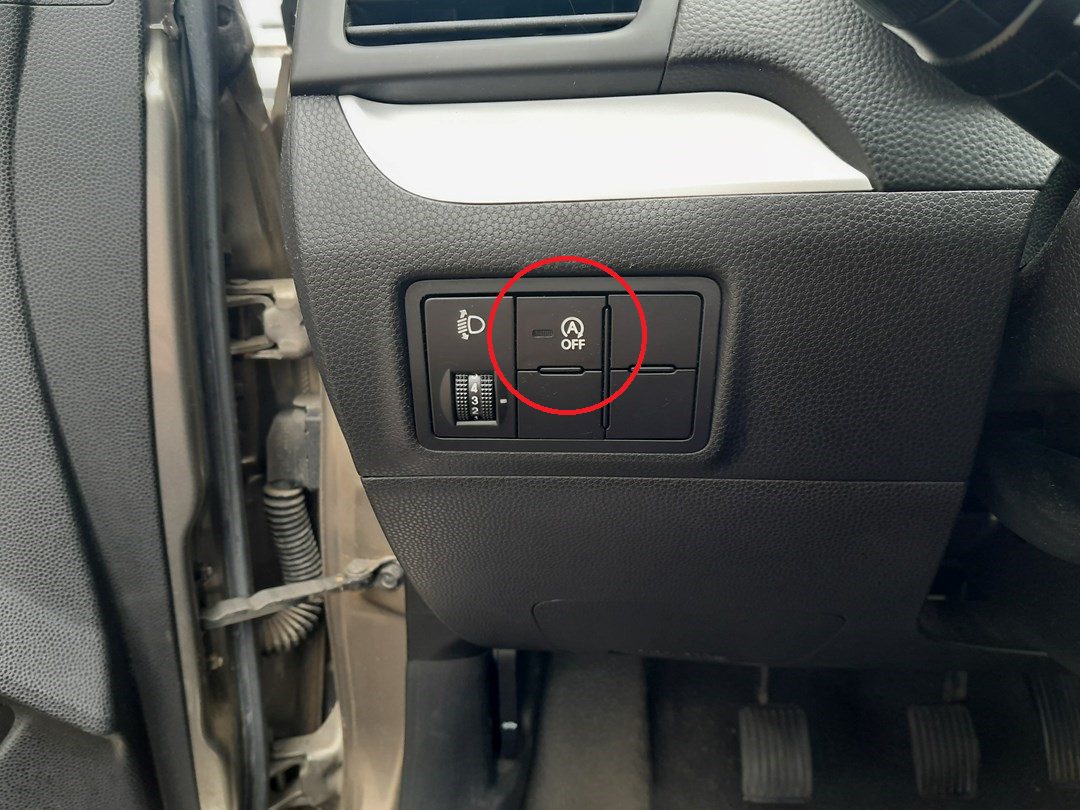
- Locate the Start/Stop OFF button (often near the gear lever/center console).
- Press the button once. The button lamp illuminates and the cluster shows a Start/Stop deactivated message.
How to Reactivate the System
- Press the Start/Stop OFF button again to turn ISG back on (lamp off), or simply restart the engine.
When Start/Stop Works (Operating Conditions)
ISG will allow an automatic engine stop only when these typical conditions are met:
- Driver’s seat belt fastened, driver’s door and hood fully closed.
- Battery voltage within target range; brake vacuum sufficient.
- Engine/coolant at normal operating temperature (not near freezing).
- Outside temperature roughly between low sub-zero and hot summer range; extreme cold/heat can inhibit ISG.
- HVAC demand is moderate (defog/defrost not forced, blower not at high).
If any prerequisite is not met, the system will show a message like “Auto Stop conditions not met,” and the engine will continue running.
Why the Engine May Restart Automatically
Even after an Auto Stop, ISG may restart the engine if:
- You turn on the defroster/defogger or demand high A/C output.
- Battery charge drops or brake vacuum falls.
- The vehicle begins to roll or steering input/parking maneuvers require power assist.
Indicator Lights & Messages Explained
- ISG OFF lamp on: You’ve disabled Start/Stop via the button (or system is temporarily unavailable).
- Auto Stop symbol on: Engine is stopped by ISG; releasing the brake (AT) or pressing the clutch (MT) will restart it.
- “Auto Stop conditions not met”: One or more prerequisites aren’t satisfied (see Operating Conditions).
Quick Troubleshooting
- ISG never stops the engine: Check seat belt, door/hood closed, HVAC not on MAX/defrost, battery state of charge.
- ISG worked, then stopped working: Battery voltage may be low; drive longer or test battery/charging system.
- ISG OFF won’t clear: Try cycling ignition. If still unavailable, have battery and related sensors checked.
Tips for Daily Use
- Use the OFF function in heavy stop-and-go traffic or short trips if desired.
- Healthy battery = reliable ISG. Consider a smart charger if the car sits often.
- After a battery replacement or disconnect, ISG may remain inactive until the car completes a few drive cycles and learns parameters again.
Disclaimer: The information on this page is provided for general guidance only. Always follow your official service manual and safety precautions when working on your vehicle. We are not responsible for errors, omissions, or any damage resulting from the use of this information.
This website is an independent resource and is not affiliated with, endorsed by, or sponsored by Kia. All trademarks and brand names belong to their respective owners.