These instructions apply to the Suzuki Celerio Mk1 (LF) 2014-2019.
For other models, please choose your vehicle here.
The Suzuki Celerio (LF) uses an indirect tyre-pressure monitoring system that reads wheel-speed from the ABS sensors rather than in-wheel sensors. After inflating or rotating tyres you must teach it the new baseline using the dedicated TPMS SET switch.
Before you start
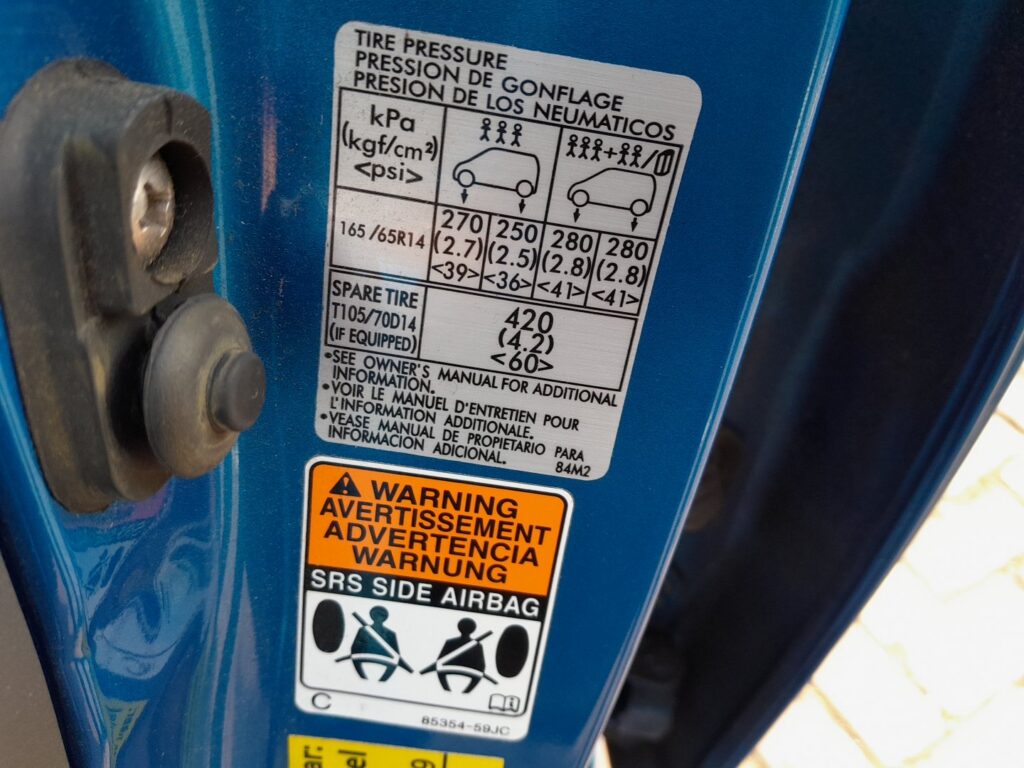
- Set all four tyres to the pressures on the driver’s door pillar placard while the tyres are COLD.
- Park on level ground with the engine off.
- Never operate the SET switch while the car is moving.
- Check and correct all four cold tyre pressures to the door-placard values.
- Turn the ignition ON but leave the engine off.
- Locate the TPMS SET switch (near the steering column/lower dash) and press and hold it for about three seconds.
- Watch the low-pressure warning lamp: it blinks for roughly five seconds and then goes out, confirming the reset has been accepted.
- Release the switch and start the engine.
- Drive normally for a while so the system re-learns the baseline from the wheel-speed data.
FAQ
Does the Celerio have sensors inside each wheel?
No. It uses an indirect system that compares the rotation speeds of the four wheels through the ABS sensors. Because there are no battery-powered in-wheel sensors, there is nothing to pair after a tyre change — you simply re-run the SET procedure.
When should I repeat the reset?
Any time you adjust the pressures, rotate the tyres, or fit a different wheel or the spare. The system stores the pressures present at the moment you press SET as “correct”, so it must be re-taught whenever those pressures legitimately change.
The warning light came back on shortly after resetting — why?
If you reset with a tyre that was already low, the system learned that low value as normal, or a slow puncture is losing air. Re-check all four cold pressures against the placard, correct them, then perform the reset again.
Independent guide — not affiliated with Suzuki. Always follow your official service manual and safety precautions. Read our full disclaimer.