These instructions apply to the Hyundai Kona Mk2 (SX2) 2023-Present.
For other models, please choose your vehicle here.
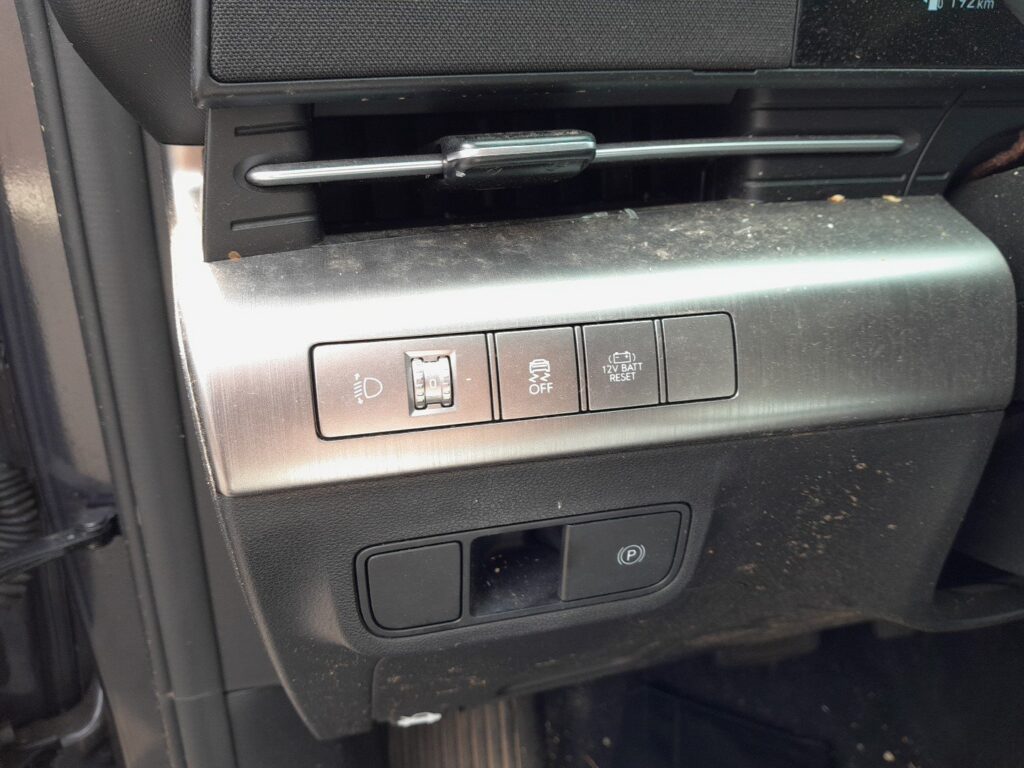
The second-generation Kona hybrid uses a lithium-ion 12V auxiliary battery with a protection circuit that isolates itself before it fully discharges. If the car will not wake up, the 12V BATT RESET switch on the steering wheel brings it back to life without a jump.
Before you start
- The 12V battery is not in the engine bay; do not connect a jump lead to the orange high-voltage components.
- Find the 12V BATT RESET switch on the right-hand side of the steering wheel.
- Have a door open so the car stays awake while you work.
- Open the driver’s door and sit in the car with the brake ready.
- Press the 12V BATT RESET switch on the right side of the steering wheel. This temporarily reconnects the isolated 12V battery.
- Immediately press the brake pedal and press the Start button so the car reaches READY within 30 seconds of pressing the switch.
- If the READY light does not come on in time, the battery re-isolates. Press the 12V BATT RESET switch again and repeat, pressing Start straight away.
- Once the car is in READY, leave it running or drive it for about 30 minutes so the 12V battery recharges.
- If the car still will not wake after several attempts, connect an external supply to the remote positive (+) jump terminal under the bonnet and the designated earth point, then use the reset switch again.
FAQ
Why does the Kona hybrid have a switch instead of just cranking?
The lithium 12V battery protects its own life by disconnecting before it drops too low. The 12V BATT RESET switch manually rejoins it for a short window so you can start the car and let the system recharge it.
Can I keep pressing the reset switch if the car will not start?
Avoid it. Repeatedly pressing the switch without giving the 12V battery a full charge of roughly 30 minutes in READY over-discharges it. If it will not hold, treat the 12V battery as flat and recharge or replace it.
Where do I connect a jump lead?
Only to the remote positive (+) terminal under the bonnet and the marked earth point, never directly to the 12V battery or to anything orange. The orange cabling is the high-voltage hybrid system and must not be touched.
Independent guide — not affiliated with Hyundai. Always follow your official service manual and safety precautions. Read our full disclaimer.