These instructions apply to the Toyota Yaris Mk2 (P9) 2005-2013.
For other models, please choose your vehicle here.
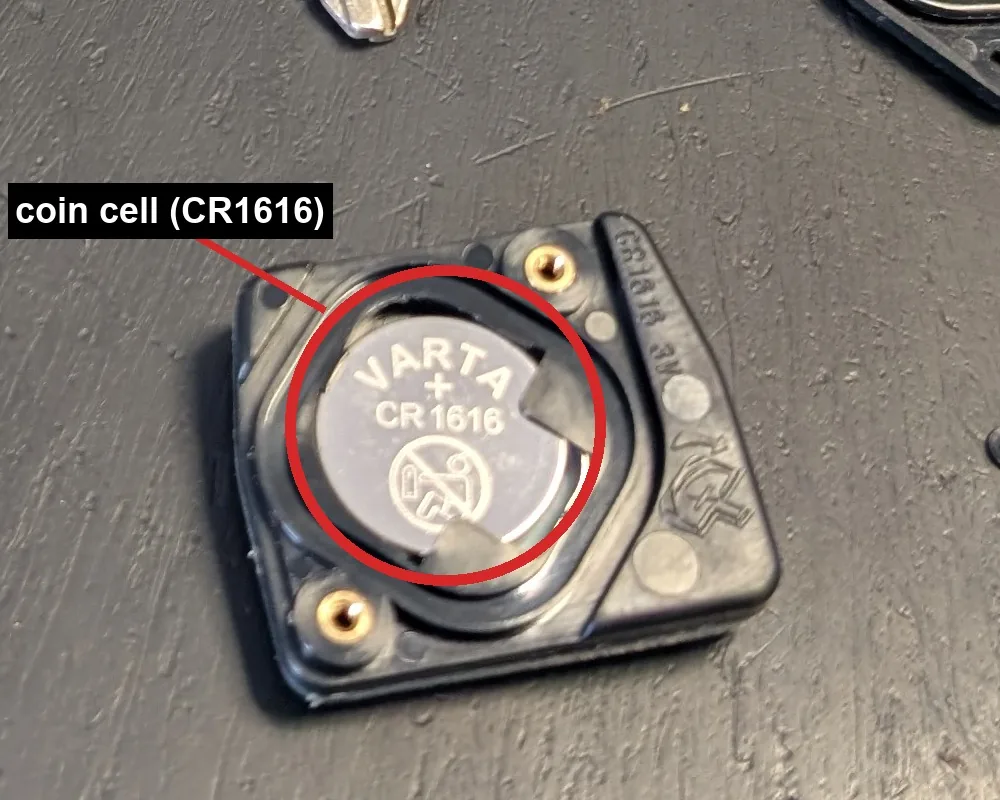
When your Yaris remote loses range or the lock and unlock buttons stop responding, the coin cell inside the key is usually flat. The Mk2 uses the familiar Toyota two-button remote-head key, which takes a CR1616 coin cell, and swapping it takes a couple of minutes. Changing the battery does not unpair the remote, so it keeps working afterwards.
- Pull the mechanical key blade out of the fob (press the release catch if fitted).
- Prise the two halves of the case apart at the seam with a small flat screwdriver. Do not use excessive force, and do not touch the circuit board or the metal terminals.
- Note which way up the old CR1616 cell sits, then lift it out.
- Fit a fresh CR1616 the same way round (positive side facing up), seating it fully under the contact.
- Press the case back together until it clips shut, refit the key blade, and press a button to confirm the remote locks and unlocks the car.
Good to know
A flat remote does not leave you stuck: the cut key still unlocks the door and starts the engine, so a dead fob battery never strands you. Replacing the cell needs no reprogramming.
Note that a battery change is not the same as pairing a remote. Registering a brand-new remote to the car requires a Toyota dealer with a diagnostic tool, but simply changing the coin cell does not touch the pairing.
FAQ
What battery does the Yaris key fob take?
The Mk2 Yaris remote-head key takes a CR1616 coin cell, the same type used across several Toyota models of this era.
Do I need to reprogramme the key after changing the battery?
No. Swapping the coin cell does not unpair the remote, so it works straight away with no reprogramming.
The remote still does not work after a new battery. What now?
Check the cell is the right way up and that the contacts are clean, as a slightly loose or greasy cell will stop it working. If the remote is genuinely faulty or brand new, it needs dealer programming with a diagnostic tool.
Independent guide — not affiliated with Toyota. Always follow your official service manual and safety precautions. Read our full disclaimer.