Service ResetService Reset
  • Home
  • Guides
  • Tools
    • Tire Pressure Calculator
    • Check DTC Codes
    • Request a Guide
    • Wheel Offset Calculator
    • Tire Size Comparison
    • Tire Pressure Converter
    • Torque Converter
    • Coolant & Antifreeze Mix
  • Blog
  • About
  • FAQ
  • Contact Us
  • Home
  • Guides
  • Tools
    • Tire Pressure Calculator
    • Check DTC Codes
    • Request a Guide
    • Wheel Offset Calculator
    • Tire Size Comparison
    • Tire Pressure Converter
    • Torque Converter
    • Coolant & Antifreeze Mix
  • Blog
  • About
  • FAQ
  • Contact Us
Home/Hyundai/i40/Mk1 (VF) 2011-2019/Initialise the Power Windows

Initialise the Power Windows

Reviewed by the Service Reset editor · Updated September 4, 2026 · How we verify

These instructions apply to the Hyundai i40 Mk1 (VF) 2011-2019.
For other models, please choose your vehicle here.

After the 12 V battery has been disconnected or gone flat, the one-touch auto-up on your Hyundai i40 (VF, 2011–2019) stops working until each window is re-initialised. It takes about ten seconds per window with the ignition on and no tools.

How to Initialise an i40 Power Window
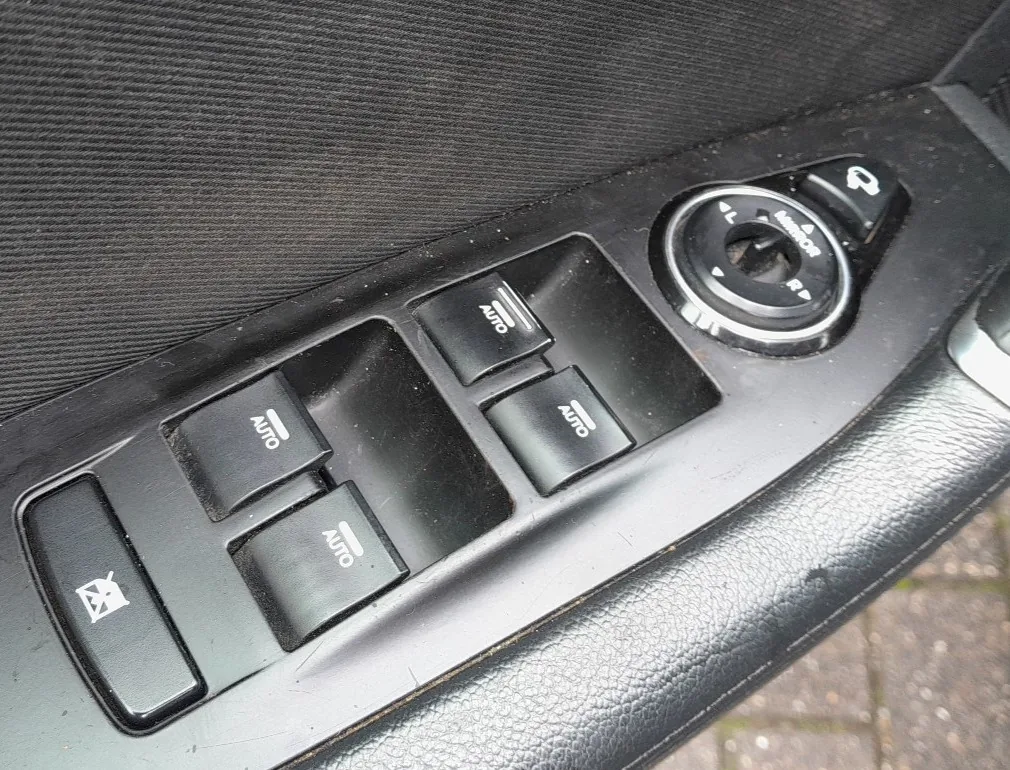
Driver door power-window switches on the Hyundai i40
The driver’s window switches — hold the switch up to re-initialise the auto-up.
  1. Turn the ignition ON.
  2. Pull and hold the window switch in the close (up) position until the window is fully closed.
  3. Keep holding for about 1 second after it has closed, then release.
  4. Repeat for the passenger’s window (and the rear windows if fitted with auto-up).
  5. Check that one-touch auto-up and auto-down now work.

Frequently Asked Questions

Why did my i40 windows stop closing automatically?

Disconnecting or flattening the battery clears the window motor’s learned top position, which disables the one-touch auto-up and the anti-pinch feature. Re-initialising teaches the position back.

Do I have to do every window?

Only the windows with a one-touch auto function need it, and only if that function has stopped. Doing the driver’s and front passenger’s windows covers most i40s.

The window still won’t auto-close — what now?

Repeat the hold-closed step, making sure you keep the switch held for a moment after the glass reaches the top. If it still fails, have the switch or motor checked.

If a warning light stays on afterwards, look the code up on our sister site autodtcs.com to see what it means.

Independent guide — not affiliated with Hyundai. Always follow your official service manual and safety precautions. Read our full disclaimer.

Related Articles
  • Release the Electric Parking Brake (EPB)
  • Replace the Wiper Blades
  • Find the Fuse Boxes
  • Jump-Start a Flat Battery
  • Replace the Engine Air Filter
  • Replace the Cabin (Pollen) Filter

On This Page: [hide]

How to Initialise an i40 Power Window

Frequently Asked Questions

Why did my i40 windows stop closing automatically?

Do I have to do every window?

The window still won’t auto-close — what now?

Service Reset

Independent step-by-step car reset & maintenance guides – not affiliated with any manufacturer. All trademarks belong to their respective owners.

© 2026 ServiceReset.net. All rights reserved.

POPULAR BRANDS
Toyota · Volkswagen · BMW · Ford · Audi · Mercedes · Nissan · Kia
EXPLORE
  • Guides
  • Blog
  • About
  • Contact
TOOLS
  • Dashboard Warning Lights
  • Tire Pressure Calculator
  • Tools
  • FAQ
  • Request a Guide
LEGAL
  • Privacy Policy
  • Terms of Use
  • Disclaimer
  • YouTube
  • Pinterest