These instructions apply to the Hyundai i40 Mk1 (VF) 2011-2019.
For other models, please choose your vehicle here.
Every Hyundai i40 (VF, 2011–2019) has a standard OBD-II diagnostic port — the 16-pin socket a scan tool or Bluetooth adapter plugs into to read fault codes and live data. On the i40 it sits low under the driver’s side of the dashboard.
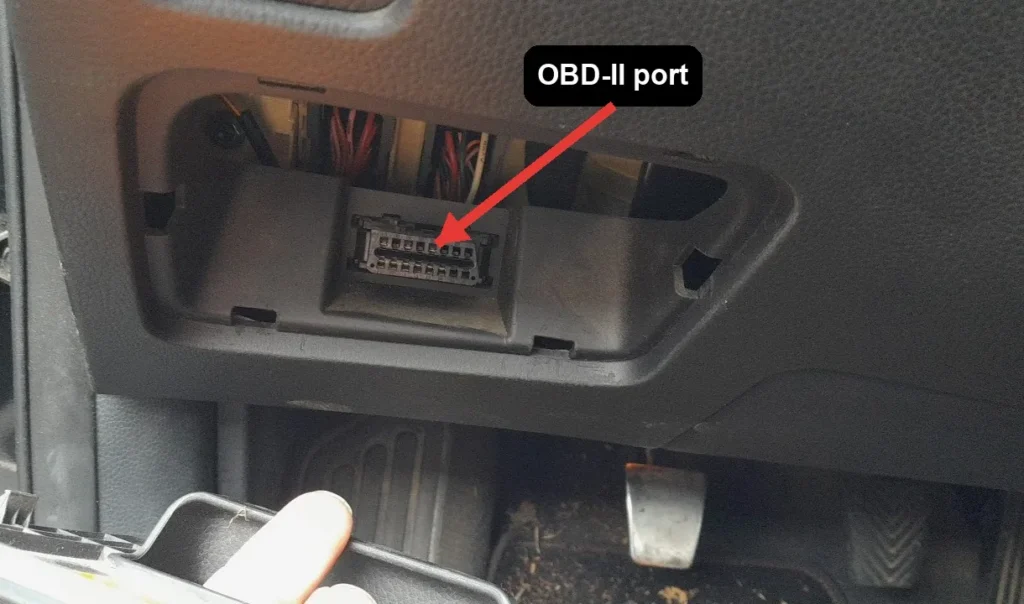
Where the i40 OBD-II Port Is
- Sit in the driver’s seat and look under the dashboard, to the left of the steering column, above the pedals.
- The 16-pin connector is near the bonnet-release lever, often behind a small trim cover or panel.
- If covered, gently pull the trim flap open by hand — no tools are needed.
- Plug your adapter or scanner in; the connector is keyed and only fits one way.
Before You Plug In
- Turn the ignition to ON (engine off) for most code reading, unless your tool asks for the engine running.
- Never connect or disconnect the tool while the engine is cranking.
- A generic OBD-II adapter with an app such as Torque or Car Scanner reads engine codes on the i40.
Frequently Asked Questions
Where is the OBD port on a Hyundai i40?
Under the dashboard on the driver’s side, to the left of the steering column and above the pedals, close to the bonnet-release lever. It faces downward and may sit behind a small trim cover.
Do I need to remove any trim?
No. At most there is a small flap you can open by hand. The socket is designed to be reached without tools.
Will any OBD-II adapter work on the i40?
Yes. The port and its core pins are standardised, so a generic Bluetooth or Wi-Fi adapter paired with a phone app will read engine codes and live data.
Once you have read a fault code from the port, our sister site autodtcs.com looks up OBD-II diagnostic codes and explains the likely causes.
Independent guide — not affiliated with Hyundai. Always follow your official service manual and safety precautions. Read our full disclaimer.