These instructions apply to the Suzuki SX4 Mk1 (EY) 2006-2014.
For other models, please choose your vehicle here.
A weak key battery is the usual reason a first-generation Suzuki SX4 remote stops locking the doors from a distance. Changing the coin cell takes a couple of minutes with a small screwdriver — but the cell size depends on your market and whether the car has keyless start, so check which remote you have first.
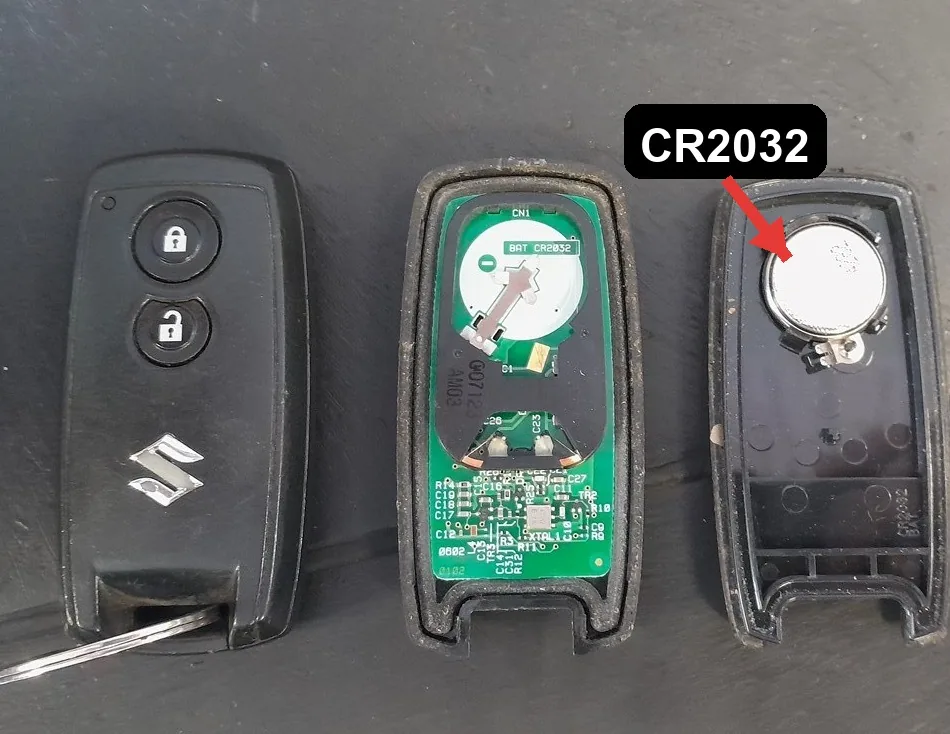
Which battery you need
- European standard remote (flip key or fixed-blade remote): CR1620 lithium coin cell.
- US/Canada standard transmitter (the LOCK / UNLOCK / PANIC three-button fob): CR2025.
- Keyless-start remote controller (either market — the fob you keep in your pocket for the push-button start): CR2032.
- On a flip key, release the metal emergency blade first. Undo the small screw on the back of the remote if fitted.
- Put the tip of a flat-blade screwdriver in the slot and gently prise the two case halves apart. Ease the circuit board out of its holder.
- Lift out the old cell. Note which way up it sits before removing it.
- Fit the new cell — CR1620 (EU), CR2025 (US/Canada) or CR2032 (keyless-start) — with the + face towards the mark shown inside the case. Keep grease and dirt off the board and battery.
- Clip the halves back together, refit the board, cover and screw, and slide the metal blade back in.
- Check that the doors lock and unlock with the remote. If they do not, the transmitter code may need re-programming.
Frequently asked questions
What battery does the Suzuki SX4 key fob use?
It depends on the version: the European standard remote uses a CR1620, the US/Canadian three-button transmitter uses a CR2025, and the keyless-start remote controller (both markets) uses a CR2032. Match the cell to the one you remove.
Do I have to reprogram the remote after changing the battery?
No. Replacing the cell does not erase the stored code, so the remote works straight away. Re-programming is only needed if the remote still will not operate the locks or you are adding a new one.
The key still starts the car but won’t lock the doors — is it the battery?
Almost certainly. The metal blade and the immobiliser transponder work without remote power, so the car still starts even when the coin cell is flat. A fresh cell of the correct size usually restores the locking.
If the immobiliser or a security light stays on after the battery change, check the exact dashboard warning against the code list on autodtcs.com.
Independent guide — not affiliated with Suzuki. Always follow your official service manual and safety precautions. Read our full disclaimer.