These instructions apply to the Ford Kuga Mk2 (C520) 2013-2019.
For other models, please choose your vehicle here.
After adjusting the pressures or changing a wheel on a Ford Kuga Mk2 (2013–2019), the tyre-pressure warning is cleared by storing a new reference through the message-centre menu. Set the correct cold pressures first, then reset the system.
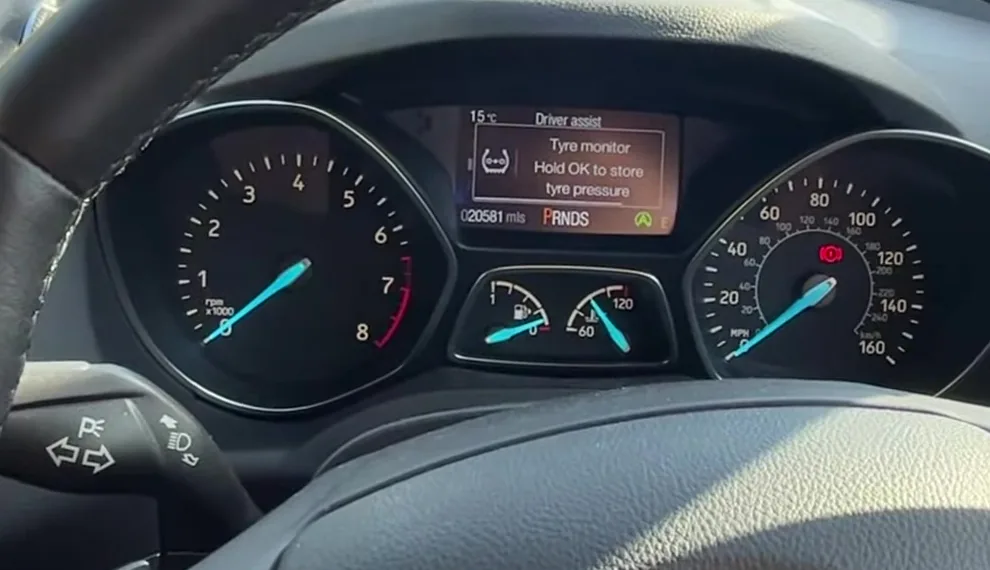
How to reset the tyre pressure monitor on a Kuga Mk2
- Set all four tyres to the correct cold pressures — the figures are on the placard in the driver’s door shut.
- Turn the ignition on (the engine can be off).
- Use the steering-wheel arrow buttons to scroll the instrument-cluster menu to SETTINGS.
- Select Driver assist, then Tyre monitor (the tyre-pressure monitoring system).
- Press and hold the OK button until a confirmation message appears, then release.
- The system stores the new pressures as its baseline and the warning clears. Drive normally for a few minutes to confirm.
Frequently Asked Questions
There is no “Tyre monitor” in my menu — why?
Some base Kugas and cars sold in markets without a TPMS requirement are not fitted with the system, so there is nothing to reset.
Do I reset before or after inflating the tyres?
After. Set the correct cold pressures first, then store them with the menu reset.
The light came back on the next morning.
Cold air lowers pressure overnight, so a borderline tyre can dip under the alert point. Top up to the placard figure while cold and reset again.
The same tyre keeps triggering the warning.
Suspect a slow puncture and have that tyre inspected rather than resetting repeatedly.
If the tyre warning appeared alongside other lights, decode the codes on autodtcs.com.
Independent guide — not affiliated with Ford. Always follow your official service manual and safety precautions. Read our full disclaimer.