These instructions apply to the Honda CR-V Mk3 (RE) 2007-2012.
For other models, please choose your vehicle here.
The recommended cold tire pressures for the Honda CR-V (RE, 2007-2012) are printed on the label inside the driver’s door pillar. The values below are taken from that placard.
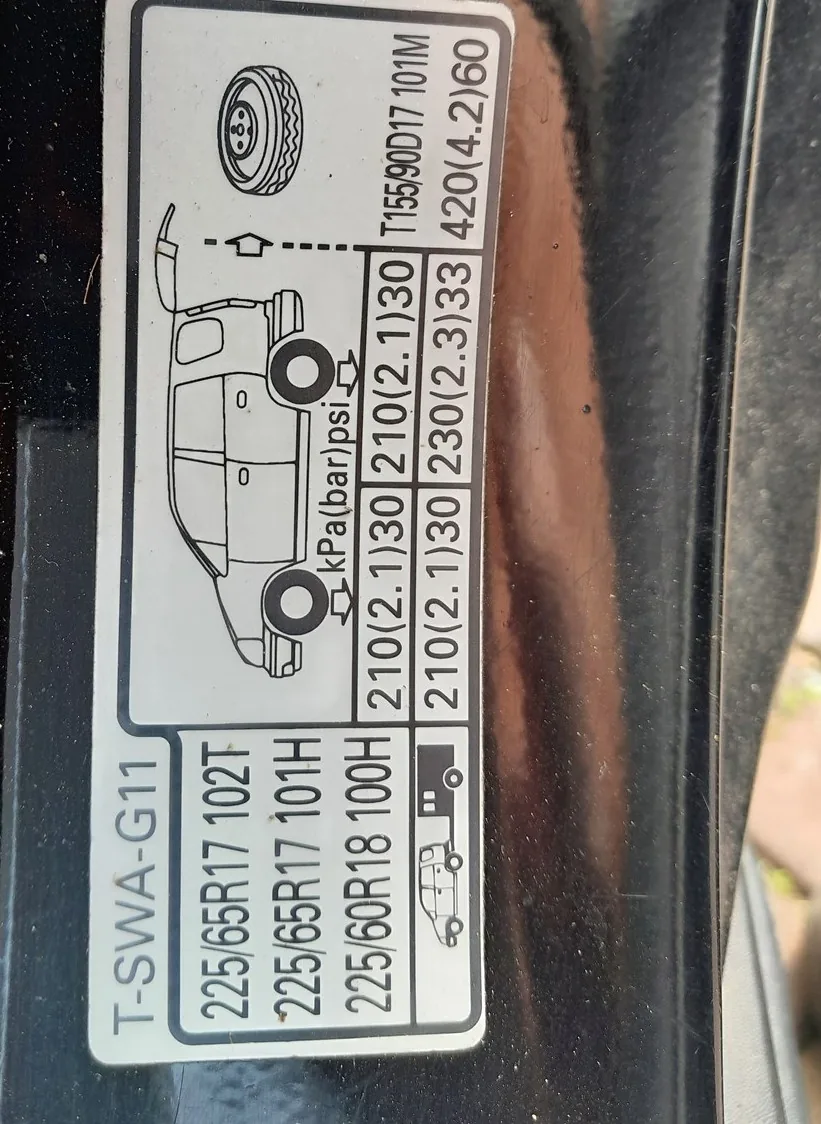
Recommended cold tire pressures
| Tire size | Front | Rear |
|---|---|---|
| 225/65 R17 (102T / 101H) | 2.1 bar (30 psi) | 2.1 bar (30 psi) |
| 225/60 R18 (100H) | 2.3 bar (33 psi) | 2.3 bar (33 psi) |
| Spare T155/90 D17 (space-saver) | 4.2 bar (60 psi) | |
Set pressures when the tires are cold. Add about 0.2 bar (3 psi) for a full load of passengers and luggage or sustained high-speed driving. Always confirm against the label on your own car’s door pillar.
Does your CR-V have TPMS?
Most European 2007-2009 CR-Vs were not fitted with a tire-pressure monitoring system; US-market cars and later European cars have one. If your cluster never shows a low-pressure warning, your car has no TPMS and there is nothing to reset — just set the pressures above.
Reset the TPMS (cars fitted with the system)
- Inflate all four tires to the pressures shown above.
- Move the gear selector to P (or N) and turn the ignition ON without starting the engine.
- Press and hold the INFO button until the service display appears in the menu.
- Press INFO to scroll through the menu until the TPMS calibration option is shown.
- Press the SEL/RESET button; a confirmation message appears.
- Press INFO, then press SEL/RESET again and wait until “COMPLETE” is displayed. The new pressures are stored.
US-market cars with direct sensors relearn automatically after driving several minutes once the tires are correctly inflated.
Frequently asked questions
What pressure for the space-saver spare? 4.2 bar (60 psi), and keep your speed below 80 km/h (50 mph) on it.
The light stays on after inflating. Make sure all four tires — and the spare on cars that monitor it — are at the correct pressure, then repeat the reset or drive a few miles for the system to relearn.
Looking for a fault code instead of a procedure? Decode it on autodtcs.com.
Independent guide — not affiliated with Honda. Always follow your official service manual and safety precautions. Read our full disclaimer.