Service ResetService Reset
  • Home
  • Guides
  • Tools
    • Tire Pressure Calculator
    • Check DTC Codes
    • Request a Guide
    • Wheel Offset Calculator
    • Tire Size Comparison
    • Tire Pressure Converter
    • Torque Converter
    • Coolant & Antifreeze Mix
  • Blog
  • About
  • FAQ
  • Contact Us
  • Home
  • Guides
  • Tools
    • Tire Pressure Calculator
    • Check DTC Codes
    • Request a Guide
    • Wheel Offset Calculator
    • Tire Size Comparison
    • Tire Pressure Converter
    • Torque Converter
    • Coolant & Antifreeze Mix
  • Blog
  • About
  • FAQ
  • Contact Us
Home/Honda/CR-V/Mk3 (RE) 2007-2012/Re-Initialize the Power Windows

Re-Initialize the Power Windows

Reviewed by the Service Reset editor · Updated October 6, 2026 · How we verify

These instructions apply to the Honda CR-V Mk3 (RE) 2007-2012.
For other models, please choose your vehicle here.

After the battery is disconnected or goes flat, the one-touch auto-up/down on the Honda CR-V (RE, 2007-2012) driver’s window stops working and must be re-initialized. It takes a few seconds.

Re-initialize the driver’s window
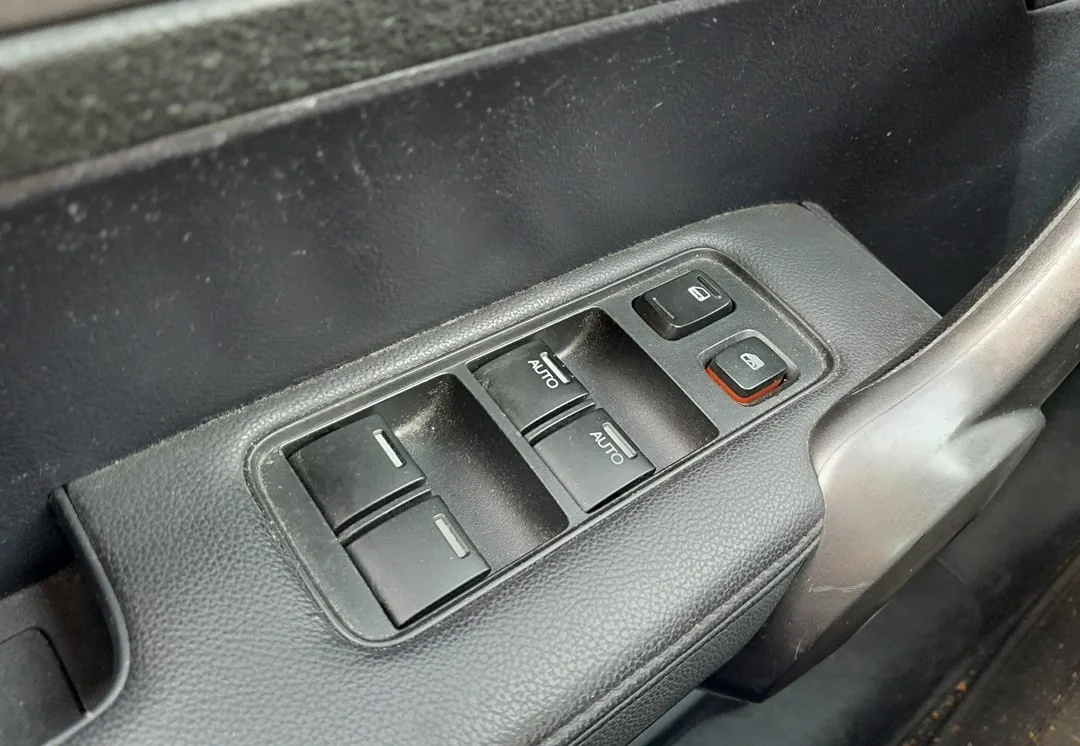
Honda CR-V driver door power window switches
The driver's door switch panel, including the one-touch auto window.
  1. Turn the ignition to ON (II).
  2. Pull the driver’s window switch up and hold it until the window is fully closed, then keep holding for about 1 more second.
  3. Release, then push the switch down and hold until the window is fully open, then hold for about 1 more second.
  4. Pull up again to fully close it and hold briefly to confirm.
  5. Test one-touch auto-up and auto-down — both should now work, with anti-pinch restored.

If one-touch still does not work, repeat the steps, holding firmly at each end stop.

Frequently asked questions

Why did auto-up stop working? The window module loses its end positions when power is removed, so it reverts to manual until re-taught.

The window reverses before it shuts. That is the anti-pinch reacting to an incomplete initialization — run the procedure again.

Looking for a fault code instead of a procedure? Decode it on autodtcs.com.

Independent guide — not affiliated with Honda. Always follow your official service manual and safety precautions. Read our full disclaimer.

Related Articles
  • Check the Automatic Transmission Fluid
  • Set the Clock & Enter the Radio Code
  • Turn VSA (Stability Control) On or Off
  • Replace the Windshield Wiper Blades
  • Move the Shifter Out of Park (Shift-Lock Release)
  • Air Conditioning Refrigerant & Regas

On This Page: [hide]

Re-initialize the driver’s window

Frequently asked questions

Service Reset

Independent step-by-step car reset & maintenance guides – not affiliated with any manufacturer. All trademarks belong to their respective owners.

© 2026 ServiceReset.net. All rights reserved.

POPULAR BRANDS
Toyota · Volkswagen · BMW · Ford · Audi · Mercedes · Nissan · Kia
EXPLORE
  • Guides
  • Blog
  • About
  • Contact
TOOLS
  • Dashboard Warning Lights
  • Tire Pressure Calculator
  • Tools
  • FAQ
  • Request a Guide
LEGAL
  • Privacy Policy
  • Terms of Use
  • Disclaimer
  • YouTube
  • Pinterest